
WPF 字符竖向排列的排版格式(直排)显示控件
自定义控件,继承自Label,重写OnRender方法,使用DrawingContext手动绘制文本。自动换列。
- 注意,同时需要使用XAML重新定义模板样式,因为默认的模块存在ContentPresenter,会显示原来的格式
- IsReverse属性可以修改文本从右往左还是从左往右的排列
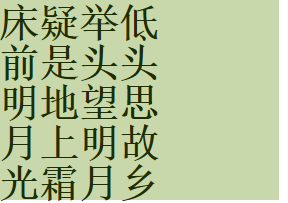
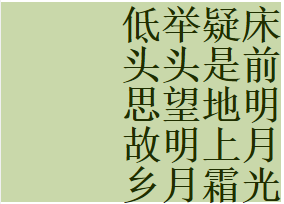
使用:
<local:VerticalTextBlock Width="280"Height="200"HorizontalAlignment="Left"Background="#555C8B00"Content="床前明月光疑是地上霜举头望明月低头思故乡"FontFamily="宋体"FontSize="40"FontWeight="Bold"Foreground="Black"IsReverse="False" />C#代码:
public class VerticalTextBlock
: Label
{
protected override void OnRender(DrawingContext drawingContext)
{
base.OnRender(drawingContext);
int charsPerColumn = (int)(ActualWidth / FontSize);
int charsPerRow = (int)(ActualHeight / FontSize);
if (charsPerColumn == 0) charsPerColumn = 1;
for (int i = 0; i < Content.ToString().Length; i++)
{
var formattedText = new FormattedText(
Content.ToString()[i].ToString(),
CultureInfo.CurrentUICulture,
FlowDirection,
new Typeface(FontFamily, FontStyle = FontStyle, FontWeight = FontWeight, FontStretch = FontStretch),
FontSize,
Foreground, 1.25);
int column = 0;
int row = 0;
if (charsPerRow != 0)
{
column = i / charsPerRow;
row = i % charsPerRow;
}
if (!IsReverse)
{
column = charsPerColumn - 1 - column;
}
drawingContext.DrawText(formattedText, new Point(column * FontSize, row * FontSize));
}
}
protected override void OnContentChanged(object oldContent, object newContent)
{
base.OnContentChanged(oldContent, newContent);
InvalidateVisual();
}
public bool IsReverse
{
get {
return (bool)GetValue(IsReverseProperty);
}
set {
SetValue(IsReverseProperty, value);
}
}
public static readonly DependencyProperty IsReverseProperty =
DependencyProperty.Register("IsReverse", typeof(bool), typeof(VerticalTextBlock), new PropertyMetadata(false, OnIsReverseChanged));
private static void OnIsReverseChanged(DependencyObject d, DependencyPropertyChangedEventArgs e)
{
var control = d as VerticalTextBlock;
if (control != null)
{
control.InvalidateVisual();
}
}
}
xaml代码:
<Style TargetType="local:VerticalTextBlock"><Setter Property="Template"><Setter.Value><ControlTemplate TargetType="local:VerticalTextBlock"><Border Padding="{TemplateBinding Padding}"Background="{TemplateBinding Background}"BorderBrush="{TemplateBinding BorderBrush}"BorderThickness="{TemplateBinding BorderThickness}" /></ControlTemplate></Setter.Value></Setter>
</Style>