
这篇文章介绍了如何从零开始构建一个基于Gemini 3的AI智能体。智能体的核心构成非常简单,包括一个LLM、可执行的工具、上下文/记忆以及一个不断循环的流程。文章通过逐步引导,展示了从基本的文本生成到创建一个功能完善的CLI代理的过程。
Practical Guide on how to build an Agent from scratch with Gemini 3
It seems complicated, when you watch an AI agent edit multiple files, run commands, handle errors, and iteratively solve a problem, it feels like magic. But it isn’t. The secret to building an agent is that there is no secret.
The core of an Agent is surprisingly simple: It is a Large Language Model (LLM) running in a loop, equipped with tools it can choose to use.
If you can write a loop in Python, you can build an agent. This guide will walk you through the process, from a simple API call to a functioning CLI Agent.
What actually is an Agent?
Traditional software workflows are prescriptive and follow predefined paths (Step A -> Step B -> Step C), Agents are System that uses an LLM to dynamically decide the control flow of an application to achieve a user goal.
An agent generally consists of these core components:
- The Model (Brain): The reasoning engine, in our case a Gemini model. It reasons through ambiguity, plans steps, and decides when it needs outside help.
- Tools (Hands and Eyes): Functions the agent can execute to interact with the outside world/environment (e.g., searching the web, reading a file, calling an API).
- Context/Memory (Workspace): The information the agent has access to at any moment. Managing this effectively, known as Context Engineering.
- The Loop (Life): A
whileloop that allows the model to: Observe → Think → Act → Observe again, until the task is complete.
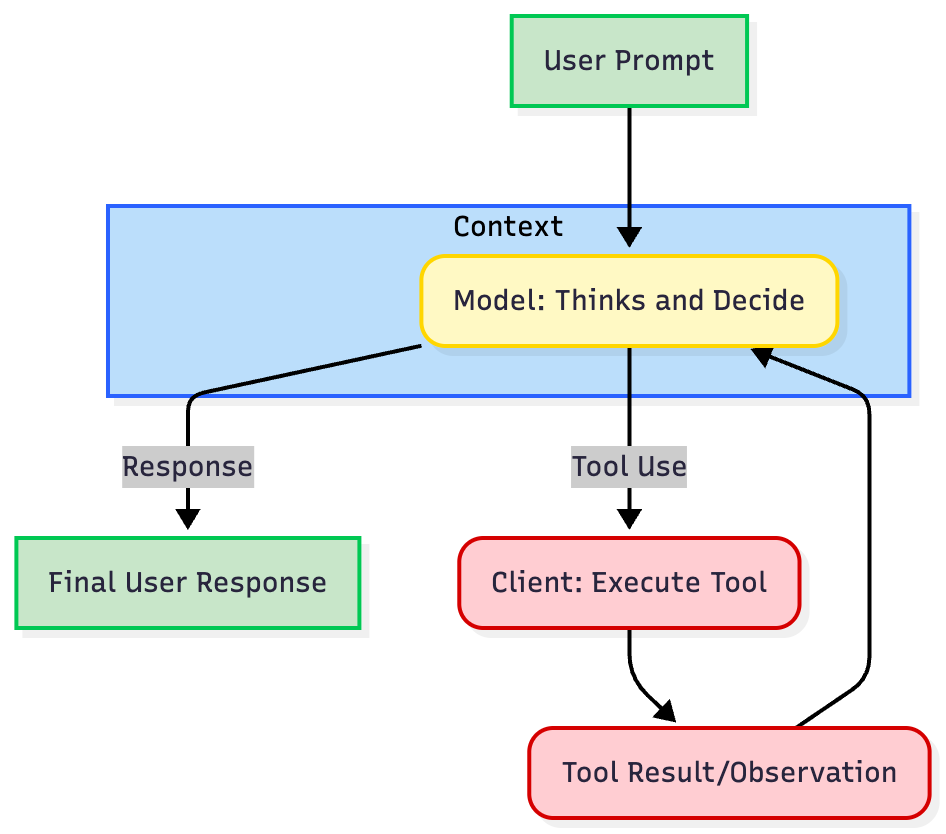
"The Loop" of nearly every agent is an iterative process:
- Define Tool Definitions: You describe your available tools (e.g.,
get_weather) to the model using a structured JSON format. - Call the LLM: You send the user's prompt and the tool definitions to the model.
- Model Decision: The model analyzes the request. If a tool is needed, it returns a structured
tool usecontaining the tool name and arguments. - Execute Tool (Client Responsibility): The client/application code intercepts this
tool use, executes the actual code or API call, and captures the result. - Respond and Iterate: You send the result (the
tool response) back to model. The model uses this new information to decide the next step, either calling another tool or generating the final response.
Building an Agent
Let's build an agent step-by-step, progressing from basic text generation to a functional CLI agent using Gemini 3 Pro and Python SDK.
Prerequisites: Install the SDK (pip install google-genai) and set your GEMINI_API_KEY environment variable (Get it in AI Studio).
Step 1: Basic Text Generation and Abstraction
The first step is to create a baseline interaction with the LLM, for us Gemini 3 Pro. We are going to create a simple Agent class abstraction to structure our code, which we will extend throughout this guide. We will first start with a simple chatbot that maintains a conversation history.
from google import genaifrom google.genai import types class Agent: def __init__(self, model: str): self.model = model self.client = genai.Client() self.contents = [] def run(self, contents: str): self.contents.append({"role": "user", "parts": [{"text": contents}]}) response = self.client.models.generate_content(model=self.model, contents=self.contents) self.contents.append(response.candidates[0].content) return response agent = Agent(model="gemini-3-pro-preview")response1 = agent.run( contents="Hello, What are top 3 cities in Germany to visit? Only return the names of the cities.") print(f"Model: {response1.text}")# Output: Berlin, Munich, Cologne response2 = agent.run( contents="Tell me something about the second city.") print(f"Model: {response2.text}")# Output: Munich is the capital of Bavaria and is known for its Oktoberfest.This is not an agent yet. It is a standard chatbot. It maintains state but cannot take action, has no "hands or eyes".
Step 2: Giving it Hands & Eyes (Tool Use)
To start turning this an agent, we need Tool Use or Function Calling. We provide the agent with tools. This requires defining the implementation (the Python code) and the definition (the schema the LLM sees). If the LLM believes that tool will help solve a user's prompt, it will return a structured request to call that function instead of just text.
We are going to create 3 tools, read_file, write_file, and list_dir. A tool Definition is a JSON schema that defines the name, description, and parameters of the tool.
Best Practice: Use the description fields to explain when and how to use the tool. The model relies heavily on these to understand when and how to use the tool. Be explicit and clear.
import osimport json read_file_definition = { "name": "read_file", "description": "Reads a file and returns its contents.", "parameters": { "type": "object", "properties": { "file_path": { "type": "string", "description": "Path to the file to read.", } }, "required": ["file_path"], },} list_dir_definition = { "name": "list_dir", "description": "Lists the contents of a directory.", "parameters": { "type": "object", "properties": { "directory_path": { "type": "string", "description": "Path to the directory to list.", } }, "required": ["directory_path"], },} write_file_definition = { "name": "write_file", "description": "Writes a file with the given contents.", "parameters": { "type": "object", "properties": { "file_path": { "type": "string", "description": "Path to the file to write.", }, "contents": { "type": "string", "description": "Contents to write to the file.", }, }, "required": ["file_path", "contents"], },} def read_file(file_path: str) -> dict: with open(file_path, "r") as f: return f.read() def write_file(file_path: str, contents: str) -> bool: """Writes a file with the given contents.""" with open(file_path, "w") as f: f.write(contents) return True def list_dir(directory_path: str) -> list[str]: """Lists the contents of a directory.""" full_path = os.path.expanduser(directory_path) return os.listdir(full_path) file_tools = { "read_file": {"definition": read_file_definition, "function": read_file}, "write_file": {"definition": write_file_definition, "function": write_file}, "list_dir": {"definition": list_dir_definition, "function": list_dir},}Now we integrate the tools and function calls into our Agent class.
from google import genaifrom google.genai import types class Agent: def __init__(self, model: str,tools: list[dict]): self.model = model self.client = genai.Client() self.contents = [] self.tools = tools def run(self, contents: str): self.contents.append({"role": "user", "parts": [{"text": contents}]}) config = types.GenerateContentConfig( tools=[types.Tool(function_declarations=[tool["definition"] for tool in self.tools.values()])], ) response = self.client.models.generate_content(model=self.model, contents=self.contents, config=config) self.contents.append(response.candidates[0].content) return response agent = Agent(model="gemini-3-pro-preview", tools=file_tools) response = agent.run( contents="Can you list my files in the current directory?")print(response.function_calls)# Output: [FunctionCall(name='list_dir', arguments={'directory_path': '.'})]Great! The model has successfully called the tool. Now, we need to add the tool execution logic to our Agent class and the loop return the result back to the model.
Step 3: Closing the Loop (The Agent)
An Agent isn't about generating one tool call, but about generating a series of tool calls, returning the results back to the model, and then generating another tool call, and so on until the task is completed.
The Agent class handles the core loop: intercepting the FunctionCall, executing the tool on the client side, and sending back the FunctionResponse. We also add a SystemInstruction to the model to guide the model on what to do.
Note: Gemini 3 uses Thought signatures to maintain reasoning context across API calls. You must return these signatures back to the model in your request exactly as they were received.
# ... Code for the tools and tool definitions from Step 2 should be here ... from google import genaifrom google.genai import types class Agent: def __init__(self, model: str,tools: list[dict], system_instruction: str = "You are a helpful assistant."): self.model = model self.client = genai.Client() self.contents = [] self.tools = tools self.system_instruction = system_instruction def run(self, contents: str | list[dict[str, str]]): if isinstance(contents, list): self.contents.append({"role": "user", "parts": contents}) else: self.contents.append({"role": "user", "parts": [{"text": contents}]}) config = types.GenerateContentConfig( system_instruction=self.system_instruction, tools=[types.Tool(function_declarations=[tool["definition"] for tool in self.tools.values()])], ) response = self.client.models.generate_content(model=self.model, contents=self.contents, config=config) self.contents.append(response.candidates[0].content) if response.function_calls: functions_response_parts = [] for tool_call in response.function_calls: print(f"[Function Call] {tool_call}") if tool_call.name in self.tools: result = {"result": self.tools[tool_call.name]["function"](**tool_call.args)} else: result = {"error": "Tool not found"} print(f"[Function Response] {result}") functions_response_parts.append({"functionResponse": {"name": tool_call.name, "response": result}}) return self.run(functions_response_parts) return response agent = Agent( model="gemini-3-pro-preview", tools=file_tools, system_instruction="You are a helpful Coding Assistant. Respond like you are Linus Torvalds.") response = agent.run( contents="Can you list my files in the current directory?")print(response.text)# Output: [Function Call] id=None args={'directory_path': '.'} name='list_dir'# [Function Response] {'result': ['.venv', ... ]}# There. Your current directory contains: `LICENSE`,Congratulations. You just built your first functioning agent.
Phase 4: Multi-turn CLI Agent
Now we can run our agent in a simple CLI loop. It takes surprisingly little code to create highly capable behavior.
# ... Code for the Agent, tools and tool definitions from Step 3 should be here ... agent = Agent( model="gemini-3-pro-preview", tools=file_tools, system_instruction="You are a helpful Coding Assistant. Respond like you are Linus Torvalds.") print("Agent ready. Ask it to check files in this directory.")while True: user_input = input("You: ") if user_input.lower() in ['exit', 'quit']: break response = agent.run(user_input) print(f"Linus: {response.text}\n")Best Practices for Engineering Agents
Building the loop is easy; making it reliable, transparent, and controllable is hard. Here are key engineering principles derived from top industry practices, grouped by functional area.
1. Tool Definition & Ergonomics
Your tools are the interface for the model. Don't just wrap your existing internal APIs. If a tool is confusing to a human, it's confusing to the model:
- Clear Naming: Use obvious names like
search_customer_databaserather thancust_db_v2_query. - Precise Descriptions: Gemini reads the function docstrings to understand when and how to use a tool. Spend time writing these carefully, it is essentially "prompt engineering" for tools.
- Return Meaningful Errors: Don't return a 50-line Java stack trace. If a tool fails, return a clear string like
Error: File not found. Did you mean 'data.csv'?. This allows the agent to self-correct. - Tolerate Fuzzy Inputs: If a model frequently guesses file paths wrong, update your tool to handle relative paths or fuzzy inputs rather than just erroring out.
2. Context Engineering
Models have a finite "attention budget." Managing what information enters the context is crucial for performance and cost.
- Don't "Dump" Data: Don't have a tool that returns an entire 10MB database table. Instead of
get_all_users(), createsearch_users(query: str). - Just-in-time Loading: Instead of pre-loading all data (traditional RAG), use just-in-time strategies. The agent should maintain lightweight identifiers (file paths, IDs) and use tools to dynamically load content only when needed.
- Compression: For very long-running agents, summarize the history, remove old context or start a new sessions.
- Agentic Memory: Allow the agent to maintain notes or a scratchpad persisted outside the context window, pulling them back in only when relevant.
3. Don't over engineer
It's tempting to build complex multi-agent systems. Don't.
- Maximize a Single Agent First: Don't immediately build complex multi-agent systems. Gemini is highly capable of handling dozens of tools in a single prompt.
- Escape Hatches: Ensure loops can be stopped like a
max_iterationsbreak (e.g., 15 turns). - Guardrails and System Instructions: Use the
system_instructionto guide the model with hard rules (e.g., "You are strictly forbidden from offering refunds greater than $50") or use external classifier. - Human-in-the-loop: For sensitive actions (like
send_emailorexecute_code), pause the loop and require user confirmation before the tool is actually executed. - Prioritize Transparency and Debugging: Log tool calls and parameters. Analyzing the model's reasoning helps identify if issues, and improve the agent over time.
Conclusion
Building an agent is no longer magic; it is a practical engineering task. As we've shown, you can build a working prototype in under 100 lines of code. While understanding these fundamentals is key, don't get bogged down re-engineering the same pattern over and over. The AI community has created fantastic open-source libraries that can help you build more complex and robust agents faster.