
在一些需要高质量文本转语音(TTS)的场景中(比如:有声书配音、播客等)。之前介绍的EdgeTTS方案可能效果没有那么好。此时就比较推荐使用 MiniMax、CosyVoice这些提供的音色,这些音色的效果会更加拟人、逼真,接近真人发音。这里依然通过 UnifiedTTS 的统一接口来对接,这样我们可以在不更换客户端代码的前提下,快速在 MiniMax、CosyVoice等引擎之间做无缝切换。本文将引导读者从零到一把MiniMax、CosyVoice的语音合成能力整合到你的Spring Boot应用中,最后也会给出一个可复制的 Spring Boot 集成示例,
实战
1. 构建 Spring Boot 应用
通过 start.spring.io 或其他构建基础的Spring Boot工程,根据你构建应用的需要增加一些依赖,比如最后用接口提供服务的话,可以加入web模块、lombok等常用依赖:
<dependencies><dependency><groupId>org.springframework.boot</groupId><artifactId>spring-boot-starter-web</artifactId></dependency><dependency><groupId>org.projectlombok</groupId><artifactId>lombok</artifactId></dependency>
</dependencies>
2. 注册 UnifiedTTS,获取 API Key
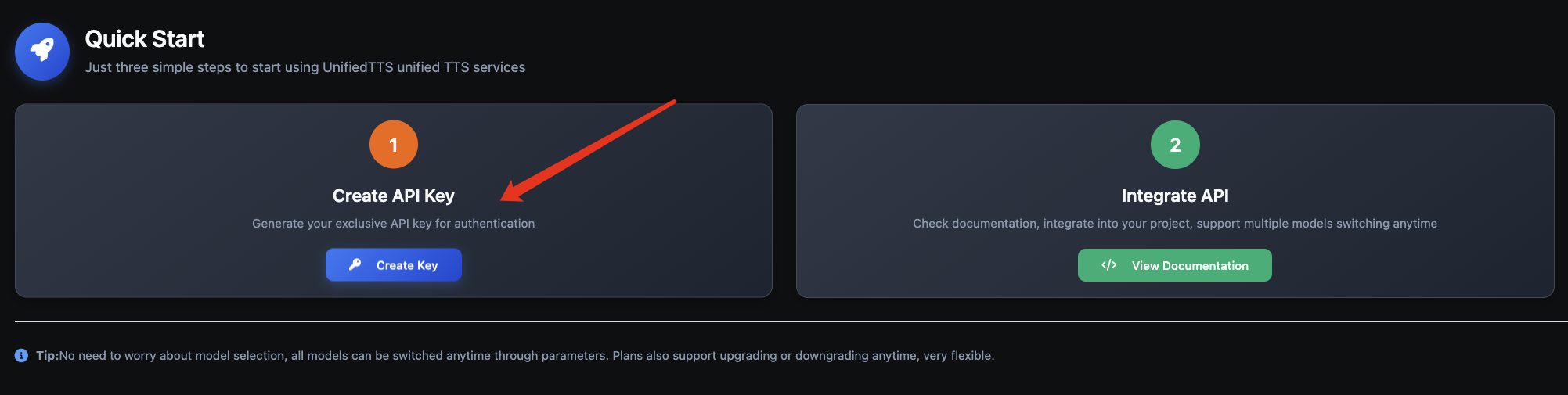
- 记录下创建的ApiKey,后续程序配置的时候需要使用
3. 集成 UnifiedTTS API(使用 MiniMax、CosyVoice)
下面给出参考实现,包括配置、DTO、服务与控制器。与 EdgeTTS 版本相比,主要是将 model 与 voice 改为 MiniMax/CosyVoice 支持的参数。
3.1 配置文件(application.properties)
unified-tts.host=https://unifiedtts.com
unified-tts.api-key=${UNIFIEDTTS_API_KEY}
这里 unified-tts.api-key 请替换为你在 UnifiedTTS 控制台创建的 API Key。
3.2 配置加载类与请求/响应封装
// src/main/java/com/example/tts/config/UnifiedTtsProperties.java
@Data
@ConfigurationProperties(prefix = "unified-tts")
public class UnifiedTtsProperties {
private String host;
private String apiKey;
}
// src/main/java/com/example/tts/dto/UnifiedTtsRequest.java
@Data
@AllArgsConstructor
@NoArgsConstructor
public class UnifiedTtsRequest {
private String model;   // 例:minimax-tts 或 cosyvoice-tts
private String voice;   // 例:zh_female_1(按模型支持的音色选择)
private String text;
private Double speed;   // 语速(可选)
private Double pitch;   // 音高(可选)
private Double volume;  // 音量(可选)
private String format;  // mp3/wav/ogg
}
// src/main/java/com/example/tts/dto/UnifiedTtsResponse.java
@Data
@AllArgsConstructor
@NoArgsConstructor
public class UnifiedTtsResponse {
private boolean success;
private String message;
private long timestamp;
private UnifiedTtsResponseData data;
@Data
@AllArgsConstructor
@NoArgsConstructor
public static class UnifiedTtsResponseData {
@JsonProperty("request_id")
private String requestId;
@JsonProperty("audio_url")
private String audioUrl;
@JsonProperty("file_size")
private long fileSize;
}
}
3.3 服务实现(RestClient 同步合成)
// src/main/java/com/example/tts/service/UnifiedTtsService.java
package com.example.tts.service;
import com.example.tts.dto.UnifiedTtsRequest;
import com.example.tts.config.UnifiedTtsProperties;
import org.springframework.http.MediaType;
import org.springframework.http.ResponseEntity;
import org.springframework.stereotype.Service;
import org.springframework.web.client.RestClient;
import java.io.IOException;
import java.nio.file.Files;
import java.nio.file.Path;
@Service
public class UnifiedTtsService {
private final RestClient restClient;
private final UnifiedTtsProperties properties;
public UnifiedTtsService(UnifiedTtsProperties properties) {
this.properties = properties;
this.restClient = RestClient.builder()
.baseUrl(properties.getHost())
.build();
}
public byte[] synthesize(UnifiedTtsRequest request) {
ResponseEntity<byte[]> response = restClient.post().uri("/api/v1/common/tts-sync").contentType(MediaType.APPLICATION_JSON).accept(MediaType.APPLICATION_OCTET_STREAM, MediaType.valueOf("audio/mpeg"), MediaType.valueOf("audio/mp3")).header("X-API-Key", properties.getApiKey()).body(request).retrieve().toEntity(byte[].class);if (response.getStatusCode().is2xxSuccessful() && response.getBody() != null) {return response.getBody();}throw new IllegalStateException("UnifiedTTS synthesize failed: " + response.getStatusCode());}public Path synthesizeToFile(UnifiedTtsRequest request, Path outputPath) {byte[] data = synthesize(request);try {if (outputPath.getParent() != null) {Files.createDirectories(outputPath.getParent());}Files.write(outputPath, data);return outputPath;} catch (IOException e) {throw new RuntimeException("Failed to write TTS output to file: " + outputPath, e);}}}
3.4 单元测试(MiniMax/CosyVoice)
// src/test/java/com/example/tts/UnifiedTtsServiceTest.java
@SpringBootTest
class UnifiedTtsServiceTest {
@Autowired
private UnifiedTtsService unifiedTtsService;
@Test
void testSynthesizeToFileWithMiniMax() throws Exception {
UnifiedTtsRequest req = new UnifiedTtsRequest(
"speech-02-turbo",
"Chinese (Mandarin)_Gentle_Youth",
"你好,欢迎使用 UnifiedTTS 的 MiniMax 模型配音。",
1.0,
0.0,
1.0,
"mp3"
);
Path projectDir = Paths.get(System.getProperty("user.dir"));
Path resultDir = projectDir.resolve("test-result");
Files.createDirectories(resultDir);
Path out = resultDir.resolve(System.currentTimeMillis() + ".mp3");
Path written = unifiedTtsService.synthesizeToFile(req, out);
assertTrue(Files.exists(written), "Output file should exist");
assertTrue(Files.size(written) > 0, "Output file size should be > 0");
}
}
4. 运行与验证
执行单元测试之后,可以在工程目录 test-result 下找到生成的音频文件:

如果你希望拿到音频 URL 或 Base64,可将接口 accept 改为 application/json 并解析返回结果,再做下载或解码。
5. 常用参数与音色选择
model:speech-02-turbo(示例),不同规格以官方为准;voice:示例Chinese (Mandarin)_Gentle_Youth等;rate:语速(建议范围 0.8–1.2);pitch:音高(建议范围 -3–+3);volume:音量(建议范围 0.8–1.2);format:mp3(常用)、wav(无损但体积大)、ogg等。
模型model与音色voice 这里推荐使用 minimax 或 cosyvoice的模型和音色。
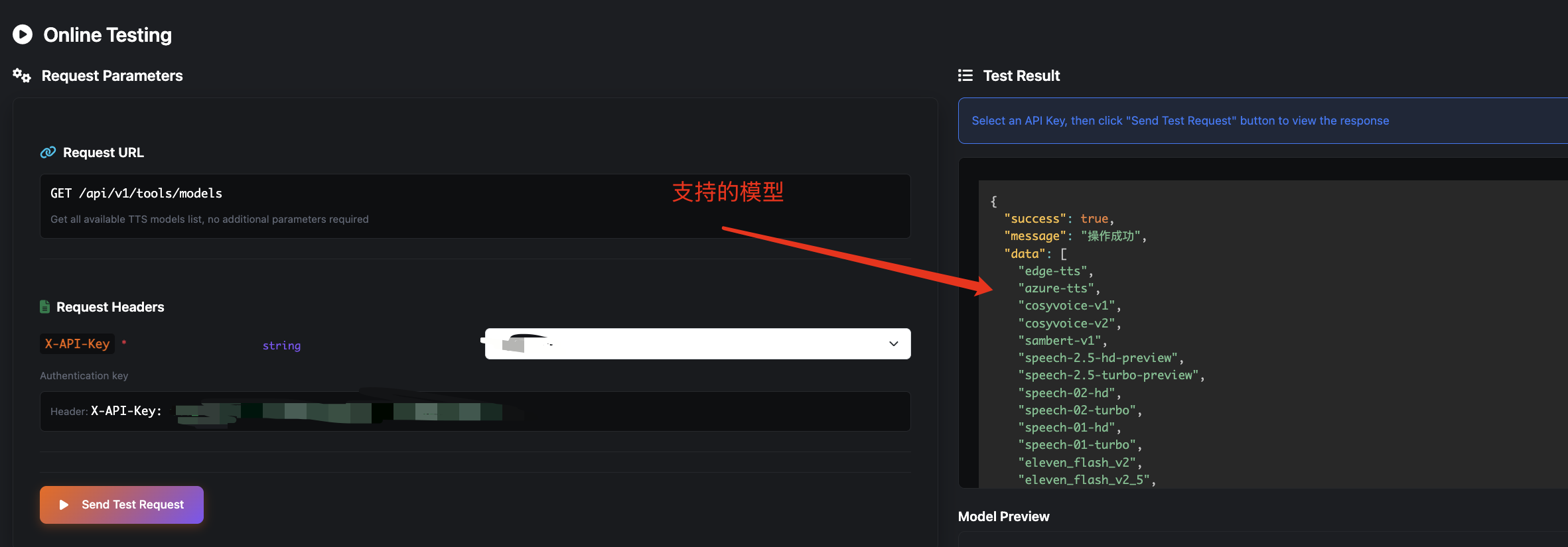
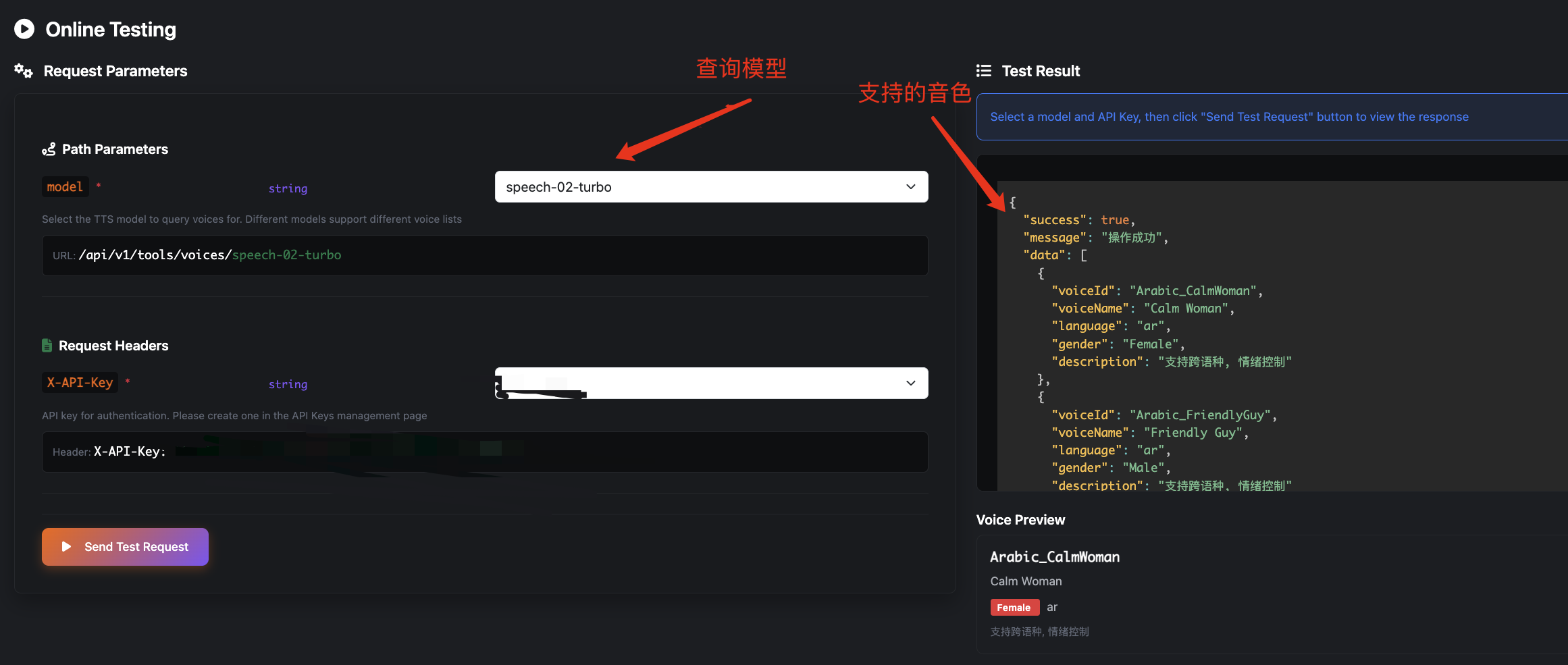
具体支持的参数可以在API文档中的接口查询可以填入的参数,比如:
model支持,调用一下可以看到,支持的模型有:
每个模型下支持的voice,也可以调用接口查询,比如这里尝试调用minimax支持的voice:
6. 异常处理与重试建议
- 超时与网络错误:设置
timeout-ms,在onErrorResume中记录原因; - 4xx/5xx:区分鉴权失败、限流、服务器错误并上报;
- 重试策略:对临时性错误采用指数退避(带抖动);
- 并发与限流:高并发场景实现队列或令牌桶;
- 缓存:对重复合成按
text+voice+params做缓存,降低成本与时延。
7. 生产化建议
- 安全:API Key 从环境变量或密钥管理系统注入;
- 监控:记录合成耗时、失败原因、重试比率;
- 存储:落盘或对象存储(如 S3)并设置生命周期;
- 规范:统一 DTO 与服务返回结构,便于多模型扩展;
- 扩展:通过配置切换 Azure/Edge/Elevenlabs/MiniMax 等模型。
小结
通过 UnifiedTTS,我们在 Spring Boot 中仅需调整 model 与 voice 即可切换到 MiniMax、CosyVoice、甚至最强的Elevenlabs,实现文本转语音。统一接口简化了多引擎维护成本,让你能在成本、音色与效果间自由选择。根据业务需求,还可进一步完善异常处理、缓存与并发控制,构建更可靠的生产级 TTS 服务。
另外,对比了官方API和UnifiedTTS的价格,后者更具备价格优势,所以非常推荐独立开发者或者初创产品的时候使用。不论从开发成本还是API成本角度看都是最佳选择。