
elastic集群监控配置
我的集群是普通的版本 并不是pod 因为业务量不稳定时高时低 配置越复杂维护程度越高,企业招聘就越难。
并没有去grafana上去配置数据源信息 图形界面之类的东西 我们的目的是想给这个在以前的基础上加一个钉钉告警。
前一段时间业务量大 swap分区被占用了5个G 简单地刷新swap并没有把数据刷到磁盘 过一会又满了。 经过排查发现是es负载很高,把系统的io速度降到很低 监控疯狂告警 最后修改es和系统内核配置 然后关闭swap分区 才解决了这个问题 当时并没有把es监控起来 现在看来十分有必要 (钉钉告警已经有了 现在是纯配置就完事 )
- 我的监控版本
![在这里插入图片描述]()
各个版本基本上变动不大 应该可以兼容
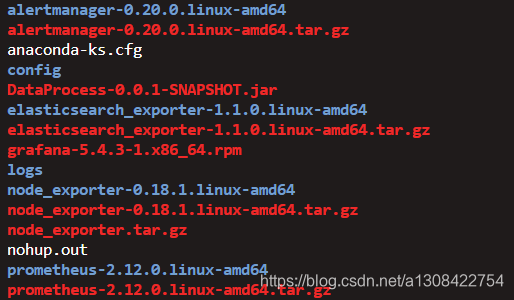
- 上传文件包elasticsearch_exporter-1.1.0.linux-amd64.tar.gz到prometheus主机 并解压
git上的学习地址: https://github.com/justwatchcom/elasticsearch_exporter
- 先启动elasticsearch_exporter 在终端启动
es.uri 地址只要有一个就会对整个集群进行监控
把红框里的配置全部打开
./elasticsearch_exporter --help 能查看使用方法 这里面有好多都是默认的 建议反复研读上文连接
![在这里插入图片描述]()
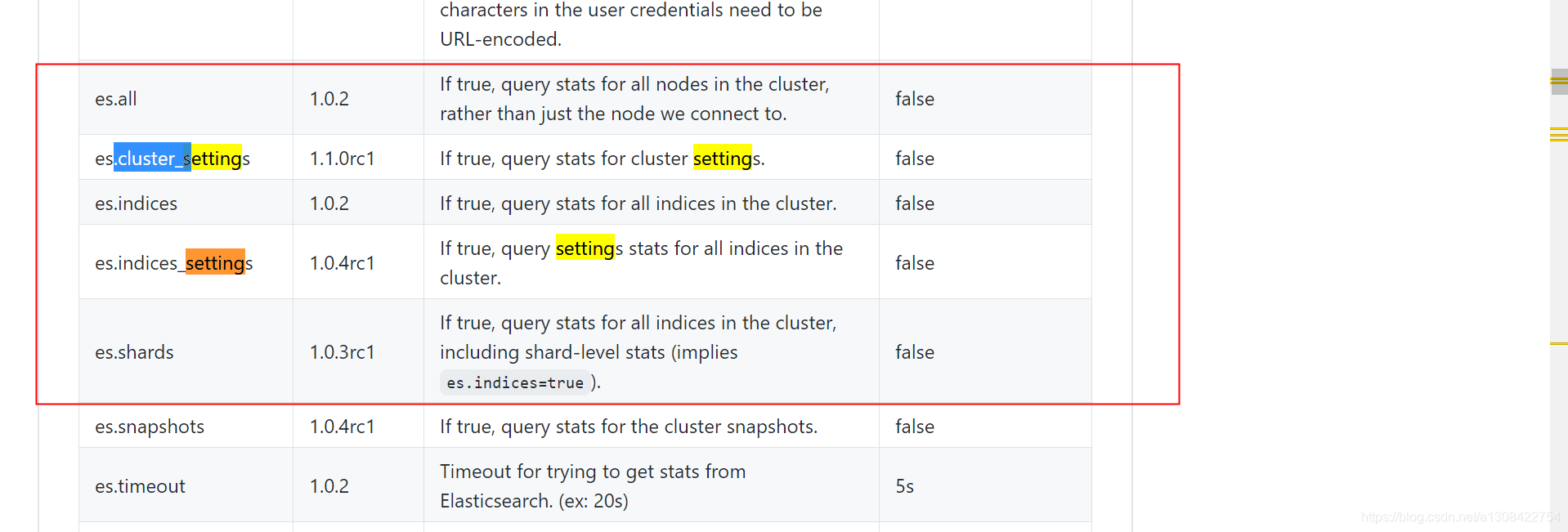
  ./elasticsearch_exporter --es.uri=http://10.128.128.51:9200 --es.all true --es.cluster_settings true --es.indices true --es.indices_settings true --es.shards true --web.listen-address=:9114无报错之后查看
curl http://127.0.0.1:9114/metrics
开始配置prometheus
- 找到文件监控规则中的配置
 vim  ../elasticsearch_exporter-1.1.0.linux-amd64/elasticsearch.rules这个文件夹有监控示例,稍作修改即可使用
# calculate filesystem used and free percent
elasticsearch_filesystem_data_used_percent = 100 * (elasticsearch_filesystem_data_size_bytes - elasticsearch_filesystem_data_free_bytes) /elasticsearch_filesystem_data_size_bytes
elasticsearch_filesystem_data_free_percent = 100 - elasticsearch_filesystem_data_used_percent# alert if too few nodes are running
ALERT ElasticsearchTooFewNodesRunningIF elasticsearch_cluster_health_number_of_nodes < 3FOR 5mLABELS {severity="critical"}ANNOTATIONS {description="There are only {{$value}} < 3 ElasticSearch nodes running", summary="ElasticSearch running on less than 3 nodes"}
# alert if heap usage is over 90%
ALERT ElasticsearchHeapTooHighIF elasticsearch_jvm_memory_used_bytes{area="heap"} / elasticsearch_jvm_memory_max_bytes{area="heap"} > 0.9FOR 15mLABELS {severity="critical"}ANNOTATIONS {description="The heap usage is over 90% for 15m", summary="ElasticSearch node {{$labels.node}} heap usage is high"}
二进制安装的prometheus目录结构
[root@jmenv ~]# ll prometheus-2.12.0.linux-amd64
total 132308
-rw-r--r--.  1 root root    29214 Aug 25 18:17 1.txt
drwxr-xr-x.  2 3434 3434       38 Aug 18  2019 console_libraries
drwxr-xr-x.  2 3434 3434      173 Aug 18  2019 consoles
drwxr-xr-x. 26 root root     4096 Aug 25 17:00 data
-rw-r--r--.  1 3434 3434    11357 Aug 18  2019 LICENSE
-rw-------.  1 root root    15434 Aug 25 17:49 nohup.out
-rw-r--r--.  1 3434 3434     2770 Aug 18  2019 NOTICE
-rwxr-xr-x.  1 3434 3434 84771664 Aug 18  2019 prometheus
-rw-r--r--.  1 3434 3434     1225 Aug 25 17:36 prometheus.yml
-rwxr-xr-x.  1 3434 3434 50620988 Aug 18  2019 promtool
-rw-r--r--.  1 root root     3822 Aug 25 17:49 rules.txt
-rw-r--r--.  1 root root      402 May 13 15:16 service.json
-rw-r--r--.  1 root root      321 May  7 18:45 service.json.bakprometheus自己有一个监控规则文档  当服务重启时会加载监控规则  将上文中的监控规则按照rule.txt中的格式稍作修改将修改后的文本复制进去,只要变量和配置格式不变的情况下可以自由发挥:  下面就是↓- alert:  es健康节点数小于3expr:  elasticsearch_cluster_health_number_of_nodes < 3for: 5mlabels:status: warningannotations:description: "There are only {{$value}} < 3 ElasticSearch nodes running, summary=ElasticSearch running on less than 3 nodes"- alert:  es占用率高于90%expr:  elasticsearch_jvm_memory_used_bytes{area="heap"} / elasticsearch_jvm_memory_max_bytes{area="heap"} > 0.9for: 15mlabels:status: warningannotations:description: "The heap usage is over 90% for 15m, summary=ElasticSearch node {{$labels.node}} heap usage is high"
- 修改prometheus.yml
[root@jmenv prometheus-2.12.0.linux-amd64]# ll
total 132308
-rw-r--r--.  1 root root    29214 Aug 25 18:17 1.txt
drwxr-xr-x.  2 3434 3434       38 Aug 18  2019 console_libraries
drwxr-xr-x.  2 3434 3434      173 Aug 18  2019 consoles
drwxr-xr-x. 26 root root     4096 Aug 25 17:00 data
-rw-r--r--.  1 3434 3434    11357 Aug 18  2019 LICENSE
-rw-------.  1 root root    15677 Aug 25 18:24 nohup.out
-rw-r--r--.  1 3434 3434     2770 Aug 18  2019 NOTICE
-rwxr-xr-x.  1 3434 3434 84771664 Aug 18  2019 prometheus
-rw-r--r--.  1 3434 3434     1225 Aug 25 17:36 prometheus.yml
-rwxr-xr-x.  1 3434 3434 50620988 Aug 18  2019 promtool
-rw-r--r--.  1 root root     3822 Aug 25 17:49 rules.txt
-rw-r--r--.  1 root root      402 May 13 15:16 service.json
-rw-r--r--.  1 root root      321 May  7 18:45 service.json.bakvim  prometheus.yml  #添加一个job
# Alertmanager configuration
alerting:alertmanagers:- static_configs:- targets:- localhost:9093# Load rules once and periodically evaluate them according to the global 'evaluation_interval'.
rule_files:# - "first_rules.yml"- "/root/prometheus-2.12.0.linux-amd64/rules.txt"# A scrape configuration containing exactly one endpoint to scrape:
# Here it's Prometheus itself.
scrape_configs:# The job name is added as a label `job=<job_name>` to any timeseries scraped from this config.- job_name: 'prometheus'# metrics_path defaults to '/metrics'# scheme defaults to 'http'.static_configs:- targets: ['localhost:9090']- job_name: 'service-node_export'file_sd_configs:- files:- /root/prometheus-2.12.0.linux-amd64/service.jsonrefresh_interval: 10s- job_name: 'elasticsearch'scrape_interval: 30sstatic_configs:- targets:- 127.0.0.1:9114
其中- targets: 127.0.0.1:9114 是我启动的es的export地址与端口- 修改 prometheus.yml 局部
prometheus-2.12.0.linux-amd64/prometheus.yml
添加job_name
```bash
- job_name: 'elasticsearch'scrape_interval: 30sstatic_configs:- targets:- 127.0.0.1:9114
热重启prometheus
 nohup ./prometheus --web.enable-lifecycle &
curl -XPOST http://localhost:9090/-/reload
如果热重启失效直接kill掉重启也行
kill  -9 $(ss  -lntup |grep  9090|awk -F'=' '{print $2}' |awk -F',' '{print $1}')
然后去prometheus目录下重启就行