
sqlite 添加用户密码的方法
1、首先添加引用
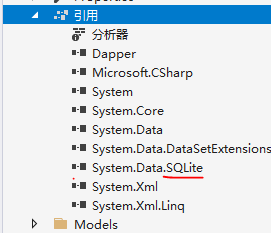
2、然后替换Bin下的x86/x64文件夹下的文件

3、添加修改密码的代码
public bool SetSqlitePsd(string passWord)
{bool result = false;try{using (SQLiteConnection cnn = new SQLiteConnection(CONNSTR)){cnn.Open();cnn.ChangePassword(passWord);result = true;}}catch (Exception ex){Debug.WriteLine(ex.Message + "数据库或已加密");}return result;
}public bool ClearSqlitePsd(string passWord)
{bool result = false;try{using (SQLiteConnection cnn = new SQLiteConnection(CONNSTR)){cnn.SetPassword(passWord);cnn.Open();cnn.ChangePassword("");result = true;}}catch (Exception ex){Debug.WriteLine(ex.Message + "数据库或已解密");}return result;
}
以上方法只能在Windows平台运行,跨平台的方法:
https://learn.microsoft.com/zh-cn/dotnet/standard/data/sqlite/encryption?tabs=net-cli