
本文教大家使用AgentFramework集成Agent Skill智能体技能
1.基础知识
代理技能 是指令、脚本和资源的可移植包,可提供代理的专用功能和域专业知识。 技能遵循开放规范并实现渐进式披露模式,以便代理在需要时仅加载所需的上下文。
在需要时使用代理技能:
封装领域专业知识 - 将专业知识(费用策略、法律工作流、数据分析管道)捕获为可重用且可移植的包。
扩展代理功能 - 为代理提供新功能,而无需更改其核心指令。
确保一致性 - 将多步骤任务转换为可重复的可审核工作流。
启用互作性 - 在不同的代理技能兼容产品中重复使用相同的技能。
技能结构
技能是一个目录,包含一个 SKILL.md 文件,并且可以选择包括用于存放资源的子目录:
expense-report/
├── SKILL.md                          # Required — frontmatter + instructions
├── scripts/
│   └── validate.py                   # Executable code agents can run
├── references/
│   └── POLICY_FAQ.md                 # Reference documents loaded on demand
└── assets/└── expense-report-template.md    # Templates and static resources
SKILL.md 格式
该文件 SKILL.md 必须包含 YAML 前置数据,后跟 Markdown 内容:
name: expense-report
description: File and validate employee expense reports according to company policy. Use when asked about expense submissions, reimbursement rules, or spending limits.
license: Apache-2.0
compatibility: Requires python3
metadata:author: contoso-financeversion: "2.1"
---
## Shell SKILL 文件夹
https://github.com/junkai-li/NetCoreKevin/tree/master/Kevin/kevin.Module/kevin.AI.AgentFramework/Skills

基本设置
创建一个指向包含您技能的目录的FileAgentSkillsProvider,并将其添加到代理的上下文提供者中。
源代码地址:https://github.com/junkai-li/NetCoreKevin/blob/master/Kevin/kevin.Module/kevin.AI.AgentFramework/AIAgentService.cs
using Azure.AI.OpenAI;
using Azure.Identity;
using Microsoft.Agents.AI;// Discover skills from the 'skills' directoryvar skillsProvider = new FileAgentSkillsProvider(skillPaths: [Path.Combine(AppContext.BaseDirectory + "/Skills", "expense-report-skills"), Path.Combine(AppContext.BaseDirectory + "/Skills", "system-ops-skills")],options: new FileAgentSkillsProviderOptions{SkillsInstructionPrompt = """你可以使用以下技能获取领域知识和操作指引。每个技能提供专业指令、参考文档和可执行脚本它们如下:{0}使用 `expense-report` 这个技能用于 按照NetCoreKevin科技公司政策填写和审核员工费用报销。适用于费用报销、报销规则、收据要求、支出限额或费用类别等相关问题。 使用 `system-ops` 这个技能 工作流程:1. 当用户任务匹配技能描述时,使用 `load_skill` 加载该技能的完整指令2. 技能指令中会标明可用脚本及其执行命令3. 使用 `run_shell` 工具执行技能中标注的命令4. 需要时使用 `read_skill_resource` 读取参考资料。重要原则:先加载知识,再执行操作。"""});// Create an agent with the skills provider
AIAgent agent = new AzureOpenAIClient(new Uri(endpoint), new DefaultAzureCredential()).GetResponsesClient(deploymentName).AsAIAgent(new ChatClientAgentOptions{Name = "SkillsAgent",ChatOptions = new(){Instructions = "You are a helpful assistant.",// 🔑 能力层:工具Tools = new List<AITool>() {AIFunctionFactory.Create(KevinBasicAI.GetNetCoreKevinInfo,new AIFunctionFactoryOptions{ Name = "GetNetCoreKevinInfo",Description = "获取NetCoreKevin框架的介绍信息" }),AIFunctionFactory.Create(ShellTools.RunShell,new AIFunctionFactoryOptions{ Name = "RunShell",Description = "执行 Shell 命令。通过操作系统原生 Shell 执行命令(Windows 用 cmd,Linux/Mac 用 bash)。包含安全护栏:危险命令阻止、输出截断(50KB)、超时控制(60秒)。" })};},AIContextProviders = [skillsProvider],});
自定义系统提示
默认情况下,技能提供程序会注入系统提示,其中列出了可用的技能,并指示代理使用 load_skill 和 read_skill_resource。 可以自定义此提示:
var skillsProvider = new FileAgentSkillsProvider(skillPath: Path.Combine(AppContext.BaseDirectory, "skills"),options: new FileAgentSkillsProviderOptions{SkillsInstructionPrompt = """You have skills available. Here they are:{0}Use the `load_skill` function to get skill instructions.Use the `read_skill_resource` function to read skill files."""});
Tools工具
ShellTools.cs
using System;
using System.Collections.Generic;
using System.ComponentModel;
using System.Diagnostics;
using System.Linq;
using System.Text;
using System.Threading.Tasks;namespace kevin.AI.AgentFramework.Tools
{public class ShellTools{// ━━━━━━━━━━━━━━━━━━━━━━━━━━━━━━━━━━━━━━━━// run_shell — 一个 Shell 工具做一切(含安全护栏)// ━━━━━━━━━━━━━━━━━━━━━━━━━━━━━━━━━━━━━━━━// 🛡️ 安全护栏 1:危险命令黑名单private static string[] dangerousPatterns = ["rm -rf /", "rm -rf /*",       // 删除根目录"sudo ",                        // 提权"shutdown", "reboot",           // 系统操作"> /dev/",                      // 设备写入":(){ :|:& };:",                // Fork bomb"mkfs.",                        // 格式化"dd if=",                       // 磁盘覆写"format ",                      // Windows 格式化"del /f /s /q",                 // Windows 递归删除];[Description("执行 Shell 命令。通过操作系统原生 Shell 执行命令(Windows 用 cmd,Linux/Mac 用 bash)。包含安全护栏:危险命令阻止、输出截断(50KB)、超时控制(60秒)。")]public static string RunShell([Description("要执行的 Shell 命令。例如:'pwsh -File /path/to/script.ps1' 或 'dir'")] string command,[Description("命令执行的工作目录(可选)。如果不指定,使用当前目录。")] string? workingDirectory = null){try{// 🛡️ 安全护栏 1:危险命令检查if (dangerousPatterns.Any(d => command.Contains(d, StringComparison.OrdinalIgnoreCase))){return "❌ 安全拦截:检测到危险命令,已阻止执行。";}Console.WriteLine($"🔧 正在执行 Shell 命令:{command}");// 🔑 跨平台 Shell 适配://   Windows → cmd /c "command"   (原生命令提示符)//   Linux/Mac → bash -c "command" (原生 Bash)//// 为什么不直接用 pwsh?//   SKILL.md 中的命令已经是 "pwsh -File ..."//   如果 RunShell 也用 pwsh -Command 包裹 → pwsh 套 pwsh(冗余嵌套)//   用原生 shell 分发 → pwsh -File 直接执行,零嵌套 var isWindows = OperatingSystem.IsWindows();var processInfo = new ProcessStartInfo{FileName = isWindows ? "cmd" : "bash",Arguments = isWindows ? $"/c {command}" : $"-c \"{command.Replace("\"", "\\\"")}\"",RedirectStandardOutput = true,RedirectStandardError = true,UseShellExecute = false,CreateNoWindow = true};// 设置工作目录if (!string.IsNullOrWhiteSpace(workingDirectory) && Directory.Exists(workingDirectory)){processInfo.WorkingDirectory = workingDirectory;}using var process = Process.Start(processInfo);if (process == null){return "❌ 无法启动 Shell 进程";}var stdout = process.StandardOutput.ReadToEnd();var stderr = process.StandardError.ReadToEnd();// 🛡️ 安全护栏 3:超时控制(60秒)if (!process.WaitForExit(60_000)){process.Kill(entireProcessTree: true);return "❌ 命令执行超时(60秒),已强制终止。";}var result = new StringBuilder();if (!string.IsNullOrWhiteSpace(stdout)){result.AppendLine(stdout.Trim());}if (!string.IsNullOrWhiteSpace(stderr)){result.AppendLine($"⚠️ stderr: {stderr.Trim()}");}if (process.ExitCode != 0){result.AppendLine($"⚠️ 退出码: {process.ExitCode}");}var output = result.Length > 0 ? result.ToString() : "(命令执行成功,无输出)";// 🛡️ 安全护栏 2:输出截断(50KB)const int maxOutputLength = 50_000;if (output.Length > maxOutputLength){output = output[..maxOutputLength] + "\n... (输出已截断,超过 50KB 上限)";}return output;}catch (Exception ex){return $"❌ 执行失败: {ex.Message}";}}}
}
效果图
AI使用Shell命名进行相关电脑本机操作
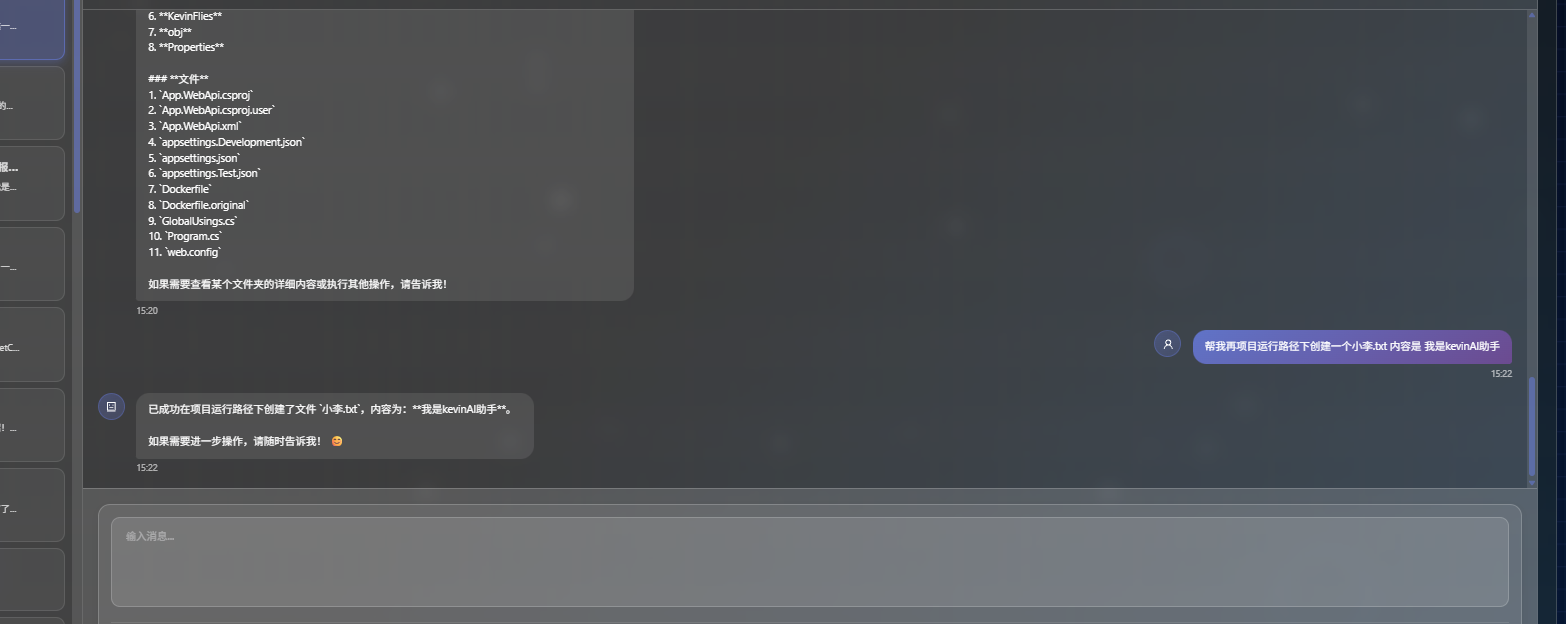
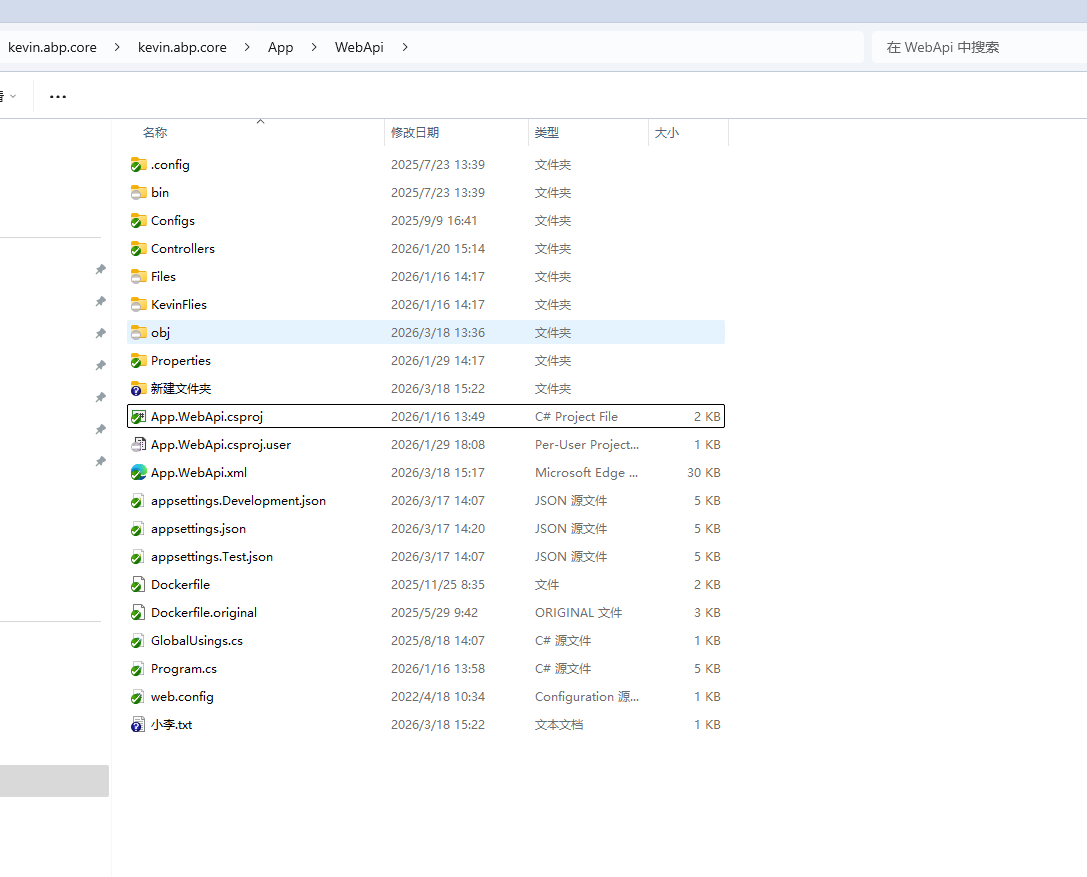
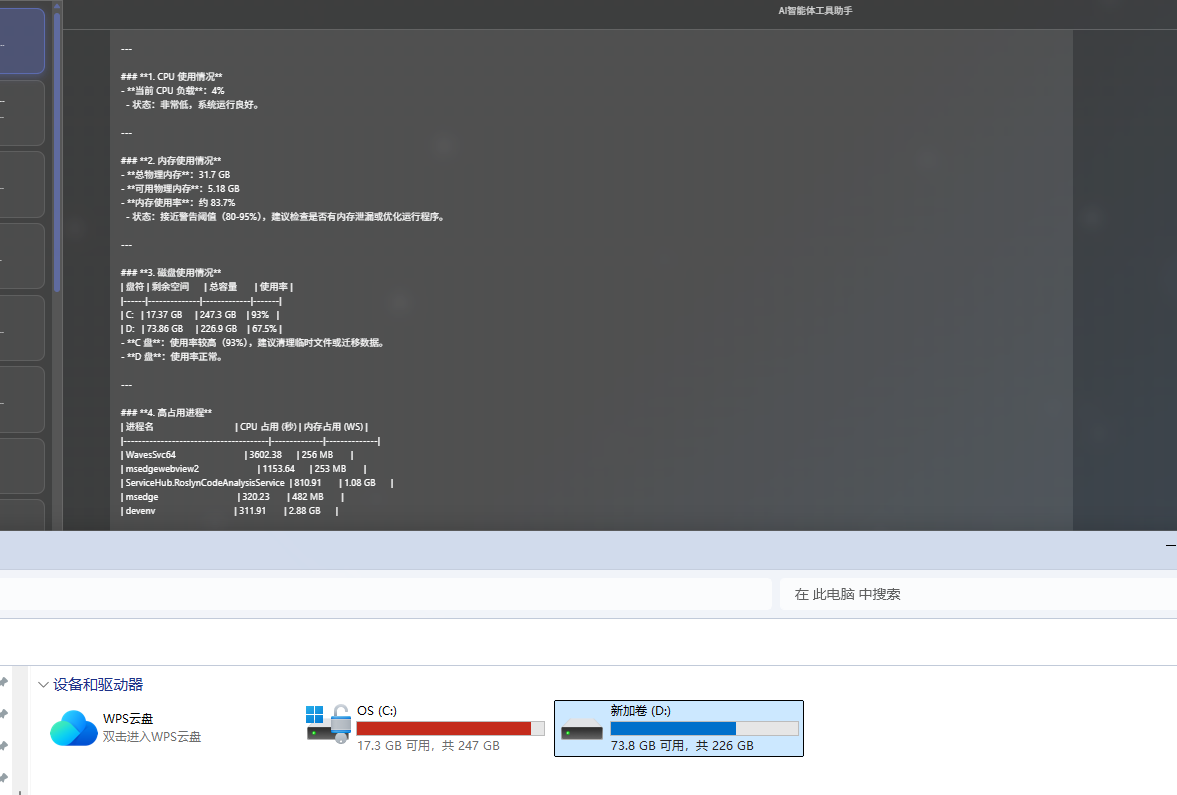
参考源代码: NetCoreKevin框架下的kevin.AI.AgentFramework模块
基于.NET构建的企业级SaaSAI智能体应用架构,采用前后端分离设计,具备以下核心特性:
- AI智能体框架RAG检索增强
- AI知识库
- AI智能体技能集成
- -RabbitMQ消息队列
- 一库多租户解决方案
- 多级缓存机制
- CAP事件集成
- SignalR实时通信
- 领域驱动设计
- 等等......
- 项目地址:github:https://github.com/junkai-li/NetCoreKevin
Gitee: https://gitee.com/netkevin-li/NetCoreKevin
参考文献:
https://learn.microsoft.com/zh-cn/agent-framework/agents/skills?pivots=programming-language-csharp