Domain Layer
# encoding: utf-8
# 版权所有  2026 ©涂聚文有限公司™ ®
# 许可信息查看:言語成了邀功盡責的功臣,還需要行爲每日來值班嗎
# 描述:
# Author    : geovindu,Geovin Du 涂聚文.
# IDE       : PyCharm 2024.3.6 python 3.11
# os        : windows 10
# database  : mysql 9.0 sql server 2019, postgreSQL 17.0  Oracle 21c Neo4j
# Datetime  : 2026/1/24 14:00
# User      :  geovindu
# Product   : PyCharm
# Project   : PyExceport
# File      : ComparisonResult.pyimport os
import threading
from typing import List, Dict, Tuple, Optional
import pandas as pd
import matplotlib.pyplot as plt
from matplotlib.backends.backend_tkagg import FigureCanvasTkAggclass ComparisonResult:"""领域模型:比对结果封装"""def __init__(self):""""""self.common_data: pd.DataFrame = pd.DataFrame()  # 两表都有的数据self.only_sheet1_data: pd.DataFrame = pd.DataFrame()  # 仅表1有的数据self.only_sheet2_data: pd.DataFrame = pd.DataFrame()  # 仅表2有的数据self.total_sheet1: int = 0self.total_sheet2: int = 0self.common_count: int = 0self.only_sheet1_count: int = 0self.only_sheet2_count: int = 0# encoding: utf-8
# 版权所有  2026 ©涂聚文有限公司™ ®
# 许可信息查看:言語成了邀功盡責的功臣,還需要行爲每日來值班嗎
# 描述:
# Author    : geovindu,Geovin Du 涂聚文.
# IDE       : PyCharm 2024.3.6 python 3.11
# os        : windows 10
# database  : mysql 9.0 sql server 2019, postgreSQL 17.0  Oracle 21c Neo4j
# Datetime  : 2026/1/24 14:01
# User      :  geovindu
# Product   : PyCharm
# Project   : PyExceport
# File      : ComparisonRule.py
import os
import threading
from typing import List, Dict, Tuple, Optionalclass ComparisonRule:"""领域模型:比对规则(比对列、工作表名称)"""def __init__(self, sheet1_name: str, sheet2_name: str, compare_columns: List[str]):""":param sheet1_name::param sheet2_name::param compare_columns:"""self.sheet1_name = sheet1_nameself.sheet2_name = sheet2_nameself.compare_columns = compare_columnsif not compare_columns:raise ValueError("至少选择一列作为比对依据")# encoding: utf-8
# 版权所有  2026 ©涂聚文有限公司™ ®
# 许可信息查看:言語成了邀功盡責的功臣,還需要行爲每日來值班嗎
# 描述:
# Author    : geovindu,Geovin Du 涂聚文.
# IDE       : PyCharm 2024.3.6 python 3.11
# os        : windows 10
# database  : mysql 9.0 sql server 2019, postgreSQL 17.0  Oracle 21c Neo4j
# Datetime  : 2026/1/24 13:59
# User      :  geovindu
# Product   : PyCharm
# Project   : PyExceport
# File      : ExcelData.pyimport os
import threading
from typing import List, Dict, Tuple, Optional
import pandas as pd
import matplotlib.pyplot as plt
from matplotlib.backends.backend_tkagg import FigureCanvasTkAggclass ExcelData:"""领域模型:Excel数据封装"""def __init__(self, file_path: str):""":param file_path:"""self.file_path = file_pathself.sheet_names: List[str] = []self.sheet_data: Dict[str, pd.DataFrame] = {}self.load_sheets()def load_sheets(self):"""加载Excel所有工作表名称和数据:return:"""try:self.sheet_names = pd.ExcelFile(self.file_path).sheet_namesfor sheet in self.sheet_names:self.sheet_data[sheet] = pd.read_excel(self.file_path, sheet_name=sheet).fillna("")except Exception as e:raise ValueError(f"加载Excel失败:{str(e)}")def get_sheet_columns(self, sheet_name: str) -> List[str]:"""获取指定工作表的列名:param sheet_name: :return: """""if sheet_name not in self.sheet_data:raise ValueError(f"工作表{sheet_name}不存在")return list(self.sheet_data[sheet_name].columns)def get_sheet_data(self, sheet_name: str) -> pd.DataFrame:"""获取指定工作表的原始数据":param sheet_name: :return: """""return self.sheet_data[sheet_name].copy()
Application Layer
# encoding: utf-8
# 版权所有  2026 ©涂聚文有限公司™ ®
# 许可信息查看:言語成了邀功盡責的功臣,還需要行爲每日來值班嗎
# 描述:
# Author    : geovindu,Geovin Du 涂聚文.
# IDE       : PyCharm 2024.3.6 python 3.11
# os        : windows 10
# database  : mysql 9.0 sql server 2019, postgreSQL 17.0  Oracle 21c Neo4j
# Datetime  : 2026/1/24 14:03
# User      :  geovindu
# Product   : PyCharm
# Project   : PyExceport
# File      : ExcelComparisonService.pyimport os
import threading
from typing import List, Dict, Tuple, Optional
import pandas as pd
import matplotlib.pyplot as plt
from matplotlib.backends.backend_tkagg import FigureCanvasTkAgg
from Domain.ExcelData import ExcelData
from Domain.ComparisonResult import ComparisonResult
from Domain.ComparisonRule import ComparisonRuleclass ExcelComparisonService:"""应用服务:封装比对业务流程"""@staticmethoddef generate_unique_key(df: pd.DataFrame, columns: List[str]) -> pd.Series:"""生成多列组合的唯一键(用于多列比对):param df::param columns::return:"""return df[columns].astype(str).agg('|'.join, axis=1)@staticmethoddef compare(excel_data: ExcelData, rule: ComparisonRule) -> ComparisonResult:"""执行核心比对逻辑:param excel_data::param rule::return:"""result = ComparisonResult()# 获取两个工作表的数据df1 = excel_data.get_sheet_data(rule.sheet1_name)df2 = excel_data.get_sheet_data(rule.sheet2_name)# 生成唯一键(单列/多列)df1['_unique_key'] = ExcelComparisonService.generate_unique_key(df1, rule.compare_columns)df2['_unique_key'] = ExcelComparisonService.generate_unique_key(df2, rule.compare_columns)# 去重(基于唯一键)df1_clean = df1.drop_duplicates(subset=['_unique_key']).reset_index(drop=True)df2_clean = df2.drop_duplicates(subset=['_unique_key']).reset_index(drop=True)# 计算集合差集/交集set1 = set(df1_clean['_unique_key'])set2 = set(df2_clean['_unique_key'])common_keys = set1 & set2only_sheet1_keys = set1 - set2only_sheet2_keys = set2 - set1# 筛选结果(移除临时唯一键)result.common_data = df1_clean[df1_clean['_unique_key'].isin(common_keys)].drop(columns=['_unique_key'])result.only_sheet1_data = df1_clean[df1_clean['_unique_key'].isin(only_sheet1_keys)].drop(columns=['_unique_key'])result.only_sheet2_data = df2_clean[df2_clean['_unique_key'].isin(only_sheet2_keys)].drop(columns=['_unique_key'])# 统计数量result.total_sheet1 = len(df1_clean)result.total_sheet2 = len(df2_clean)result.common_count = len(common_keys)result.only_sheet1_count = len(only_sheet1_keys)result.only_sheet2_count = len(only_sheet2_keys)return result@staticmethoddef create_chart(result: ComparisonResult) -> plt.Figure:"""生成比对结果图表:param result::return:"""# 设置中文字体plt.rcParams['font.sans-serif'] = ['Microsoft YaHei', 'SimHei', 'DejaVu Sans']plt.rcParams['axes.unicode_minus'] = Falsefig, (ax1, ax2) = plt.subplots(1, 2, figsize=(12, 5))# 饼图:分布比例pie_labels = ['仅表1', '仅表2', '两表共有']pie_sizes = [result.only_sheet1_count, result.only_sheet2_count, result.common_count]ax1.pie(pie_sizes, labels=pie_labels, autopct='%1.1f%%', startangle=90,colors=['#ff9999', '#66b3ff', '#99ff99'])ax1.set_title('人员分布比例', fontsize=12)# 柱状图:数量对比bar_x = ['总条数', '独有条数', '共有条数']bar_sheet1 = [result.total_sheet1, result.only_sheet1_count, result.common_count]bar_sheet2 = [result.total_sheet2, result.only_sheet2_count, result.common_count]x = range(len(bar_x))width = 0.35ax2.bar([i - width / 2 for i in x], bar_sheet1, width, label='表1', color='#ff9999')ax2.bar([i + width / 2 for i in x], bar_sheet2, width, label='表2', color='#66b3ff')ax2.set_xlabel('数据类型')ax2.set_ylabel('数量')ax2.set_title('数据数量对比', fontsize=12)ax2.set_xticks(x)ax2.set_xticklabels(bar_x)ax2.legend()ax2.grid(axis='y', alpha=0.3)plt.tight_layout()return fig@staticmethoddef export_result(result: ComparisonResult, file_path: str, rule: ComparisonRule):"""导出比对结果到Excel:param result::param file_path::param rule::return:"""with pd.ExcelWriter(file_path, engine='openpyxl') as writer:# 汇总表summary_df = pd.DataFrame({'项目': ['表1总条数', '表2总条数', '两表共有', '仅表1有', '仅表2有'],'数量': [result.total_sheet1,result.total_sheet2,result.common_count,result.only_sheet1_count,result.only_sheet2_count]})summary_df.to_excel(writer, sheet_name='比对汇总', index=False)# 详细数据result.common_data.to_excel(writer, sheet_name='两表共有', index=False)result.only_sheet1_data.to_excel(writer, sheet_name=f'仅{rule.sheet1_name}有', index=False)result.only_sheet2_data.to_excel(writer, sheet_name=f'仅{rule.sheet2_name}有', index=False)
Presentation Layer
# encoding: utf-8
# 版权所有  2026 ©涂聚文有限公司™ ®
# 许可信息查看:言語成了邀功盡責的功臣,還需要行爲每日來值班嗎
# 描述:
# Author    : geovindu,Geovin Du 涂聚文.
# IDE       : PyCharm 2024.3.6 python 3.11
# os        : windows 10
# database  : mysql 9.0 sql server 2019, postgreSQL 17.0  Oracle 21c Neo4j
# Datetime  : 2026/1/24 14:09
# User      :  geovindu
# Product   : PyCharm
# Project   : PyExceport
# File      : ComparisonApp.pyimport tkinter as tk
import ttkbootstrap as ttk
from ttkbootstrap.constants import *
import pandas as pd
import matplotlib.pyplot as plt
from matplotlib.backends.backend_tkagg import FigureCanvasTkAgg
import os
import threading
from typing import List, Dict, Tuple, Optional
import warnings
from Domain.ExcelData import ExcelData
from Domain.ComparisonResult import ComparisonResult
from Domain.ComparisonRule import ComparisonRule
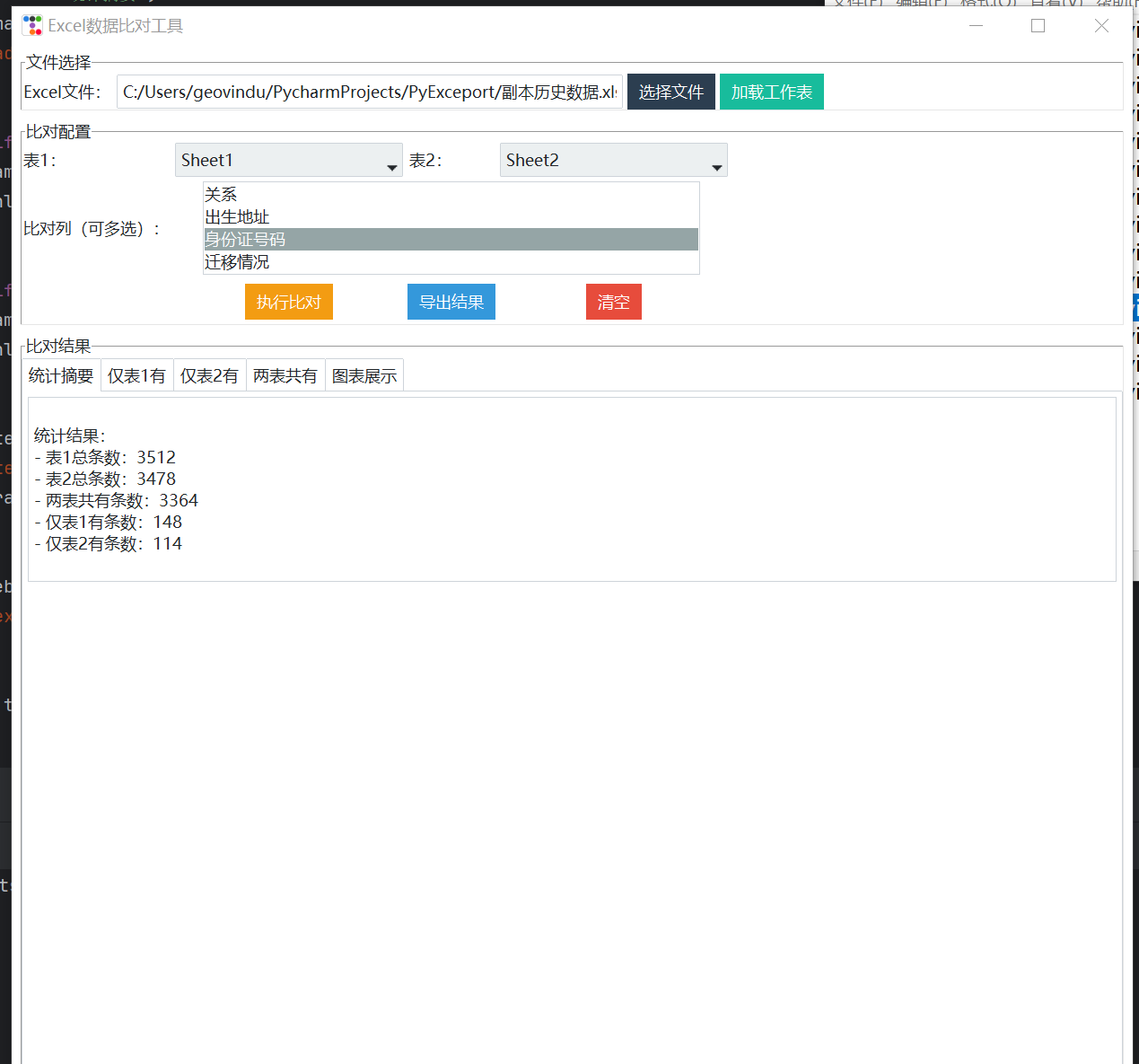
from Application.ExcelComparisonService import ExcelComparisonServicewarnings.filterwarnings('ignore')class ComparisonApp:"""UI界面:基于ttkbootstrap的桌面应用"""def __init__(self, root):self.root = rootself.root.title("Excel数据比对工具")self.root.geometry("1200x800")# 全局变量self.excel_data: Optional[ExcelData] = Noneself.comparison_result: Optional[ComparisonResult] = None# 初始化界面self._setup_ui()def _setup_ui(self):"""构建UI布局"""# 1. 顶部文件选择区file_frame = ttk.LabelFrame(self.root, text="文件选择")file_frame.pack(fill=X, padx=10, pady=5)self.file_path_var = ttk.StringVar()ttk.Label(file_frame, text="Excel文件:").grid(row=0, column=0, sticky=W)ttk.Entry(file_frame, textvariable=self.file_path_var, width=50).grid(row=0, column=1, padx=5)ttk.Button(file_frame, text="选择文件", command=self._select_excel_file, bootstyle=PRIMARY).grid(row=0,column=2)ttk.Button(file_frame, text="加载工作表", command=self._load_sheets, bootstyle=SUCCESS).grid(row=0, column=3,padx=5)# 2. 比对配置区config_frame = ttk.LabelFrame(self.root, text="比对配置")config_frame.pack(fill=X, padx=10, pady=5)# 2.1 工作表选择ttk.Label(config_frame, text="表1:").grid(row=0, column=0, sticky=W)self.sheet1_var = ttk.StringVar()self.sheet1_combobox = ttk.Combobox(config_frame, textvariable=self.sheet1_var, width=20, state="readonly")self.sheet1_combobox.grid(row=0, column=1, padx=5)self.sheet1_combobox.bind("<<ComboboxSelected>>", self._load_sheet_columns)ttk.Label(config_frame, text="表2:").grid(row=0, column=2, sticky=W)self.sheet2_var = ttk.StringVar()self.sheet2_combobox = ttk.Combobox(config_frame, textvariable=self.sheet2_var, width=20, state="readonly")self.sheet2_combobox.grid(row=0, column=3, padx=5)self.sheet2_combobox.bind("<<ComboboxSelected>>", self._load_sheet_columns)# 2.2 比对列选择ttk.Label(config_frame, text="比对列(可多选):").grid(row=1, column=0, sticky=W, pady=5)self.columns_listbox = tk.Listbox(config_frame, selectmode=tk.MULTIPLE, width=50, height=4)self.columns_listbox.grid(row=1, column=1, columnspan=3, pady=5)# 2.3 操作按钮ttk.Button(config_frame, text="执行比对", command=self._execute_comparison, bootstyle=WARNING).grid(row=2,column=1,pady=5)ttk.Button(config_frame, text="导出结果", command=self._export_result, bootstyle=INFO).grid(row=2, column=2,pady=5)ttk.Button(config_frame, text="清空", command=self._clear_all, bootstyle=DANGER).grid(row=2, column=3, pady=5)# 3. 结果展示区result_frame = ttk.LabelFrame(self.root, text="比对结果")result_frame.pack(fill=BOTH, expand=True, padx=10, pady=5)# 3.1 结果标签页self.notebook = ttk.Notebook(result_frame)self.notebook.pack(fill=BOTH, expand=True)# 3.1.1 统计摘要summary_frame = ttk.Frame(self.notebook)self.notebook.add(summary_frame, text="统计摘要")self.summary_text = ttk.Text(summary_frame, height=8, width=80)self.summary_text.pack(fill=X, padx=5, pady=5)# 3.1.2 仅表1有sheet1_only_frame = ttk.Frame(self.notebook)self.notebook.add(sheet1_only_frame, text="仅表1有")self._create_table_view(sheet1_only_frame, "sheet1_only")# 3.1.3 仅表2有sheet2_only_frame = ttk.Frame(self.notebook)self.notebook.add(sheet2_only_frame, text="仅表2有")self._create_table_view(sheet2_only_frame, "sheet2_only")# 3.1.4 两表共有common_frame = ttk.Frame(self.notebook)self.notebook.add(common_frame, text="两表共有")self._create_table_view(common_frame, "common")# 3.1.5 图表展示chart_frame = ttk.Frame(self.notebook)self.notebook.add(chart_frame, text="图表展示")self.chart_canvas = Nonedef _create_table_view(self, parent, table_type: str):"""创建结果表格视图(带滚动条):param parent::param table_type::return:"""# 滚动条vscroll = ttk.Scrollbar(parent, orient=VERTICAL)hscroll = ttk.Scrollbar(parent, orient=HORIZONTAL)# 表格table = ttk.Treeview(parent, yscrollcommand=vscroll.set, xscrollcommand=hscroll.set)vscroll.config(command=table.yview)hscroll.config(command=table.xview)# 布局table.pack(side=LEFT, fill=BOTH, expand=True)vscroll.pack(side=RIGHT, fill=Y)hscroll.pack(side=BOTTOM, fill=X)# 保存表格引用setattr(self, f"{table_type}_table", table)def _select_excel_file(self):"""选择Excel文件:return:"""from tkinter.filedialog import askopenfilenamefile_path = askopenfilename(filetypes=[("Excel文件", "*.xlsx;*.xls")])if file_path:self.file_path_var.set(file_path)def _load_sheets(self):"""加载Excel工作表列表:return:"""file_path = self.file_path_var.get()if not file_path or not os.path.exists(file_path):ttk.dialogs.Messagebox.show_error("请选择有效的Excel文件!")returntry:self.excel_data = ExcelData(file_path)# 更新工作表下拉框self.sheet1_combobox['values'] = self.excel_data.sheet_namesself.sheet2_combobox['values'] = self.excel_data.sheet_namesttk.dialogs.Messagebox.show_info(f"成功加载{len(self.excel_data.sheet_names)}个工作表!")except Exception as e:ttk.dialogs.Messagebox.show_error(f"加载失败:{str(e)}")def _load_sheet_columns(self, event=None):"""加载选中工作表的列名:param event::return:"""if not self.excel_data:return# 优先取表1的列(表1/表2列名尽量保持一致)sheet_name = self.sheet1_var.get() or self.sheet2_var.get()if not sheet_name:returntry:columns = self.excel_data.get_sheet_columns(sheet_name)self.columns_listbox.delete(0, tk.END)for col in columns:self.columns_listbox.insert(tk.END, col)except Exception as e:ttk.dialogs.Messagebox.show_error(f"加载列名失败:{str(e)}")def _execute_comparison(self):"""执行比对(异步执行,避免UI卡顿):return:"""# 校验输入if not self.excel_data:ttk.dialogs.Messagebox.show_error("请先加载Excel文件!")returnsheet1_name = self.sheet1_var.get()sheet2_name = self.sheet2_var.get()if not sheet1_name or not sheet2_name:ttk.dialogs.Messagebox.show_error("请选择要比对的两个工作表!")return# 获取选中的比对列selected_indices = self.columns_listbox.curselection()if not selected_indices:ttk.dialogs.Messagebox.show_error("请至少选择一列作为比对依据!")returncompare_columns = [self.columns_listbox.get(i) for i in selected_indices]# 异步执行比对def _compare_task():try:# 创建比对规则rule = ComparisonRule(sheet1_name, sheet2_name, compare_columns)# 执行比对self.comparison_result = ExcelComparisonService.compare(self.excel_data, rule)# 更新UIself.root.after(0, self._update_result_display)# 生成图表self.root.after(0, self._update_chart)except Exception as e:self.root.after(0, lambda: ttk.dialogs.Messagebox.show_error(f"比对失败:{str(e)}"))threading.Thread(target=_compare_task, daemon=True).start()ttk.dialogs.Messagebox.show_info("正在执行比对,请稍候...")def _update_result_display(self):"""更新结果展示:return:"""if not self.comparison_result:return# 1. 更新统计摘要summary_text = f"""
比对规则:
- 表1:{self.sheet1_var.get()}
- 表2:{self.sheet2_var.get()}
- 比对列:{', '.join([self.columns_listbox.get(i) for i in self.columns_listbox.curselection()])}
统计结果:
- 表1总条数:{self.comparison_result.total_sheet1}
- 表2总条数:{self.comparison_result.total_sheet2}
- 两表共有条数:{self.comparison_result.common_count}
- 仅表1有条数:{self.comparison_result.only_sheet1_count}
- 仅表2有条数:{self.comparison_result.only_sheet2_count}"""self.summary_text.delete(1.0, tk.END)self.summary_text.insert(tk.END, summary_text)# 2. 更新表格数据self._update_table("sheet1_only", self.comparison_result.only_sheet1_data)self._update_table("sheet2_only", self.comparison_result.only_sheet2_data)self._update_table("common", self.comparison_result.common_data)def _update_table(self, table_type: str, df: pd.DataFrame):"""更新表格数据:param table_type::param df::return:"""table = getattr(self, f"{table_type}_table")# 清空原有数据table.delete(*table.get_children())if df.empty:return# 设置列名table["columns"] = list(df.columns)table["show"] = "headings"for col in df.columns:table.heading(col, text=col)table.column(col, width=100)# 插入数据for _, row in df.iterrows():table.insert("", tk.END, values=list(row))def _update_chart(self):"""更新图表展示:return:"""if not self.comparison_result:return# 生成图表fig = ExcelComparisonService.create_chart(self.comparison_result)# 清除原有图表if self.chart_canvas:self.chart_canvas.get_tk_widget().destroy()# 嵌入图表到UIself.chart_canvas = FigureCanvasTkAgg(fig, master=self.notebook.nametowidget(self.notebook.tabs()[-1]))self.chart_canvas.draw()self.chart_canvas.get_tk_widget().pack(fill=BOTH, expand=True, padx=5, pady=5)def _export_result(self):"""导出结果:return:"""if not self.comparison_result:ttk.dialogs.Messagebox.show_error("暂无比对结果可导出!")returnfrom tkinter.filedialog import asksaveasfilenamesave_path = asksaveasfilename(defaultextension=".xlsx", filetypes=[("Excel文件", "*.xlsx")])if not save_path:returntry:rule = ComparisonRule(self.sheet1_var.get(),self.sheet2_var.get(),[self.columns_listbox.get(i) for i in self.columns_listbox.curselection()])ExcelComparisonService.export_result(self.comparison_result, save_path, rule)ttk.dialogs.Messagebox.show_info(f"结果已导出至:{save_path}")except Exception as e:ttk.dialogs.Messagebox.show_error(f"导出失败:{str(e)}")def _clear_all(self):"""清空所有状态:return:"""self.file_path_var.set("")self.sheet1_combobox['values'] = []self.sheet2_combobox['values'] = []self.columns_listbox.delete(0, tk.END)self.summary_text.delete(1.0, tk.END)# 清空表格for table_type in ["sheet1_only", "sheet2_only", "common"]:table = getattr(self, f"{table_type}_table")table.delete(*table.get_children())# 清空图表if self.chart_canvas:self.chart_canvas.get_tk_widget().destroy()self.chart_canvas = None# 重置全局变量self.excel_data = Noneself.comparison_result = None
调用:
# encoding: utf-8
# 版权所有  2026 ©涂聚文有限公司™ ®
# 许可信息查看:言語成了邀功盡責的功臣,還需要行爲每日來值班嗎
# 描述:python.exe -m pip install --upgrade pip -i https://pypi.tuna.tsinghua.edu.cn/simple
# Author    : geovindu,Geovin Du 涂聚文.
# IDE       : PyCharm 2024.3.6 python 3.11
# os        : windows 10
# database  : mysql 9.0 sql server 2019, postgreSQL 17.0  Oracle 21c Neo4j
# Datetime  : 2026/1/21 21:25
# User      :  geovindu    pip install pandas -i https://pypi.tuna.tsinghua.edu.cn/simple pip install matplotlib -i https://pypi.tuna.tsinghua.edu.cn/simple   pip3 install numpy -i https://pypi.tuna.tsinghua.edu.cn/simple
# Product   : PyCharm
# Project   : PyExceport
# File      : Main.py
'''
pip install openpyxl -i https://pypi.tuna.tsinghua.edu.cn/simple
pip install xlwt -i https://pypi.tuna.tsinghua.edu.cn/simple
python.exe -m pip install --upgrade pip -i https://pypi.tuna.tsinghua.edu.cn/simple
pip install openpyxl -i https://pypi.tuna.tsinghua.edu.cn/simple
pip install matplotlib -i https://pypi.tuna.tsinghua.edu.cn/simple
pip install pandas -i https://pypi.tuna.tsinghua.edu.cn/simple
pip install xlwt -i https://pypi.tuna.tsinghua.edu.cn/simple
pip install xlsxwriter -i https://pypi.tuna.tsinghua.edu.cn/simple
pip install ttkbootstrap  -i https://pypi.tuna.tsinghua.edu.cn/simple
'''
import pandas as pd
import matplotlib.pyplot as plt
import matplotlib.font_manager as fm
import os
from typing import Dict
import warnings
import tkinter as tk
import ttkbootstrap as ttk
from ttkbootstrap.constants import *
from Presentation.ComparisonApp import ComparisonAppwarnings.filterwarnings('ignore')# 调用示例
if __name__ == "__main__":"""主输出"""# 初始化ttkbootstraproot = ttk.Window(themename="flatly")  # 可选主题:flatly、darkly、cosmo、litera等app = ComparisonApp(root)root.mainloop()