
作业1
代码与运行结果
class ImageDownloader:def __init__(self):self.headers = {"User-Agent": "Mozilla/5.0 (Windows NT 10.0; Win64; x64) AppleWebKit/537.36 (KHTML, like Gecko) Chrome/91.0.4472.124 Safari/537.36"}# 创建图片保存目录self.image_dir = "images"if not os.path.exists(self.image_dir):os.makedirs(self.image_dir)self.max_pages = 5 # 最大页数self.max_images = 105 # 最大图片数量self.downloaded_count = 0 # 已下载图片计数def download_image(self, img_url, page_url):"""下载单个图片"""if self.downloaded_count >= self.max_images:return Falseif img_url.startswith('//'):img_url = 'http:' + img_urlelif img_url.startswith('/'):img_url = 'http://www.weather.com.cn' + img_urlelif not img_url.startswith('http'):img_url = 'http://www.weather.com.cn/' + img_url# 创建请求对象req = urllib.request.Request(img_url, headers=self.headers)# 获取图片数据with urllib.request.urlopen(req, timeout=10) as response:img_data = response.read()# 从URL中提取文件名filename = os.path.basename(img_url.split('?')[0])if not filename or '.' not in filename:filename = f"image_{self.downloaded_count + 1}.jpg"filepath = os.path.join(self.image_dir, filename)# 保存图片with open(filepath, 'wb') as f:f.write(img_data)self.downloaded_count += 1print(f"下载成功 [{self.downloaded_count}/{self.max_images}]: {img_url}")print(f" 来源页面: {page_url}")print(f" 保存路径: {filepath}")return Truedef extract_images_from_page(self, url):"""从页面中提取所有图片URL"""images = []req = urllib.request.Request(url, headers=self.headers)data = urllib.request.urlopen(req, timeout=10).read()data = UnicodeDammit(data, ["utf-8", "gbk"]).unicode_markupsoup = BeautifulSoup(data, "lxml")img_tags = soup.find_all('img')for img in img_tags:img_src = img.get('src')if img_src: # 确保src不为空images.append(img_src)return imagesdef get_weather_pages(self):"""获取气象网站的相关页面"""base_url = "http://www.weather.com.cn"pages = [base_url,base_url + "/weather/101010100.shtml", # 北京base_url + "/weather/101020100.shtml", # 上海base_url + "/weather/101280101.shtml", # 广州base_url + "/weather/101280601.shtml", # 深圳base_url + "/weather/101230101.shtml", # 福州]return pages[:self.max_pages] # 限制总页数def single_thread_download(self):print("=" * 50)print("开始单线程下载")print("=" * 50)start_time = time.time()self.downloaded_count = 0pages = self.get_weather_pages()print(f"总共爬取 {len(pages)} 个页面")print(f"最大下载图片数量: {self.max_images}")print("-" * 50)for page_url in pages:if self.downloaded_count >= self.max_images:print("已达到最大下载数量,停止爬取")breakprint(f"\n正在处理页面: {page_url}")images = self.extract_images_from_page(page_url)print(f"在该页面找到 {len(images)} 张图片")for img_url in images:if self.downloaded_count >= self.max_images:print("已达到最大下载数量,停止下载")breakself.download_image(img_url, page_url)end_time = time.time()print("\n" + "=" * 50)print(f"单线程下载完成!")print(f"总下载图片: {self.downloaded_count} 张")print(f"总耗时: {end_time - start_time:.2f} 秒")print("=" * 50)def multi_thread_download(self):"""多线程下载"""print("=" * 50)print("开始多线程下载")print("=" * 50)start_time = time.time()self.downloaded_count = 0pages = self.get_weather_pages()print(f"总共爬取 {len(pages)} 个页面")print(f"最大下载图片数量: {self.max_images}")print(f"线程数: 5")print("-" * 50)# 使用线程池with ThreadPoolExecutor(max_workers=5) as executor:futures = []for page_url in pages:if self.downloaded_count >= self.max_images:print("已达到最大下载数量,停止爬取")breakprint(f"\n正在处理页面: {page_url}")images = self.extract_images_from_page(page_url)print(f"在该页面找到 {len(images)} 张图片")# 为每个图片创建下载任务for img_url in images:if self.downloaded_count >= self.max_images:print("已达到最大下载数量,停止添加任务")breakfuture = executor.submit(self.download_image, img_url, page_url)futures.append(future)# 等待所有任务完成for future in futures:future.result()end_time = time.time()print("\n" + "=" * 50)print(f"多线程下载完成!")print(f"总下载图片: {self.downloaded_count} 张")print(f"总耗时: {end_time - start_time:.2f} 秒")print("=" * 50)

作业心得
本次天气网图片爬虫作业,我成功实现了一个兼具单线程与多线程下载功能的爬虫程序。通过分析中国气象网的页面结构,我利用BeautifulSoup精准定位并提取了图片URL,并设计了完善的URL处理逻辑,能够自动将相对路径转换为绝对地址。在控制方面,我严格遵循了学号尾数设定的限制,将最大爬取页数控制在5页,总下载图片数量限制在105张。程序运行时会实时在控制台输出每张图片的下载链接、来源页面及本地保存路径,所有图片均被有序存储在自动创建的images文件夹中。通过对比实验,我验证了多线程模式相较于单线程在I/O密集型任务上的显著效率优势,圆满完成了作业要求
作业2
代码与运行结果
import scrapy
from stock_spider.items import StockItem
import reclass EastmoneySpider(scrapy.Spider):name = 'eastmoney'allowed_domains = ['eastmoney.com']def start_requests(self):url = "https://quote.eastmoney.com/center/gridlist.html#sh_a_board"yield scrapy.Request(url, self.parse)def parse(self, response):stock_rows = response.xpath('//table//tbody/tr')for row in stock_rows:item = StockItem()item['stock_code'] = row.xpath('.//td[2]//a/text()').get(default='').strip()item['stock_name'] = row.xpath('.//td[3]//a/text()').get(default='').strip()# 验证必要字段if not item['stock_code'] or not item['stock_name']:continue# 提取价格数据item['current_price'] = self.clean_number(row.xpath('.//td[5]//text()').get())item['change_percent'] = self.clean_number(row.xpath('.//td[6]//text()').get())item['change_amount'] = self.clean_number(row.xpath('.//td[7]//text()').get())item['volume'] = row.xpath('.//td[8]//text()').get(default='').strip()item['amplitude'] = self.clean_number(row.xpath('.//td[10]//text()').get())item['high'] = self.clean_number(row.xpath('.//td[11]//text()').get())item['low'] = self.clean_number(row.xpath('.//td[12]//text()').get())item['open_price'] = self.clean_number(row.xpath('.//td[13]//text()').get())item['close_price'] = self.clean_number(row.xpath('.//td[14]//text()').get())yield itemdef clean_number(self, text):"""清理数字格式"""if not text:return 0.0try:cleaned = re.sub(r'[^\d.-]', '', str(text).strip())return float(cleaned) if cleaned else 0.0except ValueError:return 0.0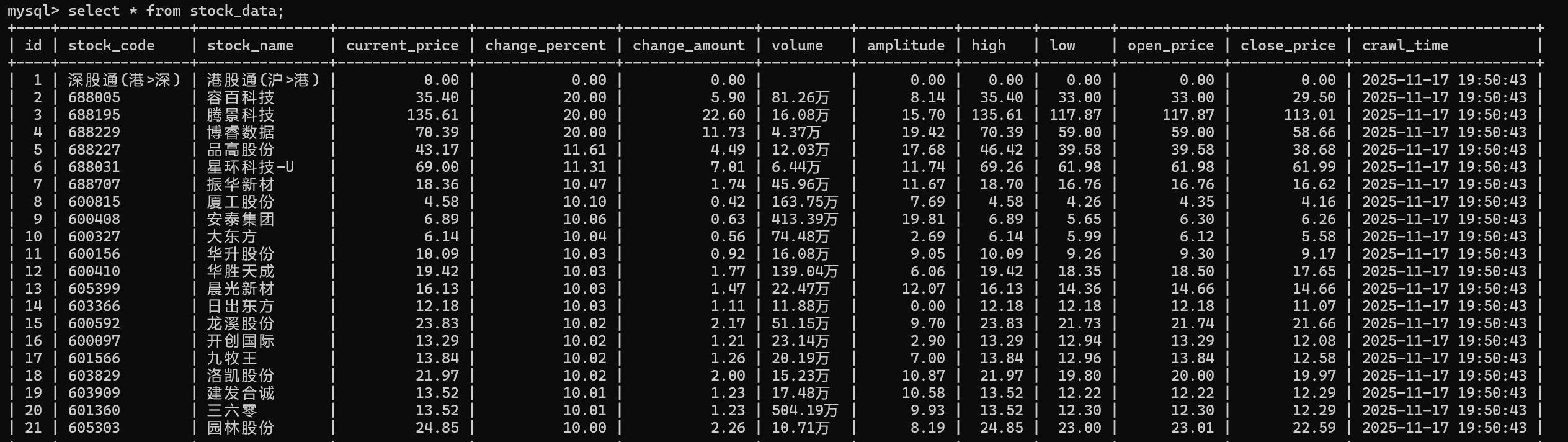
作业心得
使用 Scrapy 框架爬取东方财富网股票信息时,通过中间件机制在请求层面集成Selenium处理JavaScript渲染,管道系统自动管理数据库连接并实现数据持久化,Item类明确定义数据结构,配置化的设置便于环境管理,全面的异常处理保证程序稳定运行,模块化设计让各组件职责清晰、易于维护。
作业3
代码与运行结果
import scrapy
from boc_whpj.items import BocWHPJItem
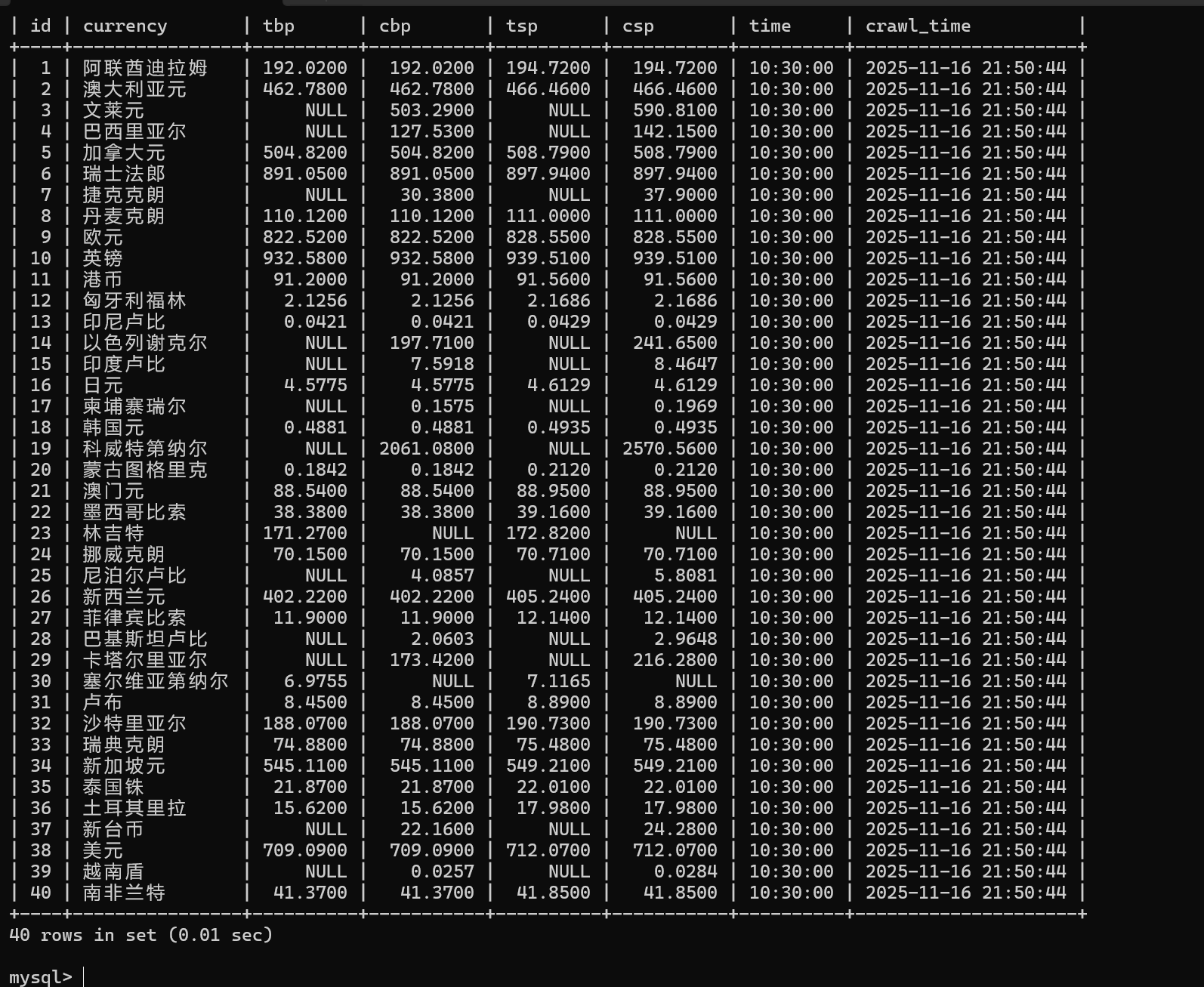
from datetime import datetimeclass BocSpider(scrapy.Spider):name = 'boc_whpj'allowed_domains = ['boc.cn']start_urls = ['https://www.boc.cn/sourcedb/whpj/']def parse(self, response):self.logger.info(f"开始解析页面,URL: {response.url}")self.logger.info(f"响应状态: {response.status}")tables = response.xpath('//table')self.logger.info(f"找到 {len(tables)} 个表格")data_table = tables[1]rows = data_table.xpath('./tr')self.logger.info(f"数据表格有 {len(rows)} 行")for i, row in enumerate(rows[1:], 1):  # 从第二行开始item = BocWHPJItem()currency = row.xpath('./td[1]//text()').get()if not currency or currency.strip() == '':self.logger.debug(f"第{i}行跳过,货币名称为空")continueitem['currency'] = currency.strip()# 提取现汇买入价 - 第二个tdtbp = row.xpath('./td[2]//text()').get()item['tbp'] = tbp.strip() if tbp else None# 提取现钞买入价 - 第三个tdcbp = row.xpath('./td[3]//text()').get()item['cbp'] = cbp.strip() if cbp else None# 提取现汇卖出价 - 第四个tdtsp = row.xpath('./td[4]//text()').get()item['tsp'] = tsp.strip() if tsp else None# 提取现钞卖出价 - 第五个tdcsp = row.xpath('./td[5]//text()').get()item['csp'] = csp.strip() if csp else None# 提取发布时间 - 第八个tdtime_str = row.xpath('./td[8]//text()').get()if time_str:try:# 处理时间格式time_obj = datetime.strptime(time_str.strip(), '%H:%M:%S')item['time'] = time_obj.strftime('%H:%M:%S')except ValueError:item['time'] = time_str.strip()self.logger.warning(f"时间格式解析失败: {time_str}")else:item['time'] = None# 记录提取的数据self.logger.info(f"提取到数据 {i}: 货币={item['currency']}, 现汇买入={item['tbp']}, 时间={item['time']}")yield item
作业心得
爬取中国银行外汇数据的过程中,通过 Scrapy 框架结合 XPath 精准提取了货币名称、现汇买入价、现钞卖出价等核心字段,借助 Pipeline 将数据有序存储到 MySQL 数据库,严格对应 Currency、TBP 等指定字段格式,不仅巩固了 Scrapy 数据序列化输出的方法,还深刻认识到外汇数据时效性强、格式严谨的特点,以及规范数据存储对后续数据分析的重要意义。
代码地址:https://gitee.com/xiaoyeabc/2025_crawl_project/tree/master/作业3