ObsUtil (web 项目)
引入 web 依赖
<dependency><groupId>org.springframework.boot</groupId><artifactId>spring-boot-starter-web</artifactId>
</dependency>
ObsWebUtil 工具类
import jakarta.servlet.http.HttpServletResponse;
import org.springframework.http.MediaType;
import org.springframework.stereotype.Component;
import org.springframework.util.StreamUtils;
import org.springframework.web.multipart.MultipartFile;import java.io.InputStream;
import java.io.OutputStream;
import java.net.URLEncoder;
import java.nio.charset.StandardCharsets;
import java.util.ArrayList;
import java.util.HashMap;
import java.util.List;
import java.util.Map;
import java.util.UUID;
import java.util.concurrent.*;
import java.util.concurrent.atomic.AtomicInteger;
import java.util.function.BiFunction;@Component
public class ObsWebUtil {/*** 上传文件(文件id系统自动生成)*/public Map<String, Object> uploadFile(MultipartFile file) {return doUpload(file, null);}/*** 上传文件,支持自定义文件id(objectKey)*/public Map<String, Object> uploadFile(MultipartFile file, String objectKey) {return doUpload(file, objectKey);}/*** 通用上传实现(Servlet 环境)*/private Map<String, Object> doUpload(MultipartFile file, String specifiedObjectKey) {String originalFilename = file.getOriginalFilename();if (originalFilename == null) {originalFilename = "";}String suffix = "";int dot = originalFilename.lastIndexOf(".");if (dot >= 0) {suffix = originalFilename.substring(dot);}String objectKey = (specifiedObjectKey == null || specifiedObjectKey.trim().isEmpty())? UUID.randomUUID().toString().replace("-", ""): specifiedObjectKey;Map<String, Object> resultMap = new HashMap<>();resultMap.put("objectKey", objectKey);resultMap.put("originalFilename", originalFilename);resultMap.put("suffix", suffix);try (InputStream inputStream = file.getInputStream()) {boolean success = ObsUtil.uploadStream(objectKey, inputStream);resultMap.put("success", success);} catch (Exception ex) {resultMap.put("success", false);resultMap.put("error", ex.getMessage());}return resultMap;}/*** 从华为云 OBS 下载文件(Servlet 环境)*/public void downloadFile(String objectKey, HttpServletResponse response) {try (InputStream inputStream = ObsUtil.downloadStream(objectKey)) {if (inputStream == null) {response.setStatus(HttpServletResponse.SC_NOT_FOUND);return;}String encodedName = URLEncoder.encode(objectKey, StandardCharsets.UTF_8.name()).replace("+", "%20");response.setContentType(MediaType.APPLICATION_OCTET_STREAM_VALUE);response.setHeader("Content-Disposition","attachment; filename=\"" + encodedName + "\"; filename*=UTF-8''" + encodedName);try (OutputStream out = response.getOutputStream()) {StreamUtils.copy(inputStream, out);out.flush();}} catch (Exception ex) {// 写响应失败或下载失败try {response.reset();response.setStatus(HttpServletResponse.SC_INTERNAL_SERVER_ERROR);response.setContentType("text/plain;charset=UTF-8");response.getWriter().write("Download failed: " + ex.getMessage());} catch (Exception ignored) {}}}/*** 图片预览(Servlet 环境)*/public void previewImage(String objectKey, HttpServletResponse response) {try (InputStream inputStream = ObsUtil.downloadStream(objectKey)) {if (inputStream == null) {response.setStatus(HttpServletResponse.SC_NOT_FOUND);return;}String lowerKey = objectKey.toLowerCase();String contentType = MediaType.IMAGE_JPEG_VALUE;if (lowerKey.endsWith(".png")) {contentType = MediaType.IMAGE_PNG_VALUE;} else if (lowerKey.endsWith(".gif")) {contentType = MediaType.IMAGE_GIF_VALUE;}response.setContentType(contentType);try (OutputStream out = response.getOutputStream()) {StreamUtils.copy(inputStream, out);out.flush();}} catch (Exception ex) {try {response.reset();response.setStatus(HttpServletResponse.SC_INTERNAL_SERVER_ERROR);response.setContentType("text/plain;charset=UTF-8");response.getWriter().write("Preview failed: " + ex.getMessage());} catch (Exception ignored) {}}}// ====================== 批量上传(复用 uploadFile) ======================/*** 批量上传文件(默认使用单文件 uploadFile 的 objectKey 生成逻辑)*/public List<Map<String, Object>> uploadFiles(List<MultipartFile> files) {int defaultConcurrency = Math.max(1, Math.min(4, Runtime.getRuntime().availableProcessors()));return uploadFiles(files, null, defaultConcurrency);}/*** 批量上传文件(支持自定义 objectKey 生成规则和并发度;内部复用 uploadFile)* @param files 文件列表* @param objectKeyGenerator 自定义 objectKey 生成器(参数:originalFilename, index),为 null 则使用 uploadFile 默认规则* @param concurrency 并发度(建议不超过 CPU 核心数的 2 倍)*/public List<Map<String, Object>> uploadFiles(List<MultipartFile> files,BiFunction<String, Integer, String> objectKeyGenerator,int concurrency) {int conc = Math.max(1, concurrency);ExecutorService pool = Executors.newFixedThreadPool(conc);List<Future<Map<String, Object>>> futures = new ArrayList<>(files.size());AtomicInteger idx = new AtomicInteger(0);try {for (MultipartFile file : files) {final int i = idx.getAndIncrement();futures.add(pool.submit(() -> {String originalFilename = file.getOriginalFilename();try {String objectKey = (objectKeyGenerator != null)? objectKeyGenerator.apply(originalFilename, i): null;return (objectKey == null || objectKey.trim().isEmpty())? uploadFile(file): uploadFile(file, objectKey);} catch (Exception ex) {Map<String, Object> fallback = new HashMap<>();fallback.put("originalFilename", originalFilename);if (objectKeyGenerator != null) {try {fallback.put("objectKey", objectKeyGenerator.apply(originalFilename, i));} catch (Exception ignored) { }}fallback.put("success", false);fallback.put("error", ex.getMessage());return fallback;}}));}List<Map<String, Object>> result = new ArrayList<>(futures.size());for (Future<Map<String, Object>> f : futures) {try {result.add(f.get());} catch (Exception ex) {Map<String, Object> fallback = new HashMap<>();fallback.put("success", false);fallback.put("error", "Task execution failed: " + ex.getMessage());result.add(fallback);}}return result;} finally {pool.shutdown();}}
}
Controller 层
import com.example.demo.utils.ObsFluxUtil;
import com.example.demo.utils.ObsWebUtil;
import jakarta.servlet.http.HttpServletResponse;
import lombok.extern.slf4j.Slf4j;
import org.springframework.beans.factory.annotation.Autowired;
import org.springframework.http.codec.multipart.FilePart;
import org.springframework.http.server.reactive.ServerHttpResponse;
import org.springframework.web.bind.annotation.*;
import org.springframework.web.multipart.MultipartFile;
import reactor.core.publisher.Mono;import java.util.List;
import java.util.Map;/*** @author chenlong* @create 2025-05-16 17:14*/
@Slf4j
@RestController
@RequestMapping("/obs2")
public class Demo2Controller {@Autowiredprivate ObsWebUtil obsWebUtil;@PostMapping(value = "/uploadFile")public Map<String, Object> uploadFile(@RequestParam(value = "file") MultipartFile filePart) {return obsWebUtil.uploadFile(filePart);}@PostMapping(value = "/uploadFiles")public List<Map<String, Object>> uploadFiles(@RequestPart("files") List<MultipartFile> fileParts) {return obsWebUtil.uploadFiles(fileParts);}@GetMapping(value = "/previewImage")public void previewImage(@RequestParam(value = "objectKey") String objectKey, HttpServletResponse response) {obsWebUtil.previewImage(objectKey, response);}@GetMapping("/downloadFile")public void downloadFile(@RequestParam String objectKey, HttpServletResponse response) {obsWebUtil.downloadFile(objectKey, response);}}
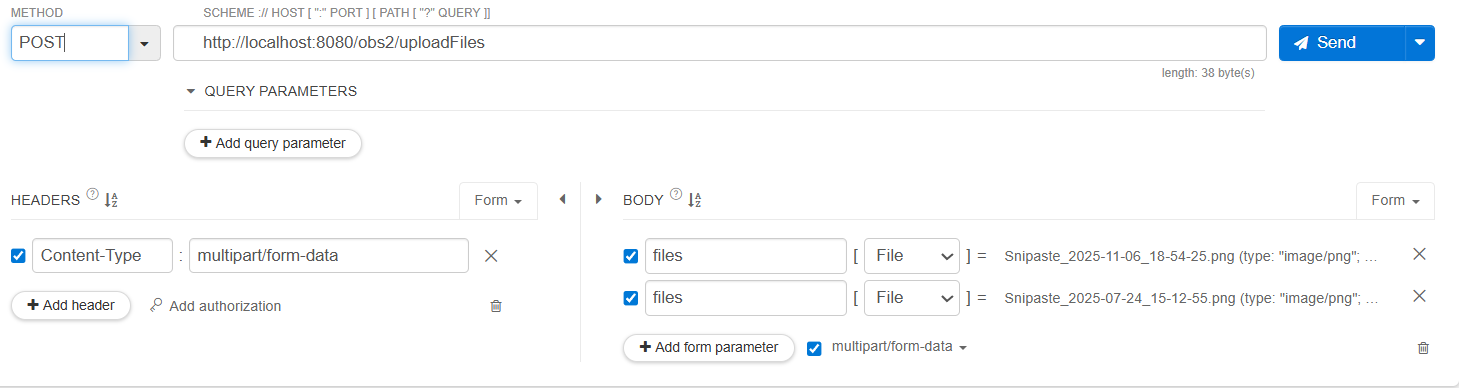
postman 接口测试
- 批量上传接口:
![]()
ObsFluxUtil (WebFlux 项目)
引入 webflux 依赖
<dependency><groupId>org.springframework.boot</groupId><artifactId>spring-boot-starter-webflux</artifactId></dependency>
ObsFluxUtil 工具类
import org.springframework.core.io.buffer.DataBuffer;
import org.springframework.core.io.buffer.DataBufferUtils;
import org.springframework.core.io.buffer.DefaultDataBufferFactory;
import org.springframework.http.HttpHeaders;
import org.springframework.http.HttpStatus;
import org.springframework.http.MediaType;
import org.springframework.http.codec.multipart.FilePart;
import org.springframework.http.server.reactive.ServerHttpResponse;
import org.springframework.stereotype.Component;
import reactor.core.publisher.Flux;
import reactor.core.publisher.Mono;
import reactor.core.scheduler.Schedulers;import java.io.ByteArrayInputStream;
import java.io.InputStream;
import java.util.HashMap;
import java.util.List;
import java.util.Map;
import java.util.UUID;
import java.util.concurrent.atomic.AtomicInteger;
import java.util.function.BiFunction;@Component
public class ObsFluxUtil {/*** 上传文件(文件id系统自动生成)*/public Mono<Map<String, Object>> uploadFile(FilePart filePart) {// 复用到私有通用方法return this.doUpload(filePart, null);}/***  上传文件,支持自定义文件id(objectKey)*/public Mono<Map<String, Object>> uploadFile(FilePart filePart, String objectKey) {return this.doUpload(filePart, objectKey);}/*** 通用上传实现*/private Mono<Map<String, Object>> doUpload(FilePart filePart, String specifiedObjectKey) {String originalFilename = filePart.filename();String suffix = "";if (originalFilename.contains(".")) {suffix = originalFilename.substring(originalFilename.lastIndexOf("."));}String objectKey = (specifiedObjectKey == null || specifiedObjectKey.trim().isEmpty())? UUID.randomUUID().toString().replace("-", ""): specifiedObjectKey;Map<String, Object> resultMap = new HashMap<>();resultMap.put("objectKey", objectKey);resultMap.put("filename", originalFilename);resultMap.put("fileSuffix", suffix);return DataBufferUtils.join(filePart.content()).flatMap(dataBuffer -> {byte[] bytes = new byte[dataBuffer.readableByteCount()];dataBuffer.read(bytes);DataBufferUtils.release(dataBuffer);// 在 boundedElastic 线程池中执行阻塞上传逻辑return Mono.fromCallable(() -> {try (InputStream inputStream = new ByteArrayInputStream(bytes)) {boolean success = ObsUtil.uploadStream(objectKey, inputStream);resultMap.put("success", success);return resultMap;}}).subscribeOn(Schedulers.boundedElastic());});}/*** 从华为云 OBS 下载文件*/public Mono<Void> downloadFile(String objectKey, ServerHttpResponse response) {return Mono.fromCallable(() -> ObsUtil.downloadStream(objectKey)).subscribeOn(Schedulers.boundedElastic()).flatMap(inputStream -> {if (inputStream == null) {response.setStatusCode(HttpStatus.NOT_FOUND);return response.setComplete();}response.getHeaders().set(HttpHeaders.CONTENT_DISPOSITION, "attachment; filename=" + objectKey);response.getHeaders().setContentType(MediaType.APPLICATION_OCTET_STREAM);Flux<DataBuffer> dataBufferFlux = DataBufferUtils.readInputStream(() -> inputStream,new DefaultDataBufferFactory(),4096);return response.writeWith(dataBufferFlux).publishOn(Schedulers.boundedElastic()).doFinally(signalType -> {try {inputStream.close();} catch (Exception ignored) {}});});}/*** 图片预览*/public Mono<Void> previewImage(String objectKey, ServerHttpResponse response) {return Mono.fromCallable(() -> ObsUtil.downloadStream(objectKey)).subscribeOn(Schedulers.boundedElastic()).flatMap(inputStream -> {if (inputStream == null) {response.setStatusCode(HttpStatus.NOT_FOUND);return response.setComplete();}String lowerKey = objectKey.toLowerCase();MediaType mediaType = MediaType.IMAGE_JPEG;if (lowerKey.endsWith(".png")) {mediaType = MediaType.IMAGE_PNG;} else if (lowerKey.endsWith(".gif")) {mediaType = MediaType.IMAGE_GIF;}response.getHeaders().setContentType(mediaType);Flux<DataBuffer> dataBufferFlux = DataBufferUtils.readInputStream(() -> inputStream,new DefaultDataBufferFactory(),4096);return response.writeWith(dataBufferFlux).publishOn(Schedulers.boundedElastic()).doFinally(signalType -> {try {inputStream.close();} catch (Exception ignored) {}});});}// ====================== 批量上传(复用 uploadFile) ======================/*** 批量上传文件(默认使用单文件 uploadFile 的 objectKey 生成逻辑)*/public Mono<List<Map<String, Object>>> uploadFiles(List<FilePart> fileParts) {int defaultConcurrency = Math.max(1, Math.min(4, Runtime.getRuntime().availableProcessors()));return this.uploadFiles(fileParts, null, defaultConcurrency);}/*** 批量上传文件(支持自定义 objectKey 生成规则和并发度;内部复用 uploadFile)* @param fileParts 文件列表* @param objectKeyGenerator 自定义 objectKey 生成器(参数:originalFilename, index),为 null 则使用 uploadFile 默认规则* @param concurrency 并发度(建议不超过 CPU 核心数的 2 倍)*/public Mono<List<Map<String, Object>>> uploadFiles(List<FilePart> fileParts,BiFunction<String, Integer, String> objectKeyGenerator,int concurrency) {AtomicInteger idx = new AtomicInteger(0);int conc = Math.max(1, concurrency);return Flux.fromIterable(fileParts).flatMap(filePart -> {int i = idx.getAndIncrement();String originalFilename = filePart.filename();// 根据是否提供生成器,决定调用哪个 uploadFile 重载Mono<Map<String, Object>> singleUploadMono;if (objectKeyGenerator != null) {String objectKey = objectKeyGenerator.apply(originalFilename, i);singleUploadMono = this.uploadFile(filePart, objectKey);} else {singleUploadMono = this.uploadFile(filePart);}// 统一错误兜底,保证批量上传不中断return singleUploadMono.onErrorResume(ex -> {Map<String, Object> fallback = new HashMap<>();fallback.put("filename", originalFilename);if (objectKeyGenerator != null) {// 尽力放入生成过的 key,便于排查try {fallback.put("objectKey", objectKeyGenerator.apply(originalFilename, i));} catch (Exception ignored) { }}fallback.put("success", false);fallback.put("error", ex.getMessage());return Mono.just(fallback);});}, conc).collectList();}}
Controller 层
import com.example.demo.utils.ObsFluxUtil;
import lombok.extern.slf4j.Slf4j;
import org.springframework.beans.factory.annotation.Autowired;
import org.springframework.http.codec.multipart.FilePart;
import org.springframework.http.server.reactive.ServerHttpResponse;
import org.springframework.web.bind.annotation.*;
import reactor.core.publisher.Mono;import java.util.List;
import java.util.Map;/*** @author chenlong* @create 2025-05-16 17:14*/
@Slf4j
@RestController
@RequestMapping("/obs")
public class DemoController {@Autowiredprivate ObsFluxUtil obsFluxUtil;@PostMapping(value = "/uploadFile")public Mono<Map<String, Object>> uploadFile(@RequestPart(value = "file") FilePart filePart) {return obsFluxUtil.uploadFile(filePart);}@PostMapping(value = "/uploadFiles")public Mono<List<Map<String, Object>>> uploadFiles(@RequestPart("files") List<FilePart> fileParts) {return obsFluxUtil.uploadFiles(fileParts);}@GetMapping(value = "/previewImage")public Mono<Void> previewImage(@RequestParam(value = "objectKey") String objectKey, ServerHttpResponse response) {return obsFluxUtil.previewImage(objectKey, response);}@GetMapping("/downloadFile")public Mono<Void> downloadFile(@RequestParam String objectKey, ServerHttpResponse response) {return obsFluxUtil.downloadFile(objectKey, response);}}
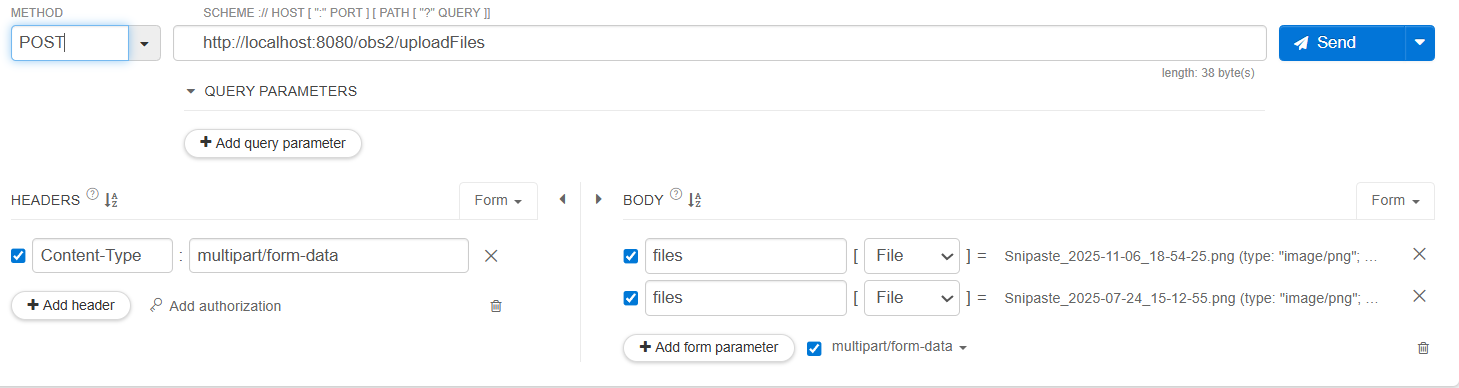
postman 测试接口
- 批量上传接口:
![]()