
Tool 系统分析
请关注微信公众号:阿呆-bot
概述
本文档分析 Spring AI Alibaba Agent Framework 中的 Tool(工具)系统,包括工具的定义、注册、调用流程、扩展机制以及 AgentTool 的实现。
入口类说明
ToolCallback - 工具回调接口
ToolCallback 是 Spring AI 提供的工具接口,定义了工具的基本能力。
核心职责:
- 定义工具名称和描述
- 定义工具输入输出 Schema
- 执行工具调用
- 返回工具结果
AgentTool - Agent 作为工具
AgentTool 将 ReactAgent 封装为工具,使 Agent 可以作为工具被其他 Agent 调用。
核心职责:
- 将 Agent 转换为 ToolCallback
- 执行 Agent 调用
- 返回 Agent 响应
关键代码:
public class AgentTool implements BiFunction<String, ToolContext, AssistantMessage> {private final ReactAgent agent;public AgentTool(ReactAgent agent) {this.agent = agent;}@Overridepublic AssistantMessage apply(String input, ToolContext toolContext) {OverAllState state = (OverAllState) toolContext.getContext().get("state");try {// Copy state to avoid affecting the original state.// The agent that calls this tool should only be aware of the ToolCallChoice and ToolResponse.OverAllState newState = agent.getAndCompileGraph().cloneState(state.data());// Build the messages list to add// Add instruction first if present, then the user input// Note: We must add all messages at once because cloneState doesn't copy keyStrategies,// so multiple updateState calls would overwrite instead of appendjava.util.List<Message> messagesToAdd = new java.util.ArrayList<>();if (StringUtils.hasLength(agent.instruction())) {messagesToAdd.add(new AgentInstructionMessage(agent.instruction()));}messagesToAdd.add(new UserMessage(input));Map<String, Object> inputs = newState.updateState(Map.of("messages", messagesToAdd));Optional<OverAllState> resultState = agent.getAndCompileGraph().invoke(inputs);Optional<List> messages = resultState.flatMap(overAllState -> overAllState.value("messages", List.class));if (messages.isPresent()) {@SuppressWarnings("unchecked")List<Message> messageList = (List<Message>) messages.get();// Use messageListAssistantMessage assistantMessage = (AssistantMessage)messageList.get(messageList.size() - 1);return assistantMessage;}}catch (Exception e) {throw new RuntimeException(e);}throw new RuntimeException("Failed to execute agent tool or failed to get agent tool result");}public static ToolCallback getFunctionToolCallback(ReactAgent agent) {// convert agent inputType to json schemaString inputSchema = StringUtils.hasLength(agent.getInputSchema())? agent.getInputSchema(): (agent.getInputType() != null )? JsonSchemaGenerator.generateForType(agent.getInputType()): null;return FunctionToolCallback.builder(agent.name(), AgentTool.create(agent)).description(agent.description()).inputType(String.class) // the inputType for ToolCallback is always String.inputSchema(inputSchema).toolCallResultConverter(CONVERTER).build();}}
关键特性:
- 状态隔离:通过
cloneState()创建独立状态,避免影响调用 Agent 的状态 - 指令传递:支持传递 Agent 指令
- Schema 生成:自动生成工具输入 Schema
AgentToolNode - 工具执行节点
AgentToolNode 是执行工具调用的 Graph 节点。
核心职责:
- 解析工具调用请求
- 执行工具调用
- 处理工具响应
- 支持工具拦截器
关键代码:
public class AgentToolNode implements NodeActionWithConfig {private List<ToolCallback> toolCallbacks = new ArrayList<>();private List<ToolInterceptor> toolInterceptors = new ArrayList<>();private ToolCallbackResolver toolCallbackResolver;@Overridepublic Map<String, Object> apply(OverAllState state, RunnableConfig config) throws Exception {List<Message> messages = (List<Message>) state.value("messages").orElseThrow();Message lastMessage = messages.get(messages.size() - 1);Map<String, Object> updatedState = new HashMap<>();Map<String, Object> extraStateFromToolCall = new HashMap<>();if (lastMessage instanceof AssistantMessage assistantMessage) {// execute the tool functionList<ToolResponseMessage.ToolResponse> toolResponses = new ArrayList<>();for (AssistantMessage.ToolCall toolCall : assistantMessage.getToolCalls()) {// Execute tool call with interceptor chainToolCallResponse response = executeToolCallWithInterceptors(toolCall, state, config, extraStateFromToolCall);toolResponses.add(response.toToolResponse());}ToolResponseMessage toolResponseMessage = new ToolResponseMessage(toolResponses, Map.of());updatedState.put("messages", toolResponseMessage);} else if (lastMessage instanceof ToolResponseMessage toolResponseMessage) {// Handle incremental tool execution// ...} else {throw new IllegalStateException("Last message is not an AssistantMessage or ToolResponseMessage");}// Merge extra state from tool callsupdatedState.putAll(extraStateFromToolCall);return updatedState;}
AgentLlmNode - LLM 节点
AgentLlmNode 负责调用 LLM,并将工具信息传递给模型。
关键代码:
public class AgentLlmNode implements NodeActionWithConfig {private List<ToolCallback> toolCallbacks = new ArrayList<>();private List<ModelInterceptor> modelInterceptors = new ArrayList<>();private ChatClient chatClient;@Overridepublic Map<String, Object> apply(OverAllState state, RunnableConfig config) throws Exception {// add streaming supportboolean stream = config.metadata("_stream_", new TypeRef<Boolean>(){}).orElse(true);if (stream) {@SuppressWarnings("unchecked")List<Message> messages = (List<Message>) state.value("messages").get();augmentUserMessage(messages, outputSchema);renderTemplatedUserMessage(messages, state.data());// Create ModelRequestModelRequest modelRequest = ModelRequest.builder().messages(messages).options(toolCallingChatOptions).context(config.metadata().orElse(new HashMap<>())).build();// Create base handler that actually calls the model with streamingModelCallHandler baseHandler = request -> {try {Flux<ChatResponse> chatResponseFlux = buildChatClientRequestSpec(request).stream().chatResponse();return ModelResponse.of(chatResponseFlux);} catch (Exception e) {return ModelResponse.of(new AssistantMessage("Exception: " + e.getMessage()));}};// Chain interceptors if anyModelCallHandler chainedHandler = InterceptorChain.chainModelInterceptors(modelInterceptors, baseHandler);// Execute the chained handlerModelResponse modelResponse = chainedHandler.call(modelRequest);return Map.of(StringUtils.hasLength(this.outputKey) ? this.outputKey : "messages", modelResponse.getMessage());} else {// Non-streaming mode// ...}}
工具注册机制
工具注册流程
工具通过以下方式注册:
- 直接注册:通过
ReactAgent.Builder.tools()方法注册 - Interceptor 工具:通过
ModelInterceptor.getTools()方法提供 - 工具解析器:通过
ToolCallbackResolver动态解析
关键代码:
// Extract regular tools from user-provided toolsif (CollectionUtils.isNotEmpty(tools)) {regularTools.addAll(tools);}// Extract interceptor toolsList<ToolCallback> interceptorTools = new ArrayList<>();if (CollectionUtils.isNotEmpty(modelInterceptors)) {interceptorTools = modelInterceptors.stream().flatMap(interceptor -> interceptor.getTools().stream()).collect(Collectors.toList());}// Combine all tools: regularTools + regularToolsList<ToolCallback> allTools = new ArrayList<>();allTools.addAll(interceptorTools);allTools.addAll(regularTools);// Set combined tools to LLM nodeif (CollectionUtils.isNotEmpty(allTools)) {llmNodeBuilder.toolCallbacks(allTools);}AgentLlmNode llmNode = llmNodeBuilder.build();// Setup tool node with all available toolsAgentToolNode toolNode = null;if (resolver != null) {toolNode = AgentToolNode.builder().toolCallbackResolver(resolver).build();}else if (CollectionUtils.isNotEmpty(allTools)) {toolNode = AgentToolNode.builder().toolCallbacks(allTools).build();}else {toolNode = AgentToolNode.builder().build();}return new ReactAgent(llmNode, toolNode, buildConfig(), this);
工具调用流程
工具调用步骤
- LLM 生成工具调用:AgentLlmNode 调用 LLM,LLM 返回包含工具调用的 AssistantMessage
- 工具调用解析:AgentToolNode 解析 AssistantMessage 中的工具调用
- 工具执行:通过工具拦截器链执行工具调用
- 响应生成:将工具执行结果封装为 ToolResponseMessage
- 状态更新:更新状态中的消息列表
关键代码:
/*** Execute a tool call with interceptor chain support.*/private ToolCallResponse executeToolCallWithInterceptors(AssistantMessage.ToolCall toolCall,OverAllState state,RunnableConfig config,Map<String, Object> extraStateFromToolCall) {// Create ToolCallRequestToolCallRequest request = ToolCallRequest.builder().toolCall(toolCall).context(config.metadata().orElse(new HashMap<>())).build();// Create base handler that actually executes the toolToolCallHandler baseHandler = req -> {ToolCallback toolCallback = resolve(req.getToolName());String result = toolCallback.call(req.getArguments(),new ToolContext(Map.of("state", state, "config", config, "extraState", extraStateFromToolCall)));return ToolCallResponse.of(req.getToolCallId(), req.getToolName(), result);};// Chain interceptors if anyToolCallHandler chainedHandler = InterceptorChain.chainToolInterceptors(toolInterceptors, baseHandler);// Execute the chained handlerreturn chainedHandler.call(request);}private ToolCallback resolve(String toolName) {return toolCallbacks.stream().filter(callback -> callback.getToolDefinition().name().equals(toolName)).findFirst().orElseGet(() -> toolCallbackResolver.resolve(toolName));}
工具扩展机制
自定义工具实现
开发者可以通过以下方式扩展工具:
- 实现 ToolCallback 接口:创建自定义工具
- 使用 FunctionToolCallback:将函数转换为工具
- AgentTool:将 Agent 转换为工具
工具类型
- 函数工具:通过
FunctionToolCallback将 Java 函数转换为工具 - Agent 工具:通过
AgentTool将 Agent 转换为工具 - Interceptor 工具:通过
ModelInterceptor.getTools()提供工具
关键类关系
以下 PlantUML 类图展示了 Tool 系统的类关系:
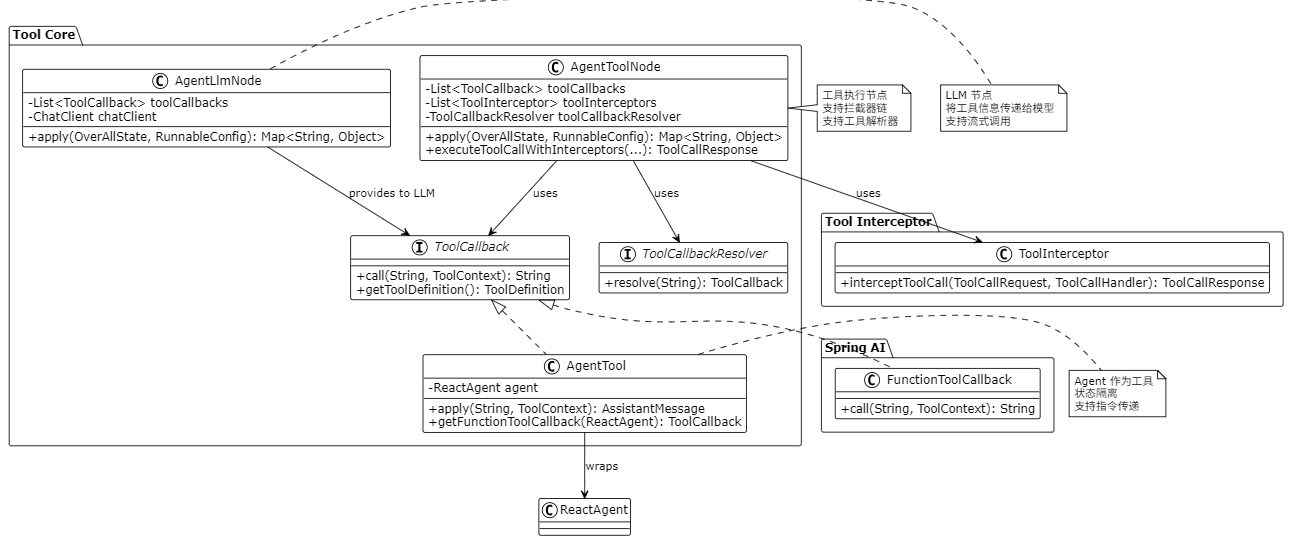
关键流程
以下 PlantUML 时序图展示了工具调用的完整流程:
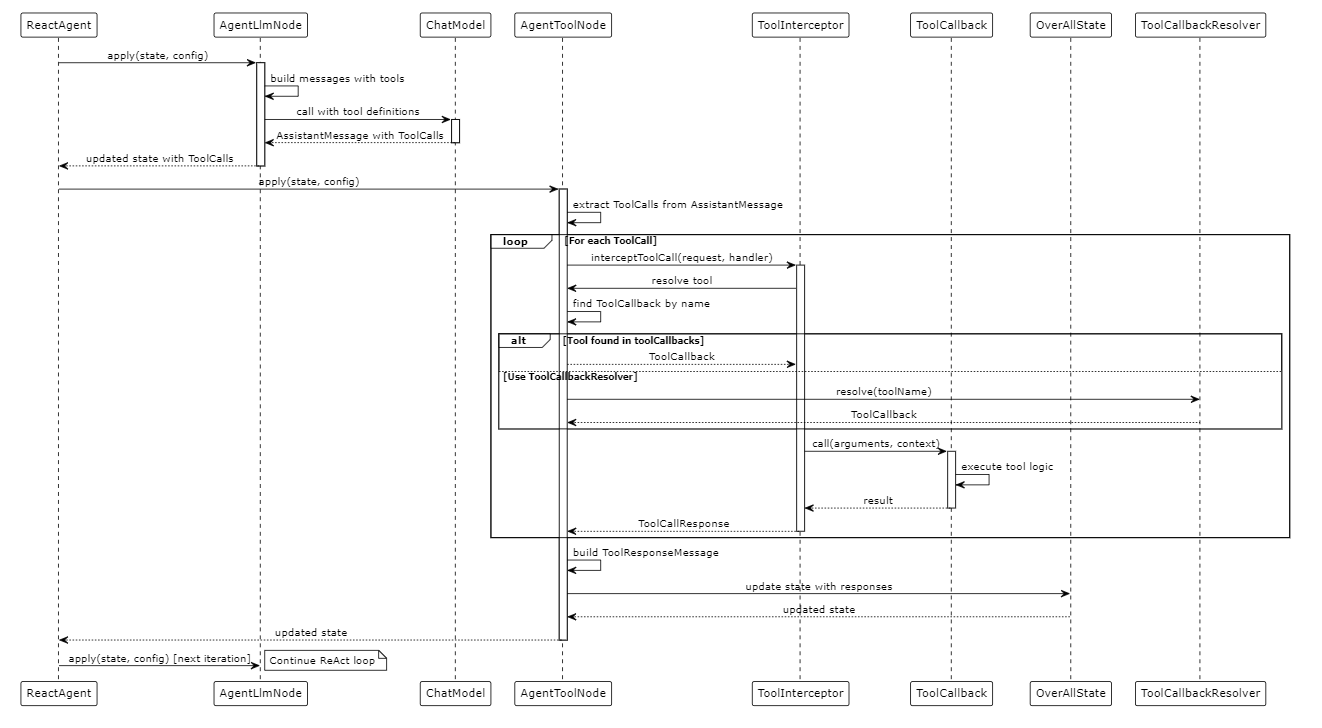
实现关键点说明
1. 工具注册机制
工具通过多种方式注册:
- 直接注册:通过 Builder 的
tools()方法 - Interceptor 工具:通过
ModelInterceptor.getTools() - 动态解析:通过
ToolCallbackResolver
2. 工具调用流程
工具调用经过以下步骤:
- LLM 生成工具调用请求
- AgentToolNode 解析工具调用
- 通过拦截器链执行工具
- 生成工具响应
- 更新状态
3. 拦截器支持
工具调用支持拦截器:
ToolInterceptor可以拦截工具调用- 支持请求修改和响应处理
- 支持重试、错误处理等功能
4. Agent 作为工具
Agent 可以作为工具被调用:
- 通过
AgentTool封装 - 状态隔离,不影响调用 Agent
- 支持指令传递
5. 工具解析器
支持动态工具解析:
ToolCallbackResolver接口- 可以按需加载工具
- 支持工具发现机制
6. 状态管理
工具调用可以更新状态:
- 通过
extraStateFromToolCall传递额外状态 - 工具响应添加到消息列表
- 支持状态合并
工具扩展示例
创建自定义工具
// 1. 使用 FunctionToolCallback
FunctionToolCallback tool = FunctionToolCallback.builder("myTool", (input, context) -> {// 工具逻辑return "result";
})
.description("My custom tool")
.build();// 2. 实现 ToolCallback 接口
public class MyTool implements ToolCallback {@Overridepublic String call(String arguments, ToolContext context) {// 工具逻辑return "result";}@Overridepublic ToolDefinition getToolDefinition() {return ToolDefinition.builder().name("myTool").description("My custom tool").build();}
}// 3. 将 Agent 转换为工具
ReactAgent subAgent = ReactAgent.builder().name("subAgent").description("Sub agent").model(model).build();ToolCallback agentTool = AgentTool.getFunctionToolCallback(subAgent);
总结说明
核心设计理念
- 统一接口:所有工具实现
ToolCallback接口 - 灵活注册:支持多种工具注册方式
- 拦截器支持:工具调用支持拦截器链
- Agent 工具化:Agent 可以作为工具被调用
关键优势
- 灵活性:支持多种工具类型和注册方式
- 可扩展性:易于添加新的工具实现
- 可组合性:Agent 可以作为工具,实现 Agent 嵌套
- 拦截器支持:支持工具调用的拦截和修改
解决的问题
- 工具集成:统一工具接口,简化工具集成
- Agent 嵌套:通过 AgentTool 实现 Agent 嵌套调用
- 动态工具:通过 ToolCallbackResolver 支持动态工具加载
- 工具拦截:通过拦截器支持工具调用的增强
使用场景
- 函数工具:将业务函数封装为工具
- Agent 工具:将 Agent 封装为工具,实现多 Agent 协作
- Interceptor 工具:通过拦截器提供内置工具
- 动态工具:通过解析器动态加载工具
Tool 系统为 Agent Framework 提供了强大的工具能力,使开发者能够灵活地扩展 Agent 的功能,实现复杂的业务需求。