
最近在使用新框架SpringBoot + shiro + spring-data-jpa时,为了体验下spring自带的热部署工具的便捷,于是引入了
- <dependency>
- <groupId>org.springframework.boot</groupId>
- <artifactId>spring-boot-devtools</artifactId>
- <!-- optional=true,依赖不会传递,该项目依赖devtools;之后依赖myboot项目的项目如果想要使用devtools,需要重新引入 -->
- <optional>true</optional>
- </dependency>
在起初并没遇到什么问题,当使用shiro的session管理,而且用的sessionDao是redis实现的,然后再使用Session存取属性时,发现存进去的属性,再取出来后,就会出现类型转换异常ClassCastException
分析:
然后自己写了一大推单元测试模拟就是没问题,后来突然意识到会不会是因为ClassLoader不同导致的类型转换异常呢,然后注意了下项目启动时加载项目中的类使用的加载器都是
org.springframework.boot.devtools.restart.classloader.RestartClassLoader
而从shiro session 取出来的对象(从redis中取出经过反序列化)的类加载器都是
sun.misc.Launcher.AppClassLoader
很明显会导致类型转换异常,原来Spring的dev-tools为了实现重新装载class自己实现了一个类加载器,来加载项目中会改变的类,方便重启时将新改动的内容更新进来,其实其中官方文档中是有做说明的:
By default, any open project in your IDE will be loaded using the “restart” classloader, and any regular .jar file will be loaded using the “base” classloader. If you work on a multi-module project, and not each module is imported into your IDE, you may need to customize things. To do this you can create a META-INF/spring-devtools.properties file. The spring-devtools.properties file can contain restart.exclude. and restart.include. prefixed properties. The include elements are items that should be pulled up into the “restart” classloader, and the exclude elements are items that should be pushed down into the “base” classloader. The value of the property is a regex pattern that will be applied to the classpath.
解决:
方案一、解决方案就是在resources目录下面创建META-INF文件夹,然后创建spring-devtools.properties文件,文件加上类似下面的配置:
restart.exclude.companycommonlibs=/mycorp-common-[\w-]+.jar restart.include.projectcommon=/mycorp-myproj-[\w-]+.jar
All property keys must be unique. As long as a property starts with restart.include. or restart.exclude. it will be considered. All META-INF/spring-devtools.properties from the classpath will be loaded. You can package files inside your project, or in the libraries that the project consumes.
方案二、不使用spring-boot-devtools
针对方案一作一个详细的案例进行分析说明,以及解决问题
首先准备一个jar包,里面包含序列化以及反序列化的功能。
并打包,在springboot项目中引入
- <dependency>
- <groupId>org.springframework.boot</groupId>
- <artifactId>spring-boot-devtools</artifactId>
- </dependency>
- <!-- 这个包是我自己创建的序列化以及反序列化工具包 -->
- <dependency>
- <groupId>com.example</groupId>
- <artifactId>devtools-serialization</artifactId>
- <version>1.0-SNAPSHOT</version>
- </dependency>
简单的配置下springboot项目,并模拟使用jar中的序列化工具类进行处理对象如下
- @SpringBootApplication
- public class PortalApplication {
- public static void main(String[] args) throws Exception {
- ConfigurableApplicationContext context = SpringApplication.run(PortalApplication.class, args);
- DemoBean demoBean = new DemoBean();
- SerializationUtils.serialize(demoBean);
- Object deserialize = SerializationUtils.deserialize();
- System.out.println(PortalApplication.class.getClassLoader());
- //这里对象引用是Object类型
- System.out.println(deserialize);
- System.out.println(deserialize.getClass().getClassLoader());
- context.getBeanFactory().destroySingletons();
- }
- }
如上,是不会报错的,因为Object是bootstrap引导类加载器加载的,因此不会产生任何问题,
但是如果改成下面这样
- //...
- public static void main(String[] args) throws Exception {
- ConfigurableApplicationContext context = SpringApplication.run(PortalApplication.class, args);
- DemoBean demoBean = new DemoBean();
- SerializationUtils.serialize(demoBean);
- Object deserialize = SerializationUtils.deserialize();
- System.out.println(PortalApplication.class.getClassLoader());
- //注意这里进行了一次类型强转
- System.out.println((DemoBean)deserialize);
- System.out.println(deserialize.getClass().getClassLoader());
- context.getBeanFactory().destroySingletons();
- }
- //...
结果是会抛出:
Exception in thread "restartedMain" java.lang.reflect.InvocationTargetException at sun.reflect.NativeMethodAccessorImpl.invoke0(Native Method) at sun.reflect.NativeMethodAccessorImpl.invoke(NativeMethodAccessorImpl.java:62) at sun.reflect.DelegatingMethodAccessorImpl.invoke(DelegatingMethodAccessorImpl.java:43) at java.lang.reflect.Method.invoke(Method.java:498) at org.springframework.boot.devtools.restart.RestartLauncher.run(RestartLauncher.java:49) Caused by: java.lang.ClassCastException: com.sample.serial.DemoBean cannot be cast to com.sample.serial.DemoBean at com.sample.PortalApplication.main(PortalApplication.java:27) ... 5 more
而观察上面输出的ClassLoader信息会发现分别为
org.springframework.boot.devtools.restart.classloader.RestartClassLoader@63059d5a sun.misc.Launcher$AppClassLoader@18b4aac2
这就是为什么会明明没问题,却仍然抛了个ClassCastException的根源所在。
那么如何解决这个问题呢?
将输出的ClassLoader信息保持一致即可,要么都是RestartClassLoader要么都是
AppClassLoader
这里参考spring官方文档给出的配置方法进行处理。
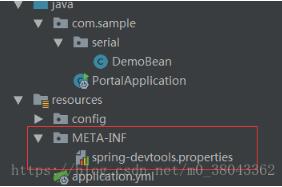
在resources下创建META-INF/spring-devtools.properties
如图:
下一步在spring-devtools.properties添加配置
restart.include.projectcommon=/devtools-serialization-[\\w.-]+.jar
注意这里我需要包含的jar包名称为devtools-serialization-1.0-SNAPSHOT.jar
配置的key以restart.include.开头即可
restart.include.*
value 为一个正则表达式
下面再次运行程序查看效果:
没有异常产生
控制台输出classLoader信息为
org.springframework.boot.devtools.restart.classloader.RestartClassLoader@1d9fbdd4 DemoBean{age=null, name='null'} org.springframework.boot.devtools.restart.classloader.RestartClassLoader@1d9fbdd4
问题完美解决。
补充知识:Springboot+devtools配置热部署
Spring Boot提供了spring-boot-devtools这个模块来使应用支持热部署,可以提高开发者的开发效率,无需手动重启Spring Boot应用就能实现自动加载,之前写了一篇可以自动加载springboot静态文件的,这次的只需要在原来的基础上再加一些配置即可实现springboot工程的热部署,步骤如下:
1、pom文件增加依赖:
- <dependencies>
- <dependency>
- <groupId>org.springframework.boot</groupId>
- <artifactId>spring-boot-devtools</artifactId>
- <optional>true</optional>
- </dependency>
- </dependencies>
- <build>
- <plugins>
- <plugin>
- <groupId>org.springframework.boot</groupId>
- <artifactId>spring-boot-maven-plugin</artifactId>
- <configuration>
- <fork>true</fork> <!--重要-->
- </configuration>
- </plugin>
- </plugins>
- </build>
2、yml文件中添加配置使其生效:
- # devtools
- debug: true
- spring:
- devtools:
- restart:
- enabled: true #设置开启热部署
- freemarker:
- cache: false #页面不加载缓存,修改即时生效
3、快捷键:Ctrl+Alt+S

4、快捷键:Ctrl+Shift+A,输入Registry,点击进入勾选:

以上这篇解决SpringBoot使用devtools导致的类型转换异常问题就是小编分享给大家的全部内容了,希望能给大家一个参考,也希望大家多多支持我们。