
使用openresty+lua来实现grafana中自动切换实时群集/历史群集对应的vmselect
作者:张富春(ahfuzhang),转载时请注明作者和引用链接,谢谢!
- cnblogs博客
- zhihu
- Github
- 公众号:一本正经的瞎扯
![]()

我曾设计了这样的 VictoriaMetrics 中的实时群集和历史群集:
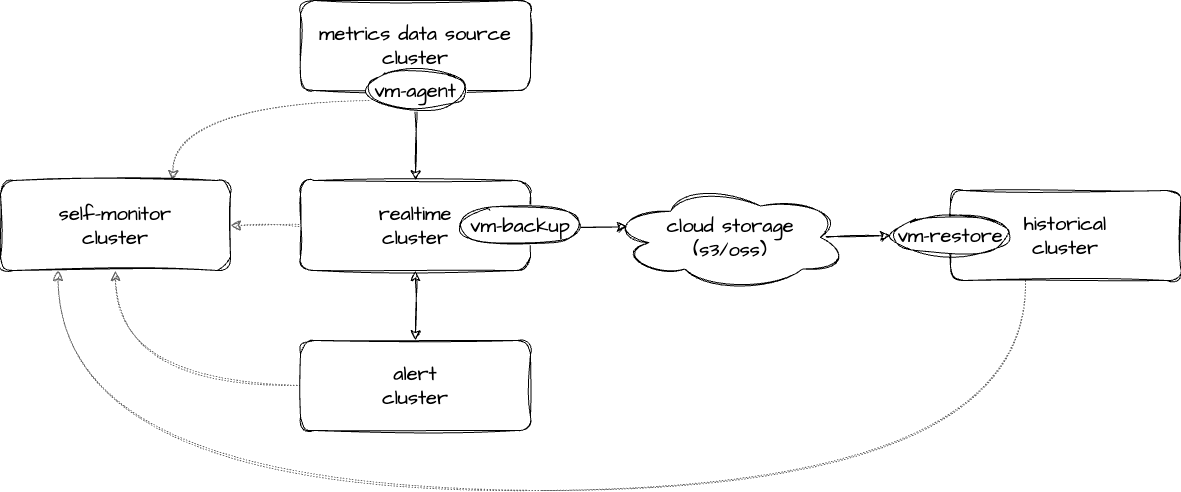
see: deploy_VictoriaMetrics_cluster
期待的效果是:
- 实时群集存储最近 7 天的数据,保障足够快足够可靠,提供告警查询和当前的系统监控。
- 为了保障实时群集的稳定性,通过牺牲存储时间来减少存储的数据
- 历史群集提供长周期的(例如半年),且降采样的数据的存储
- 以低成本的方式提供长周期的数据查询
部署完成后,我部署了一个新的 vmselect 节点,来连接到所有的实时群集和历史群集的vmselect节点上。
可是当我执行如下的查询时,发现数据是正确数据的两倍:
sum by (path) (increase(http_request_total{job="myApp"}[1m]))
很明显, sum() 时,把实时群集和历史群集中同样的 time series 上的值加了两次。
研究过 dedup 的源码,并未发现明显问题。
无奈,只能通过别的办法绕过去。
于是想到:如果能够自动发现用户查询的时间范围,当用户查询七天以内时转发到实时群集,而查询超过七天就转到历史群集,那么就不用把历史群集和实时群集混合在一起了。
下面是这个思路的详细解决办法:
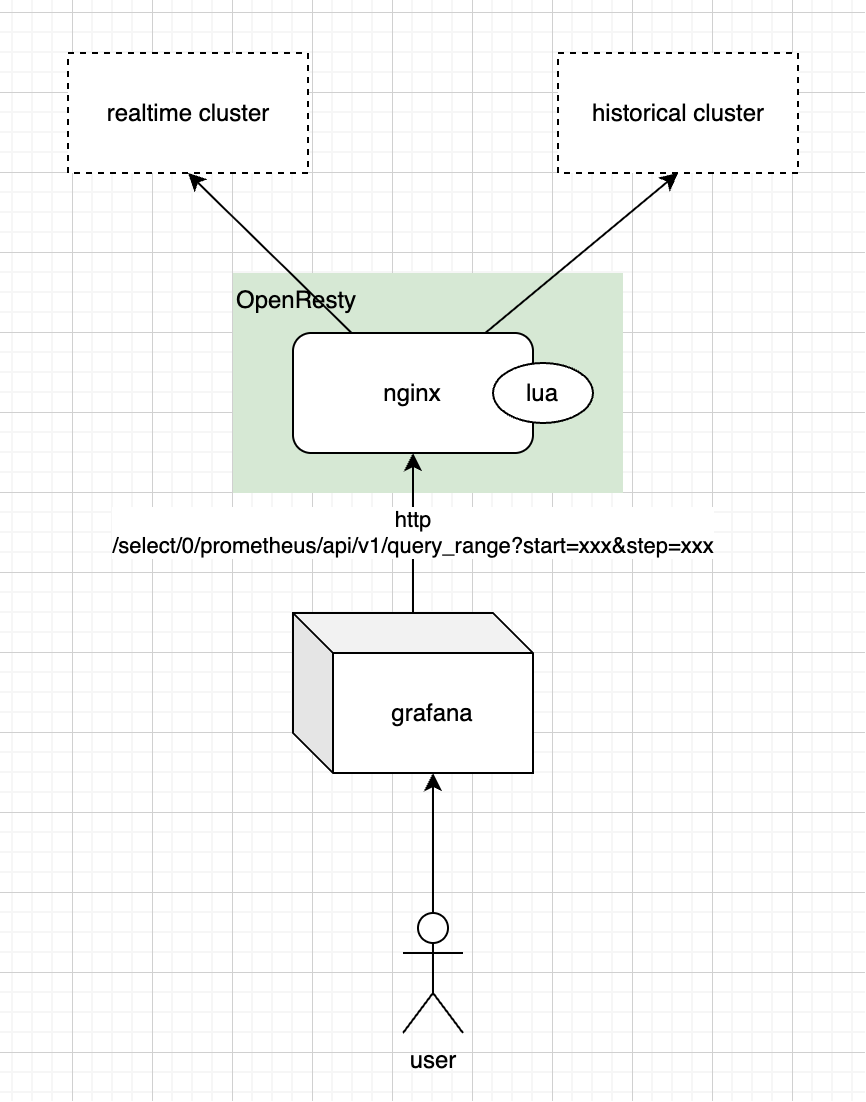
部署 openresty 的 deployment 的代码如下:
# openresty.yaml# nginx 的配置文件放在 configMap 中
apiVersion: v1
kind: ConfigMap
metadata:name: openresty-config
data:# nginx 的 配置文件nginx.conf: |worker_processes  1;events {worker_connections  1024;}http {access_log /dev/stdout;error_log /dev/stderr warn;lua_package_path "/usr/local/openresty/nginx/lua/?.lua;;";upstream realtime {server vmselect-realtime:8481;  # 实时群集的 vmselect}upstream historical {server vmselect-historical:8481;  # 历史群集的 vmselect}server {listen 8401;location /select/0/prometheus/api/v1/query_range {  # 核心是修改 query_range 这条 apicontent_by_lua_file /usr/local/openresty/nginx/lua/router.lua;}# 其它所有路径默认走 realtimelocation / {proxy_pass http://realtime;}location @toRealtime {proxy_pass http://realtime;}location @toHistorical {proxy_pass http://historical;}}}# lua 脚本的代码router.lua: |-- 时间值要支持三种格式:数值,字符串,grafana中的简写local function parse_start(val)if not val then return nil endlocal num = tonumber(val)if num thenif num > 1e12 thenreturn math.floor(num / 1000)elsereturn numendendlocal year, mon, day, hour, min, sec =val:match("^(%d+)%-(%d+)%-(%d+)T(%d+):(%d+):(%d+)")if year thenreturn os.time({year = tonumber(year),month = tonumber(mon),day = tonumber(day),hour = tonumber(hour),min = tonumber(min),sec = tonumber(sec)})endlocal num, unit = val:match("^([%-]?%d+)([smhdw])$")if num and unit thennum = tonumber(num)local seconds = 0if unit == "s" then seconds = numelseif unit == "m" then seconds = num * 60elseif unit == "h" then seconds = num * 3600elseif unit == "d" then seconds = num * 86400elseif unit == "w" then seconds = num * 7 * 86400endreturn ngx.time() + secondsendreturn nilendlocal args = ngx.req.get_uri_args()local is_post = (ngx.req.get_method() == "POST")local post_args = {}if is_post thenngx.req.read_body()post_args = ngx.req.get_post_args()for k,v in pairs(post_args) doargs[k] = vendendlocal start = parse_start(args["start"])local now = ngx.time()local days = 7  -- 这里设定一个七天的范围:七天以内在实时群集查询,超过七天在历史群集查询local n_days_ago = now - days*24*3600local step = "300s"  -- 当查询历史群集时,使用历史群集的降采样后的间隔,即 5 分钟if start ~= nil thenif start > n_days_ago thenreturn ngx.exec("@toRealtime")elseif is_post thenpost_args["step"] = steplocal body_tbl = {}for k,v in pairs(post_args) dotable.insert(body_tbl, ngx.escape_uri(k) .. "=" .. ngx.escape_uri(v))endlocal new_body = table.concat(body_tbl, "&")ngx.req.set_body_data(new_body)elseargs["step"] = stepngx.req.set_uri_args(args)endreturn ngx.exec("@toHistorical")endelsereturn ngx.exec("@toRealtime")end
---
# 这里是部署 openresty 的 deployment
apiVersion: apps/v1
kind: Deployment
metadata:name: openresty
spec:replicas: 1selector:matchLabels:app: openrestytemplate:metadata:labels:app: openrestyspec:containers:- name: openrestyimage: openresty/openresty:1.27.1.2-alpineports:- containerPort: 8401volumeMounts:- name: configmountPath: /usr/local/openresty/nginx/conf/nginx.confsubPath: nginx.conf- name: configmountPath: /usr/local/openresty/nginx/lua/router.luasubPath: router.luacommand: ["/usr/local/openresty/bin/openresty"]args: ["-g", "daemon off;", "-c", "/usr/local/openresty/nginx/conf/nginx.conf"]volumes:- name: configconfigMap:name: openresty-config
---
apiVersion: v1
kind: Service
metadata:name: openresty
spec:selector:app: openrestyports:- protocol: TCPport: 8401targetPort: 8401type: ClusterIP
通过命令行部署:
KUBECONFIG=~/my-test-k8s.yaml kubectl apply -f ./openresty.yaml -n my-namespace
通过 grafana 创建新的数据源,或者可以使用命令查询:
curl -G "http://127.0.0.1:8401/select/0/prometheus/api/v1/query_range?start=-7d" -v
可以通过 header X-Server-Hostname 观察数据由哪个服务返回。
Have Fun. 😃