
在数据隐私日益重要的今天,将大型语言模型(LLM)部署在本地环境已成为开发者的重要选择。通过Ollama这一开源平台,结合Python的强大生态,我们能够构建完全离线运行、成本可控且高度私密的AI应用。本文将带你从零开始,掌握将本地LLM无缝集成到Python项目的完整流程。
环境准备:搭建本地LLM运行基础
在开始编码之前,我们需要确保系统环境满足运行本地LLM的基本要求。与使用云端API不同,本地部署对硬件资源有特定需求:
- Ollama运行时:这是运行本地模型的核心引擎,支持Windows、macOS和Linux系统
- Python 3.8+:确保安装了较新版本的Python,以获得最佳兼容性
- 充足的硬件资源:至少8GB内存,建议16GB以上;模型需要2-8GB不等的磁盘空间
值得注意的是,虽然Python是本教程的主要语言,但Ollama的理念与容器化技术相似,这让熟悉Docker、Go或Java的开发者也能快速上手。实际上,Ollama的底层实现就使用了Go语言,展现了现代编程语言在系统工具开发中的优势。
安装配置:三步启动Ollama服务
安装Ollama的过程因操作系统而异,但都遵循相似的逻辑。对于Linux用户,最快捷的方式是通过命令行安装:
$ curl -fsSL https://ollama.com/install.sh | sh安装完成后,验证安装是否成功:
$ ollama -v如果看到版本信息,说明安装正确。接下来启动服务:
$ ollama serveWindows和macOS用户可以从官网下载安装包,图形化安装过程更加简单。安装完成后,Ollama会在后台运行,准备接收我们的指令。
模型管理:获取并测试本地LLM
Ollama支持多种开源模型,我们可以根据需求选择合适的版本。本教程将使用两个经典模型:
llama3.2:latest:轻量级通用模型,适合快速原型开发codellama:latest:代码专用模型,在编程任务上表现优异
下载模型只需简单命令:
$ ollama pull llama3.2:latest
$ ollama pull codellama:latest这个过程可能需要一些时间,取决于网络速度和模型大小。llama3.2:latest模型约需2.0GB空间,而codellama:latest则需要3.8GB。下载完成后,可以通过命令行快速测试:
$ ollama run llama3.2:latest
>>> Explain what Python is in one sentence.
Python is a high-level, interpreted programming language known for its
simplicity, readability, and versatility, often used for web development,
data analysis, machine learning, automation, and more.
如果模型能正常响应,说明一切就绪。现在安装Python SDK:
(venv) $ python -m pip install ollama这个ollama库是我们与本地模型交互的主要桥梁。
对话交互:构建智能聊天应用
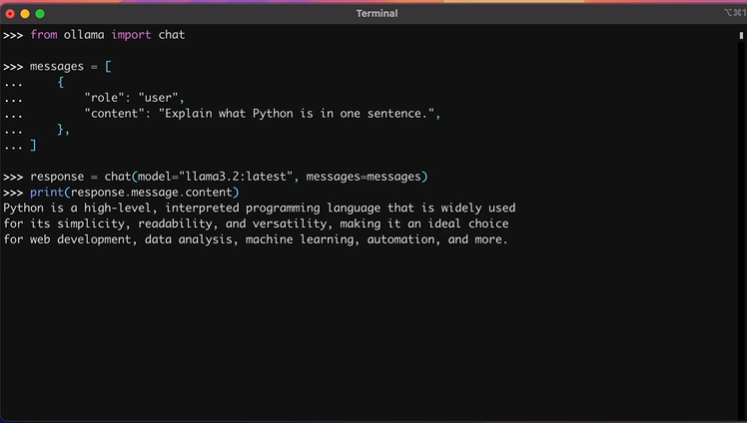
Ollama Python库提供了两种核心交互方式。首先是聊天接口,适合需要多轮对话的场景。基本用法如下:
>>> from ollama import chat
>>> messages = [
...     {
...         "role": "user",
...         "content": "Explain what Python is in one sentence.",
...     },
... ]
>>> response = chat(model="llama3.2:latest", messages=messages)
>>> print(response.message.content)
Python is a high-level, interpreted programming language that is widely used
for its simplicity, readability, and versatility, making it an ideal choice
for web development, data analysis, machine learning, automation, and more.
这里有几个关键点需要注意:
messages必须是字典列表,每条消息包含role和content字段- 调用
chat()函数返回ChatResponse对象 - 通过
response.message.content属性获取模型回复
为了保持对话连续性,我们需要将历史消息传入上下文。例如,讨论Python列表推导式:
>>> messages = [
...     {"role": "system", "content": "You are an expert Python tutor."},
...     {
...         "role": "user",
...         "content": "Define list comprehensions in a sentence."
...     },
... ]
>>> response = chat(model="llama3.2:latest", messages=messages)
>>> print(response.message.content)
List comprehensions are a concise and expressive way to create new lists
by performing operations on existing lists or iterables, using a compact
syntax that combines conditional statements and iteration.
>>> messages.append(response.message)  # Keep context
>>> messages.append(
...     {
...         "role": "user",
...         "content": "Provide a short, practical example."
...     }
... )
>>> response = chat(model="llama3.2:latest", messages=messages)
>>> print(response.message.content)
Here's an example of a list comprehension:
```python
numbers = [1, 2, 3, 4, 5]
double_numbers = [num * 2 for num in numbers if num % 2 == 0]
print(double_numbers)  # Output: [2, 4, 6]
```这个例子中,numbers列表的处理展示了模型对Python语法的理解能力。对于需要实时响应的场景,可以使用流式输出:
streams.py
from ollama import chat
stream = chat(model="llama3.2:latest",messages=[{"role": "user","content": "Explain Python dataclasses with a quick example."}],stream=True,
)
for chunk in stream:print(chunk.message.content, end="", flush=True)设置stream为True后,chat()函数返回迭代器,实现逐词输出效果。
⚡ 文本生成:高效处理单次任务
对于不需要上下文的一次性任务,generate()函数更加高效。这个函数专为文本生成、代码编写等场景优化:
>>> from ollama import generate
>>> response = generate(
...     model="llama3.2:latest",
...     prompt="Explain what Python is in one sentence."
... )
>>> print(response.response)
Python is a high-level, interpreted programming language known for its
simplicity, readability, and versatility. It is widely used in various
fields such as web development, data analysis, artificial intelligence,
and more.generate()函数特别适合:
- 文本摘要和改写
- 代码片段生成
- 快速原型设计
让我们用codellama:latest模型生成一个FizzBuzz实现:
>>> from ollama import generate
>>> prompt = """
... Write a Python function fizzbuzz(n: int) -> List[str] that:
...
... - Returns a list of strings for the numbers 1..n
... - Uses "Fizz" for multiples of 3
... - Uses "Buzz" for multiples of 5
... - Uses "FizzBuzz" for multiples of both 3 and 5
... - Uses the number itself (as a string) otherwise
... - Raises ValueError if n < 1
...
... Include type hints compatible with Python 3.8.
... """
>>> response = generate(model="codellama:latest", prompt=prompt)
>>> print(response.response)
```
from typing import List
def fizzbuzz(n: int) -> List[str]:if n < 1:raise ValueError("n must be greater than or equal to 1")result = []for i in range(1, n+1):if i % 3 == 0 and i % 5 == 0:result.append("FizzBuzz")elif i % 3 == 0:result.append("Fizz")elif i % 5 == 0:result.append("Buzz")else:result.append(str(i))return result
```
生成代码后,务必进行测试:
>>> from typing import List
>>> def fizzbuzz(n: int) -> List[str]:
...     if n < 1:
...         raise ValueError("n must be greater than or equal to 1")
...     result = []
...     for i in range(1, n+1):
...         if i % 3 == 0 and i % 5 == 0:
...             result.append("FizzBuzz")
...         elif i % 3 == 0:
...             result.append("Fizz")
...         elif i % 5 == 0:
...             result.append("Buzz")
...         else:
...             result.append(str(i))
...     return result
...
>>> fizzbuzz(16)
['1', '2', 'Fizz', '4', 'Buzz', 'Fizz', ..., 'FizzBuzz', '16']
这种工作流程不仅适用于Python,对于TypeScript、Java、C++等其他编程语言的代码生成同样有效。开发者可以根据项目需求,调整提示词以生成特定语言的代码。
️ 高级功能:工具调用增强模型能力
工具调用(函数调用)让LLM能够执行外部函数,获得更准确、实时的信息。这类似于RAG(检索增强生成)技术,但更加灵活。llama3.2:latest等模型支持此功能。
工作流程分为五步:
- 定义Python工具函数
- 将工具和提示一起发送给模型
- 执行模型选择的工具
- 将结果作为
role="tool"消息附加 - 生成最终答案
下面是一个完整示例:
tool_calling.py
import math
from ollama import chat
# Define a tool as a Python function
def square_root(number: float) -> float:"""Calculate the square root of a number.Args:number: The number to calculate the square root for.Returns:The square root of the number."""return math.sqrt(number)
messages = [{"role": "user","content": "What is the square root of 36?",}
]
response = chat(model="llama3.2:latest",messages=messages,tools=[square_root]  # Pass the tools along with the prompt
)
# Append the response for context
messages.append(response.message)
if response.message.tool_calls:tool = response.message.tool_calls[0]# Call the toolresult = square_root(float(tool.function.arguments["number"]))# Append the tool resultmessages.append({"role": "tool","tool_name": tool.function.name,"content": str(result),})# Obtain the final answerfinal_response = chat(model="llama3.2:latest", messages=messages)print(final_response.message.content)注意square_root()函数的文档字符串和类型提示很重要,它们帮助模型理解如何调用工具。square_root()的设计体现了良好的工程实践。
调用chat()时传入工具列表,然后处理响应。如果模型调用square_root()工具,将结果添加到消息列表,角色设为"tool"。最后再次调用chat(),传入messages提供的所有上下文。
运行结果示例:
(venv) $ python tool_calling.py
The square root of 36 is 6.如果模型没有调用工具,可以尝试使用更大的模型如llama3.1:8b,或优化提示词。
总结与展望
通过本教程,我们掌握了使用Ollama和ollama库集成本地LLM的核心技能:
- 成功安装运行Ollama并获取本地模型
- 使用
chat()进行多轮对话管理 - 利用
generate()高效处理一次性任务 - 实现工具调用扩展模型能力
本地LLM部署为开发者提供了隐私保护、成本控制和离线可用的三重优势。无论是构建企业内部助手、开发教育应用,还是创建个性化的写作工具,这套技术栈都能提供坚实的基础。
随着模型优化和硬件发展,本地AI应用的潜力将进一步释放。开发者可以结合Python丰富的生态系统,TypeScript的前端能力,Go的高并发特性,或Java的企业级框架,构建更加复杂和强大的本地智能应用。