
全是干货,仅供参考,不喜勿喷,有问题欢迎交流!若能帮助您之万一,节省您工作中一点点时间,吾心甚慰。
关键字:java、springboot、idea、maven、allatori。
一、下载混淆组件
1、 下载最新版,官网https://allatori.com/
2、 本实例,使用包Allatori-9.5-Demo.zip解压后目录:
lib下混淆使用的jar组件,tutorial下是一些例子。

二、集成到idea maven环境
1、将lib文件夹拷贝到idea项目目录(或者公共目录)下,确保项目(模块)找到。
2、在项目(模块)根目录(src平级)添加allatori.xml文件,可在tutorial例子中找到一个allatori.xml添加到项目中。
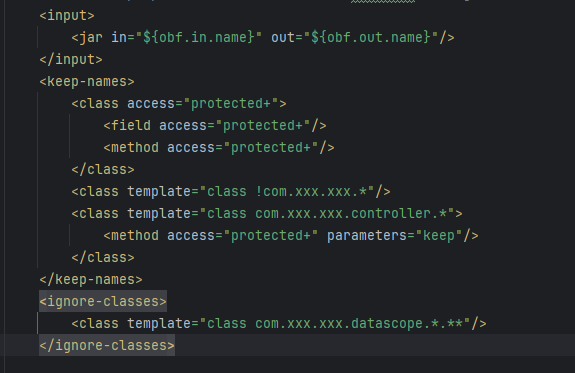
3、配置allatori.xml文件,此文件对哪些类混淆,怎么混淆做配置;本文章一个样例allatori.xml文件(见代码实例)。
官网帮助文档:https://allatori.com/doc.html
关键配置说明:
Input 节点配置要混淆的jar文件,in为输入jar文件,out为加密混淆后输出jar文件(支持pom.xml中变量写法)。
配置说明:对于protected 及以上的访问级别的类、方法、属性保持名称不变。
!com.xxx.xxx.* 非项目包下的类不混淆。
其中
对于一个springboot项目此配置基本够用,其他配置,保持默认即可。
4、maven配置pom.xml
其他不变,在build>plugins节点内maven打包节点plugin后添加两个plugin节点
注意:若项目使用了${project.build.finalName}参数,在pom.xml中要配置。
若不是springboot项目,maven打包build节点可不配置,但
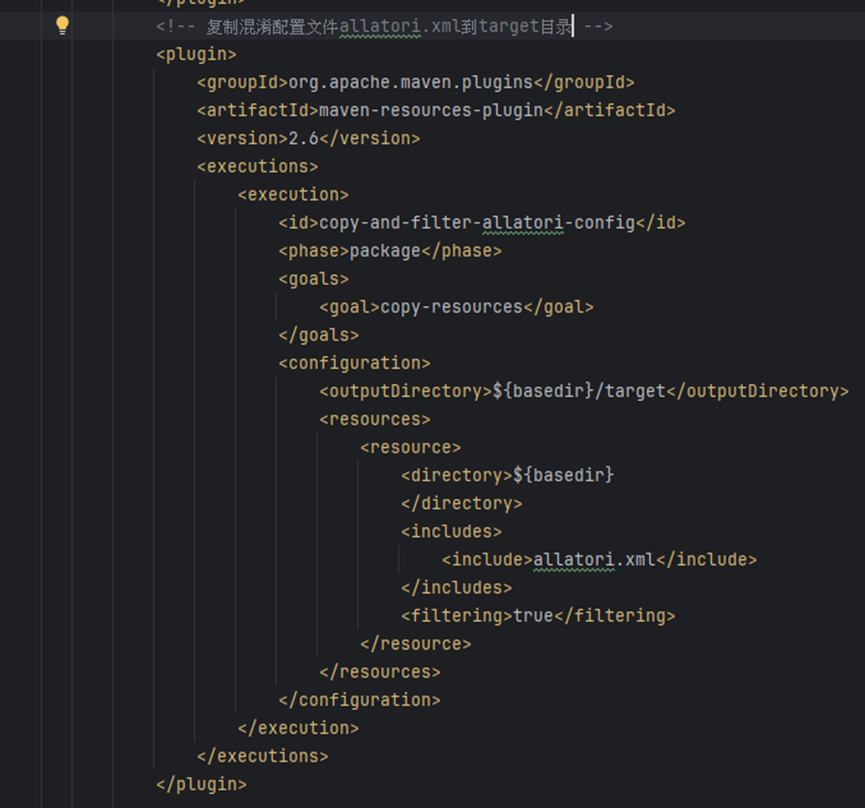
上图说明:将allatori.xml文件从根目录拷贝到target目录。
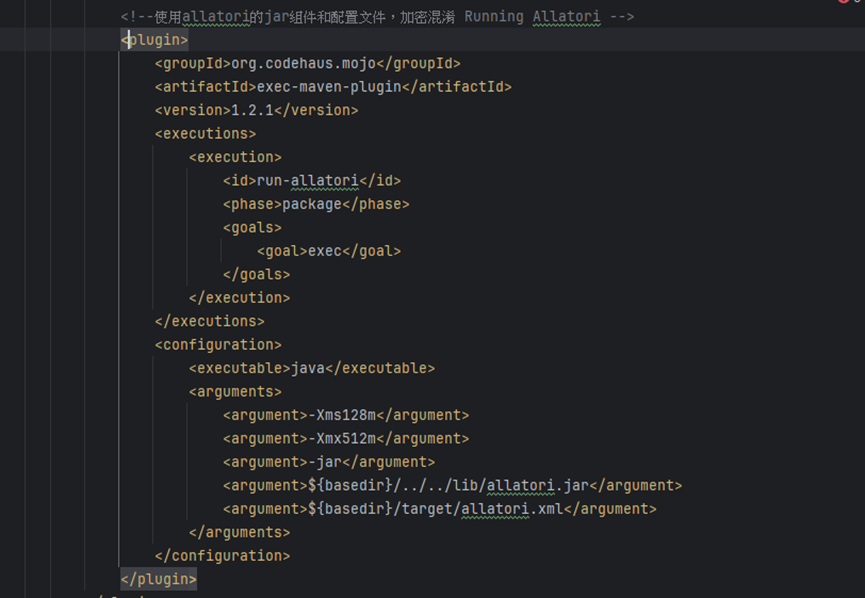
上图说明:
5、执行打包混淆,mvn clean package。输出文件为混淆后的jar包,在target目录下。例子中混淆后的包为project-xxx-xxx-obfuscated.jar,原始包project-xxx-xxx.jar
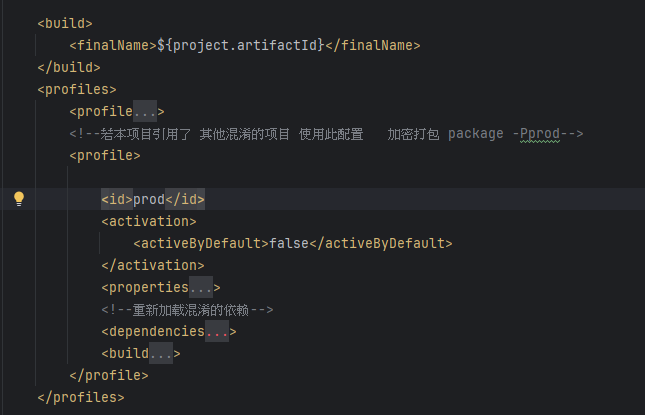
6、若有更多要求,如特殊打包环境启用混淆,可使用profiles方式,如添加一种prod环境,在打包时使用参数 prod,执行命令maven clean package -Pprod;不带有prod默认打包模式,不混淆。
若项目引用了其他加密混淆的项目,使用dependencies重新引用。
二、其他
1、扩展,上述打包如果子项目过多,可将加密混淆后的jar包,统一输出到一个指定目录。
2、不使用maven加密混淆,可参考下载包中的例子,直接执行命令打包混淆。
三、代码实例
以下为完整版代码,若要求比较简单请参考上面图片中代码。
1、allatori.xml 代码实例
 <config><!-- Maven properties could be used in Allatori configuration file. --><input><jar in="${obf.in.name}" out="${obf.out.name}"/></input><keep-names><class access="protected+"><field access="protected+"/><method access="protected+"/></class><class template="class !com.xxx.xxx.*"/><class template="class com.xxx.xxx.controller.*"><method access="protected+" parameters="keep"/></class></keep-names><ignore-classes><class template="class com.xxx.xxx.datascope.*.**"/></ignore-classes><!-- 水印 --><watermark key="secure-key-to-extract-watermark" value="@Copyright (c) by 2025-2099 Co.All Rights Reserved"/><!-- 随机字符加密 --><property name="random-seed" value="任意字符串"/><!-- 字符串加密 --><property name="string-encryption" value="maximum"/><!--    fast,strong--><property name="string-encryption-type" value="fast"/><property name="string-encryption-version" value="v4"/><!-- 成员重新排序 --><property name="member-reorder" value="random"/><!--    <property name="string-encryption-ignored-strings" value="patterns.txt"/>--><!-- 广泛流混淆 --><!-- Control flow obfuscation --><property name="control-flow-obfuscation" value="enable"/><property name="extensive-flow-obfuscation" value="normal"/><expiry date="2099/01/01" string="EXPIRED!"/><property name="log-file" value="log.xml"/>
</config>
2、pom.xml 代码实例。
<?xml version="1.0" encoding="UTF-8"?>
<project xmlns="http://maven.apache.org/POM/4.0.0"xmlns:xsi="http://www.w3.org/2001/XMLSchema-instance"xsi:schemaLocation="http://maven.apache.org/POM/4.0.0 http://maven.apache.org/xsd/maven-4.0.0.xsd"><parent><groupId>com.xxx</groupId><artifactId>xxx-modules</artifactId><version>0.0.0</version></parent><modelVersion>4.0.0</modelVersion><artifactId>xxx-modules-topic</artifactId><properties><maven.compiler.source>8</maven.compiler.source><maven.compiler.target>8</maven.compiler.target><project.build.sourceEncoding>UTF-8</project.build.sourceEncoding></properties><dependencies><!-- 各种引用 --></dependencies><build><finalName>${project.artifactId}</finalName></build><profiles><profile><id>default</id><activation><activeByDefault>true</activeByDefault></activation><build><plugins><plugin><groupId>org.springframework.boot</groupId><artifactId>spring-boot-maven-plugin</artifactId><version>${spring-boot.version}</version><configuration><includeSystemScope>true</includeSystemScope></configuration><executions><execution><goals><goal>repackage</goal></goals></execution></executions></plugin></plugins></build></profile><!--若本项目引用了其他混淆的项目,使用此配置,加密打包 maven clean package -Pprod--><profile><id>prod</id><activation><activeByDefault>false</activeByDefault></activation><properties><obf.dir>obfuscated</obf.dir><obf.in.name-pre>${project.artifactId}-temp</obf.in.name-pre><obf.in.name>${obf.in.name-pre}.jar</obf.in.name><obf.out.name>${obf.dir}/${project.artifactId}-${project.version}.jar</obf.out.name></properties><!--重新加载混淆的依赖--><dependencies><dependency><groupId>com.xxx</groupId><artifactId>xxx-xxxxx-xxx</artifactId><version>${project.version}</version><scope>system</scope><systemPath>${basedir}/../xxx-common/xxx-common-module_1/target/${obf.dir}/xxx-common-module_1-${project.version}.jar</systemPath></dependency></dependencies><build><finalName>${obf.in.name-pre}</finalName><plugins><plugin><groupId>org.springframework.boot</groupId><artifactId>spring-boot-maven-plugin</artifactId><version>${spring-boot.version}</version><configuration><includeSystemScope>true</includeSystemScope></configuration><executions><execution><goals><goal>repackage</goal></goals></execution></executions></plugin><!-- Copying Allatori configuration file to 'target' directory.The destination file will be filtered (Maven properties used in configuration file will be resolved). --><plugin><groupId>org.apache.maven.plugins</groupId><artifactId>maven-antrun-plugin</artifactId><version>1.3</version><executions><execution><id>run-create-obf-dir</id><phase>package</phase><configuration><tasks><delete dir="${basedir}/target/${obf.dir}"/><mkdir dir="${basedir}/target/${obf.dir}"/></tasks></configuration><goals><goal>run</goal></goals></execution></executions></plugin><plugin><groupId>org.apache.maven.plugins</groupId><artifactId>maven-resources-plugin</artifactId><version>2.6</version><executions><execution><id>copy-and-filter-allatori-config</id><phase>package</phase><goals><goal>copy-resources</goal></goals><configuration><outputDirectory>${basedir}/target</outputDirectory><resources><resource><directory>${basedir}</directory><includes><include>allatori.xml</include></includes><filtering>true</filtering></resource></resources></configuration></execution></executions></plugin><!-- Running Allatori --><plugin><groupId>org.codehaus.mojo</groupId><artifactId>exec-maven-plugin</artifactId><version>1.2.1</version><executions><execution><id>run-allatori</id><phase>package</phase><goals><goal>exec</goal></goals></execution></executions><configuration><executable>java</executable><arguments><argument>-Xms128m</argument><argument>-Xmx512m</argument><argument>-jar</argument><argument>${basedir}/../../lib/allatori.jar</argument><argument>${basedir}/target/allatori.xml</argument></arguments></configuration></plugin></plugins></build></profile></profiles></project>