- 表结构设计
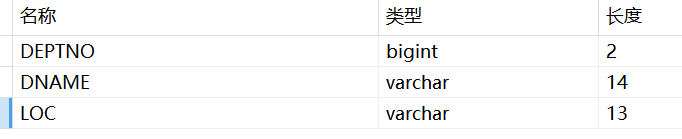
![Snipaste_2026-01-28_18-52-50]()
注:deptno 部门编号 dname 部门名称 loc 部门所在位置
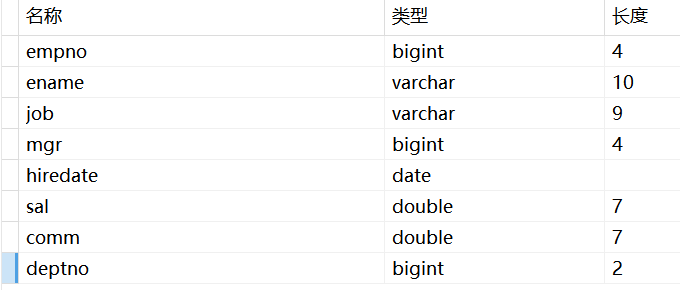
![Snipaste_2026-01-28_18-53-19]()
注:empno 雇员编号 ename 雇员姓名 job 雇员职位 mgr 雇员领到编号 hiredate 雇佣日期 sal 工资 comm 奖金 deptno 部门编号
- 封装实体类
员工 Employee
点击查看代码
  @Data
@AllArgsConstructor
@NoArgsConstructor
public class Employee {/*雇员的编号,由四位数字所组成*/private Long empno;/*雇员的姓名,由10位字符所组成*/private String ename;/*雇员的职位*/private String job;/*雇员对应的领导编号,领导也是雇员*/private Long mgr;/*雇员的雇佣日期*/private Date hiredate;/*基本工资,其中有两位小数,五位整数,一共是七位*/private Double sal;/*奖金,佣金(销售才有)*/private Double comm;/*雇员所在的部门编号*/private Long deptno;/*雇员对应的部门*/private Dept dept;}
点击查看代码
@Data
@AllArgsConstructor
@NoArgsConstructor
public class Dept {/* 表示部门编号,由两位数字所组成 */private Long deptNo;/* 部门名称,最多由14个字符所组成 */private String dname;/* 部门所在的位置 */private String loc;private List<Employee> empList;
}
2.创建DeptMapper接口和查询方法
点击查看代码
public interface DeptMapper {List<Dept> selAll();
}
3.创建DeptMapper.xml文件
点击查看代码
<?xml version="1.0" encoding="UTF-8" ?>
<!DOCTYPE mapper PUBLIC "-//mybatis.org//DTD Mapper 3.0//EN" "http://mybatis.org/dtd/mybatis-3-mapper.dtd" >
<mapper namespace="cn.wolfcode.mapper.DeptMapper"><resultMap id="DeptResultMap" type="dept"><id column="dno" property="deptNo"/><result column="dname" property="dname"/><result column="loc" property="loc"/><collection property="empList" ofType="employee"resultMap="cn.wolfcode.mapper.EmployeeMapper.EmployeeResultMap1"></collection></resultMap><sql id="dept_column">dept.deptno as dno, dname, loc, empno, ename, job, mgr, hiredate, sal, comm, emp.deptno</sql><select id="selById" resultMap="DeptResultMap">select <include refid="dept_column"/> from dept where DEPTNO=#{id}</select><select id="selAll" resultMap="DeptResultMap">select <include refid="dept_column"/> from dept left join emp on dept.deptno=emp.deptno</select></mapper>
- 创建Deptservice接口和查询方法
点击查看代码
public interface DeptService {List<Dept> selAll();
}
- 创建EmployeeMapper接口以及EmployeeMapper.xml文件 并封装resultMap
点击查看代码
<?xml version="1.0" encoding="UTF-8" ?>
<!DOCTYPE mapper PUBLIC "-//mybatis.org//DTD Mapper 3.0//EN" "http://mybatis.org/dtd/mybatis-3-mapper.dtd" >
<mapper namespace="cn.wolfcode.mapper.EmployeeMapper"><resultMap id="EmployeeResultMap" type="Employee"><id column="empno" property="empno" /><result column="ename" property="ename" /><result column="job" property="job" /><result column="mgr" property="mgr" /><result column="hiredate" property="hiredate" /><result column="sal" property="sal" /><result column="comm" property="comm" /><result column="deptno" property="deptno" /><association property="dept" javaType="dept"select="cn.wolfcode.mapper.DeptMapper.selById" column="deptno"></association></resultMap></mapper>
6.实现 DeptService 接口并实现查询方法
点击查看代码
public class DeptServiceImpl implements DeptService {@Overridepublic List<Dept> selAll() {SqlSession ss= MybatisUtils.getSqlSession();DeptMapper DeptMapper=ss.getMapper(DeptMapper.class);List<Dept> list = DeptMapper.selAll();ss.close();return list;}
}
7.创建测试类
点击查看代码
@Testvoid selAll() {deptService.selAll().forEach(System.out::println);}
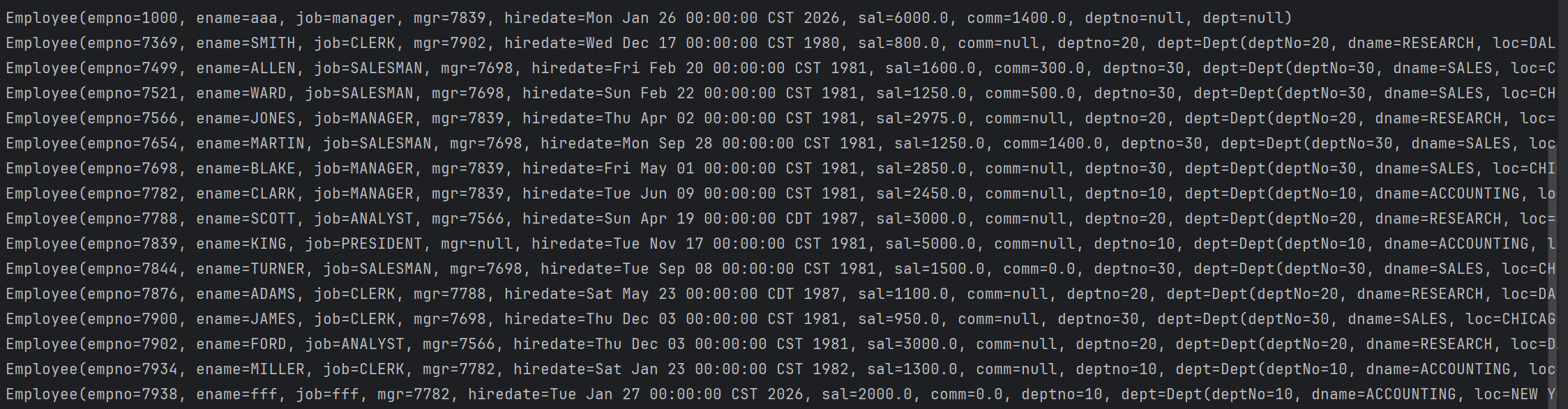
测试结果:

- 子查询方法
- 在EmployeMapper接口中添加方法并在EmployeeMapper.xml文件中添加方法
点击查看代码
<?xml version="1.0" encoding="UTF-8" ?>
<!DOCTYPE mapper PUBLIC "-//mybatis.org//DTD Mapper 3.0//EN" "http://mybatis.org/dtd/mybatis-3-mapper.dtd" >
<mapper namespace="cn.wolfcode.mapper.EmployeeMapper"><resultMap id="EmployeeResultMap" type="Employee"><id column="empno" property="empno" /><result column="ename" property="ename" /><result column="job" property="job" /><result column="mgr" property="mgr" /><result column="hiredate" property="hiredate" /><result column="sal" property="sal" /><result column="comm" property="comm" /><result column="deptno" property="deptno" /><association property="dept" javaType="dept"select="cn.wolfcode.mapper.DeptMapper.selById" column="deptno"></association></resultMap><resultMap id="EmployeeResultMap1" type="Employee"><id column="empno" property="empno" /><result column="ename" property="ename" /><result column="job" property="job" /><result column="mgr" property="mgr" /><result column="hiredate" property="hiredate" /><result column="sal" property="sal" /><result column="comm" property="comm" /><result column="deptno" property="deptno" /></resultMap><sql id="emp_columns">empno, ename, job, mgr, hiredate, sal, comm, emp.deptno, dept.deptno as dno, dname, loc</sql><sql id="emp_columns2">empno, ename, job, mgr, hiredate, sal, comm, deptno</sql><select id="selAll" resultMap="EmployeeResultMap">select <include refid="emp_columns2" /> from emp</select>
</mapper>
2.在deptMapper.xml中添加 selById方法
点击查看代码
<resultMap id="DeptResultMap" type="dept"><id column="dno" property="deptNo"/><result column="dname" property="dname"/><result column="loc" property="loc"/><collection property="empList" ofType="employee"resultMap="cn.wolfcode.mapper.EmployeeMapper.EmployeeResultMap1"></collection></resultMap><sql id="dept_column1">dept.deptno as dno, dname, loc</sql><select id="selById" resultMap="DeptResultMap">select <include refid="dept_column1"/> from dept where DEPTNO=#{id}</select>
3.创建EmployeeService接口以及实现类
点击查看代码
List<Employee> selAll();@Overridepublic Employee selById(Long id) {SqlSession ss= MybatisUtils.getSqlSession();EmployeeMapper employeeMapper=ss.getMapper(EmployeeMapper.class);Employee employee = employeeMapper.selById(id);ss.close();return employee;}
4.创建测试
点击查看代码
@Testvoid selAll() {employeeService.selAll().forEach(System.out::println);}测试结果: