
![摸鱼笔记[2]-提取windows已安装的驱动](https://img2024.cnblogs.com/blog/1048201/202511/1048201-20251109185853706-1654521909.png) 使用`DriverStoreExplorer`提取windows已安装的海康相机.inf驱动文件.
使用`DriverStoreExplorer`提取windows已安装的海康相机.inf驱动文件.摘要
使用DriverStoreExplorer提取windows已安装的海康相机.inf驱动文件.
实现
[https://github.com/lostindark/DriverStoreExplorer]
Driver Store Explorer modifies the Windows driver store. Improper use can cause system malfunction, prevent Windows from booting, or result in loss of device functionality. Know the risks before proceeding. Always back up your drivers before deleting anything.
Driver Store Explorer (RAPR) is a powerful tool for viewing, managing, and cleaning up the Windows DriverStore. It is intended for advanced users and administrators. If you are not familiar with Windows internals, use of this tool is discouraged.
Browse & List: View all third-party driver packages with detailed metadata (size, version, date etc.)
Add/Install: Install new driver packages with optional automatic device installation
Remove/Delete: Delete single or multiple drivers with force deletion for in-use drivers
Note: The exact implications of removing or deleting drivers depend on system state and usage. Exercise caution, as removal may affect device functionality or require reinstallation of drivers for certain hardware.
Export: Backup selected or all drivers to organized folder structures
Smart Cleanup: Automatically identify and select old/unused driver versions
Multiple APIs: Native Windows API, DISM, or PnPUtil backend support with auto-detection
Online & Offline: Work with local machine or offline Windows image driver stores
Device Association: View connected devices and their presence status
Batch Operations: Multi-select for bulk operations with progress tracking
Real-time Search: Live filtering and CSV export for analysis
Multi-language: 20+ languages with RTL support
Customizable: Sortable columns, grouping, and flexible layout
Visual Feedback: Color coding, selection highlighting, and detailed logging
⚠️ 电脑洁癖星人必备!⚠️
Driver Store Explorer(RAPR)= 驱动仓库“清道夫”🧹
一键揪出多余/老旧驱动, bulk delete 超爽!💥
但!删错 = 直接蓝屏💔,小白请绕道~
📦 功能一览
🔍 全景浏览:第三方驱动大小、版本、日期全曝光
📥 一键备份:选中→导出,整整齐齐还原不慌
🗑️ 智能清理:自动标红“前任”驱动,点点鼠标秒瘦身
⚙️ 多引擎:DISM / PnPUtil 随心切换,离线镜像也 OK
🌍 20+ 语言 + 深色模式,颜值在线!
💡 使用小贴士
1️⃣ 操作前必点“导出”做全套备份!
2️⃣ 只删“old version + 无设备占用”的驱动
3️⃣ 删完重启,若设备打叹号➡️ 立刻还原备份
驱动清理 #Windows神器 #极客工具 #系统瘦身 #RAPR
| 操作截图 |
|---|
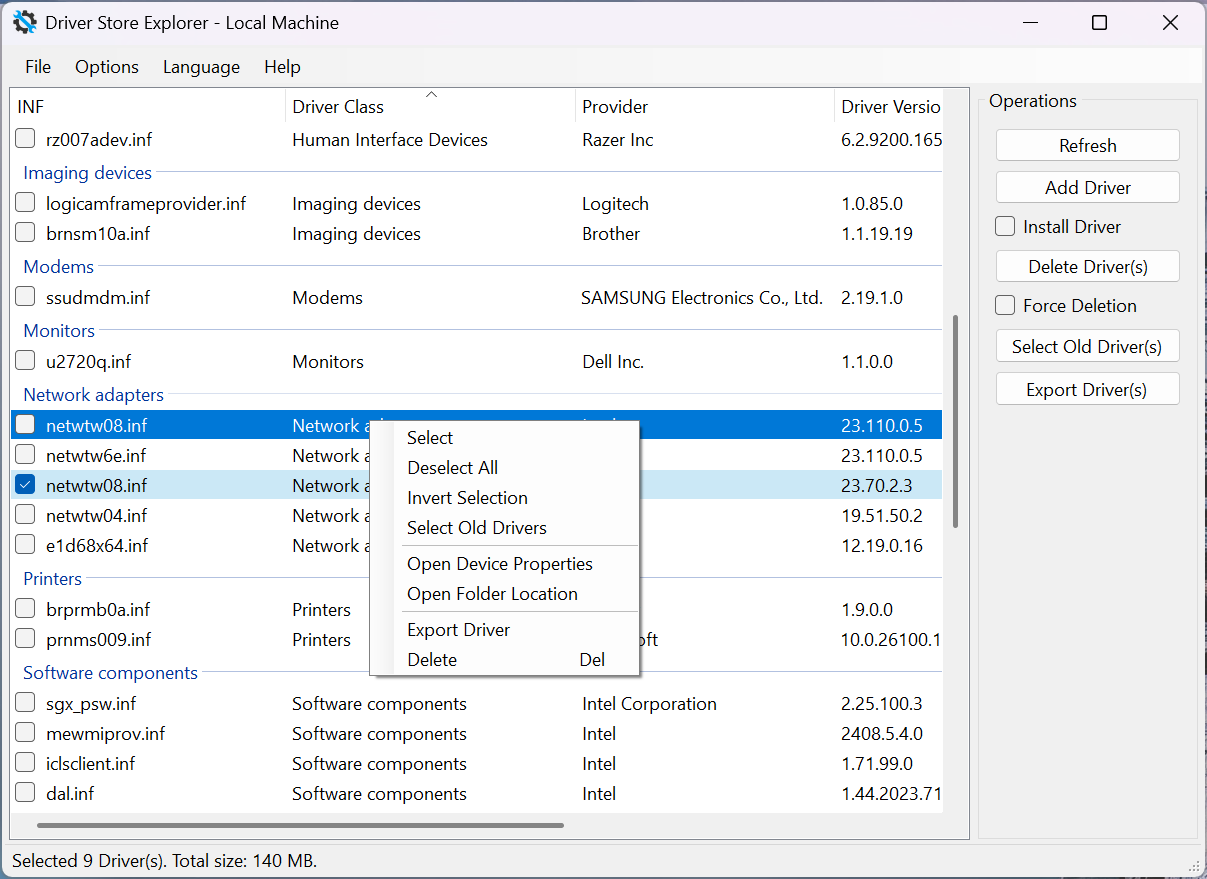 |
注意:右键驱动点击Export Driver即可