
Plan-and-Execute Agents
https://blog.langchain.com/planning-agents/
Over the past year, language model-powered agents and state machines have emerged as a promising design pattern for creating flexible and effective ai-powered products.
At their core, agents use LLMs as general-purpose problem-solvers, connecting them with external resources to answer questions or accomplish tasks.
LLM agents typically have the following main steps:
- Propose action: the LLM generates text to respond directly to a user or to pass to a function.
- Execute action: your code invokes other software to do things like query a database or call an API.
- Observe: react to the response of the tool call by either calling another function or responding to the user.
The ReAct agent is a great prototypical design for this, as it prompts the language model using a repeated thought, act, observation loop:
Thought: I should call Search() to see the current score of the game.
Act: Search("What is the current score of game X?")
Observation: The current score is 24-21
... (repeat N times)
A typical ReAct-style agent trajectory.
This takes advantage of Chain-of-thought prompting to make a single action choice per step. While this can be effect for simple tasks, it has a couple main downsides:
- It requires an LLM call for each tool invocation.
- The LLM only plans for 1 sub-problem at a time. This may lead to sub-optimal trajectories, since it isn't forced to "reason" about the whole task.
One way to overcome these two shortcomings is through an explicit planning step. Below are two such designs we have implemented in LangGraph.
Plan-And-Execute
🔗 Python Link
🔗 JS Link
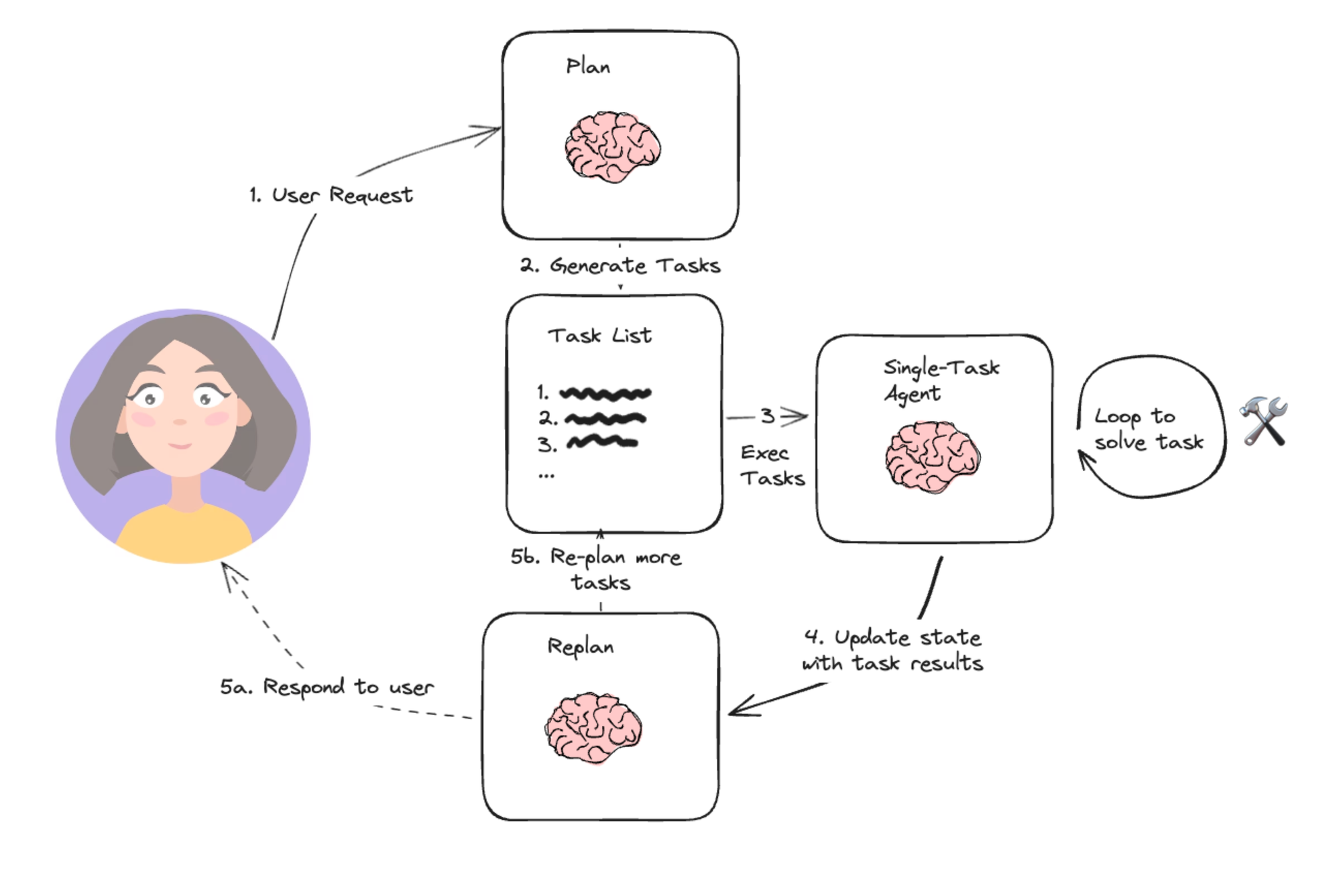 Plan-and-execute Agent
Based loosely on Wang, et. al.’s paper on Plan-and-Solve Prompting, and Yohei Nakajima’s BabyAGI project, this simple architecture is emblematic of the planning agent architecture. It consists of two basic components:
- A planner, which prompts an LLM to generate a multi-step plan to complete a large task.
- Executor(s), which accept the user query and a step in the plan and invoke 1 or more tools to complete that task.
Once execution is completed, the agent is called again with a re-planning prompt, letting it decide whether to finish with a response or whether to generate a follow-up plan (if the first plan didn’t have the desired effect).
This agent design lets us avoid having to call the large planner LLM for each tool invocation. It still is restricted by serial tool calling and uses an LLM for each task since it doesn't support variable assignment.
REF
https://www.bilibili.com/video/BV1vJ4m1s7Zn?spm_id_from=333.788.videopod.sections&vd_source=57e261300f39bf692de396b55bf8c41b
https://www.bilibili.com/video/BV1qa43z5EBJ/?spm_id_from=333.337.search-card.all.click&vd_source=57e261300f39bf692de396b55bf8c41b
https://github.com/MehdiRezvandehy/Multi-Step-Plan-and-Execute-Agents-with-LangGraph/blob/main/langgraph_plan_execute.ipynb
https://github.com/fanqingsong/langgraph-plan-and-react-agent
https://github.com/fanqingsong/plan-execute-langgraph
LANGCHAIN MEMORY
https://www.cnblogs.com/mangod/p/18243321
https://reference.langchain.com/python/langchain_core/prompts/#langchain_core.prompts.chat.ChatPromptTemplate
https://langchain-tutorials.com/lessons/langchain-essentials/lesson-6
from langchain.memory import ConversationBufferMemorymemory = ConversationBufferMemory(return_messages=True)
memory.load_memory_variables({})memory.save_context({"input": "我的名字叫张三"}, {"output": "你好,张三"})
memory.load_memory_variables({})memory.save_context({"input": "我是一名 IT 程序员"}, {"output": "好的,我知道了"})
memory.load_memory_variables({})from langchain.prompts import ChatPromptTemplate
from langchain.prompts import ChatPromptTemplate, MessagesPlaceholderprompt = ChatPromptTemplate.from_messages([("system", "你是一个乐于助人的助手。"),MessagesPlaceholder(variable_name="history"),("human", "{user_input}"),]
)
chain = prompt | modeluser_input = "你知道我的名字吗?"
history = memory.load_memory_variables({})["history"]chain.invoke({"user_input": user_input, "history": history})user_input = "中国最高的山是什么山?"
res = chain.invoke({"user_input": user_input, "history": history})
memory.save_context({"input": user_input}, {"output": res.content})res = chain.invoke({"user_input": "我们聊得最后一个问题是什么?", "history": history})
https://docs.langchain.com/oss/python/langchain/messages