气泡组装
- 气泡可以看做是由圆形和倒三角形组装起来的
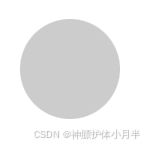
- 利用 clip-path 属性,组装两个元素
width: 100px;
height: 100px;
clip-path: circle(50% at 50% 50%);
background: #ccc;
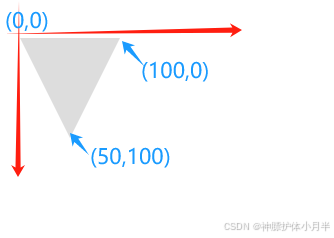
倒三角形
width: 100px;
height: 100px;
clip-path: polygon(0% 0%, 100% 0%, 50% 100%, 0% 0%);
background: #ddd;
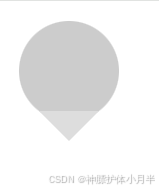
组合
<div class="pop">
<div class="circle"></div>
<div class="trangle"></div>
</div><style lang="scss" scoped>.pop {width: 100px;height: 120px;position: relative;.circle {position: absolute;top: 0;left: 0;width: 100px;height: 100px;clip-path: circle(50% at 50% 50%);background: #ccc;}.trangle {position: absolute;bottom: 0;left: 50%;transform: translateX(-50%);width: 60px;height: 30px;clip-path: polygon(0% 0%, 100% 0%, 50% 100%, 0% 0%);background: #ddd;}}
</style>
边框效果
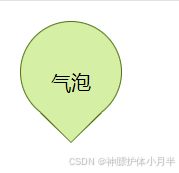
- 用两个气泡叠加。下层气泡的尺寸略大于上层气泡的尺寸,形成边框效果
<template><div class="myPop"><div class="backBox"><div class="circle"></div><div class="trangle"></div></div><div class="frontBox"><div class="circle"></div><div class="trangle"></div></div><div class="msg">气泡</div></div>
</template><style lang="scss" scoped>.myPop {width: 102px;height: 122px;position: relative;& > div {position: absolute;top: 50%;left: 50%;transform: translate(-50%, -50%);}.circle {position: absolute;top: 0;left: 0;clip-path: circle(50% at 50% 50%);}.trangle {position: absolute;bottom: 0;left: 50%;transform: translateX(-50%);clip-path: polygon(0% 0%, 100% 0%, 50% 100%, 0% 0%);}.backBox {width: 102px;height: 122px;.circle {width: 102px;height: 102px;background: #4e700f;}.trangle {width: 62px;height: 30px;background: #4e700f;clip-path: polygon(0% 0%, 100% 0%, 50% 100%, 0% 0%);}}.frontBox {width: 100px;height: 120px;.circle {width: 100px;height: 100px;background: #d5f0a5;}.trangle {width: 60px;height: 30px;background: #d5f0a5;}}.msg {width: 100%;height: 100%;font-size: 20px;display: flex;align-items: center;justify-content: center;}}
</style>
