
视频链接:
https://www.bilibili.com/video/BV1wT9rYZEKe?spm_id_from=333.788.videopod.sections&vd_source=25b783f5f945c4507229e9dec657b5bb
本教程涉及到 Unity 常用组件、常用方法等核心知识点,掌握本教程相关知识后你就就可以快速掌握一些 Unity2D 常用组件了
1.需求分析
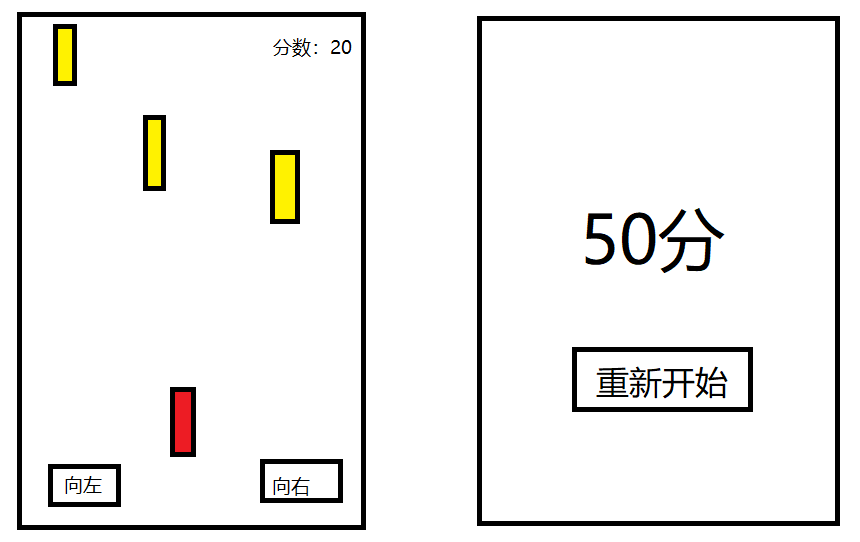
- 玩家通过点击屏幕上的向左、向右移动按钮控制红色小车左右移动避让黄色小车
- 黄色小车在屏幕最上方随机生成后向下移动
- 屏幕右上方分数跟随时间变化而变化
- 红色小车与某一辆黄色小车碰撞则游戏结束,弹出游戏结束界面
- 游戏结束界面上有本局游戏分数以及重新开始的按钮
2.代码实现
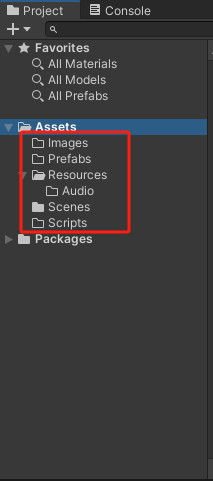
2.1 创建项目目录
-
Imags:静态图片
-
Prefabs:预设物体
-
Resources:动态资源
- Audio:音频
-
Scenes:场景
-
Scripts:脚本
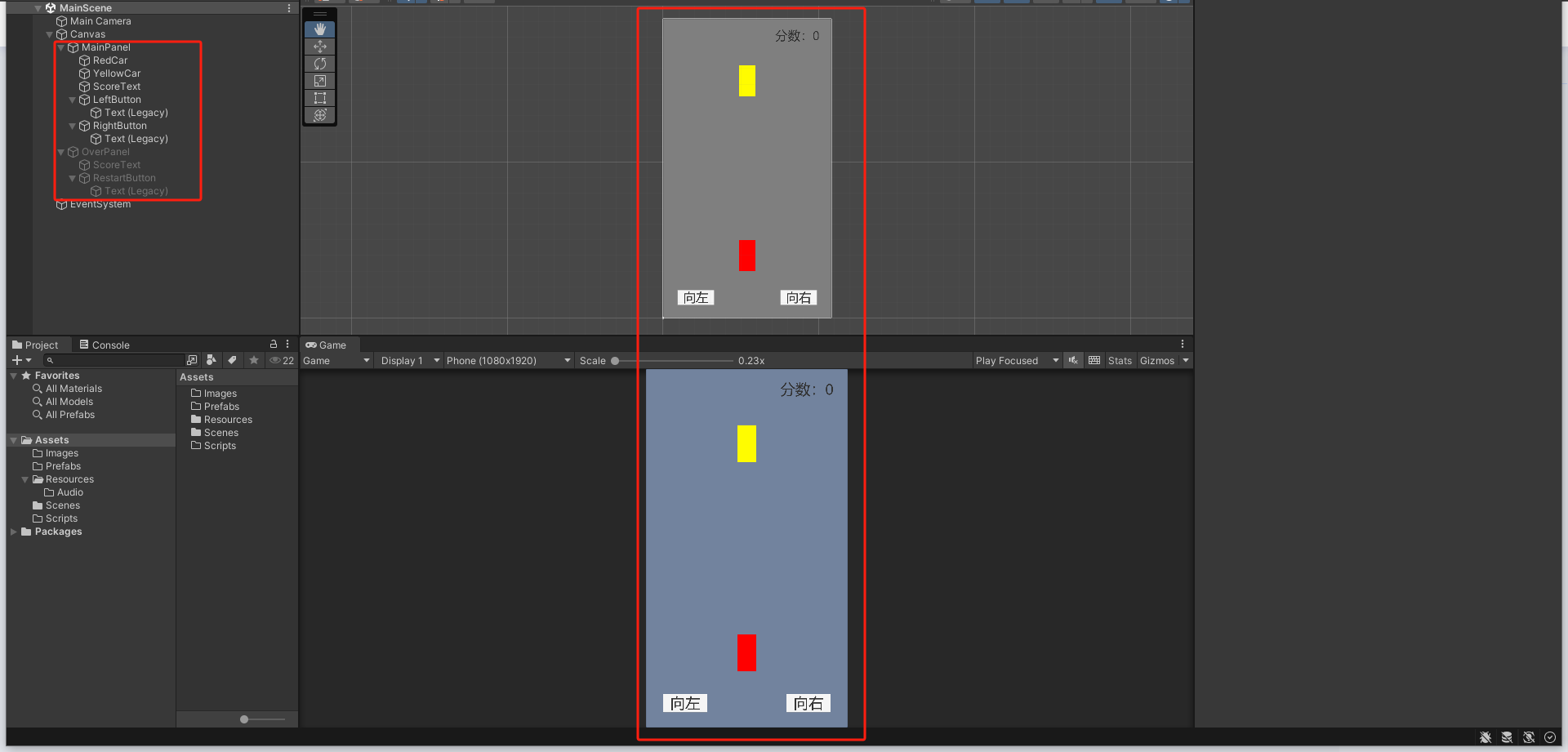
2.2 创建面板、小车、按钮等
2.3 按钮控制红色小车左右移动
创建游戏管理脚本 GameManager.cs
using System.Collections;
using System.Collections.Generic;
using UnityEngine;public class GameManager : MonoBehaviour
{/// <summary>/// 游戏管理器实例/// </summary>public static GameManager insta;/// <summary>/// 主界面/// </summary>public MainPanel mainPanel;private void Awake(){insta = this;}// Start is called before the first frame updatevoid Start(){}// Update is called once per framevoid Update(){}
}
红色小车挂载脚本 RedCar.cs
using System.Collections;
using System.Collections.Generic;
using UnityEngine;public class RedCar : MonoBehaviour
{/// <summary>/// 移动速度/// </summary>private int moveSpeed = 100;/// <summary>/// 移动方向/// </summary>public int moveDirection = 0;// Start is called before the first frame updatevoid Start(){}// Update is called once per framevoid Update(){//屏幕范围内左右移动if (moveDirection == -1 && transform.localPosition.x <= -490) return;if (moveDirection == 1 && transform.localPosition.x >= 490) return;transform.localPosition += new Vector3(moveDirection * moveSpeed * Time.deltaTime, 0, 0);}/// <summary>/// 碰撞显示结束界面/// </summary>/// <param name="collision"></param>private void OnTriggerEnter2D(Collider2D collision){GameManager.insta.overPanel.ShowPanel();}
}
主界面挂载脚本 MainPanel.cs,拖拽相应物体
using System.Collections;
using System.Collections.Generic;
using UnityEngine;
using UnityEngine.UI;public class MainPanel : MonoBehaviour
{/// <summary>/// 红色小车物体/// </summary>public RedCar redCar;/// <summary>/// 分数文本/// </summary>public Text scoreText;// Start is called before the first frame updatevoid Start(){}// Update is called once per framevoid Update(){}/// <summary>/// 点击按钮向左移动/// </summary>public void OnLeftMoveClick(){redCar.moveDirection = -1;}/// <summary>/// 点击按钮向右移动/// </summary>public void OnRightMoveClick(){redCar.moveDirection = 1;}
}
2.4 黄色小车自动向下移动
黄色小车挂载脚本 YellowCar.cs
using System.Collections;
using System.Collections.Generic;
using UnityEngine;public class YellowCar : MonoBehaviour
{/// <summary>/// 移动速度/// </summary>private int moveSpeed = 100;// Start is called before the first frame updatevoid Start(){}// Update is called once per framevoid Update(){transform.localPosition -= new Vector3(0, moveSpeed * Time.deltaTime, 0);//向下移动if(transform.localPosition.y <= -1060) Destroy(gameObject);//如果移动到屏幕最底端则自动销毁}
}
2.5 红色小车与黄色小车碰撞则游戏结束
红色小车挂载组件 Box Collider 2D 和 Rigidbody 2D
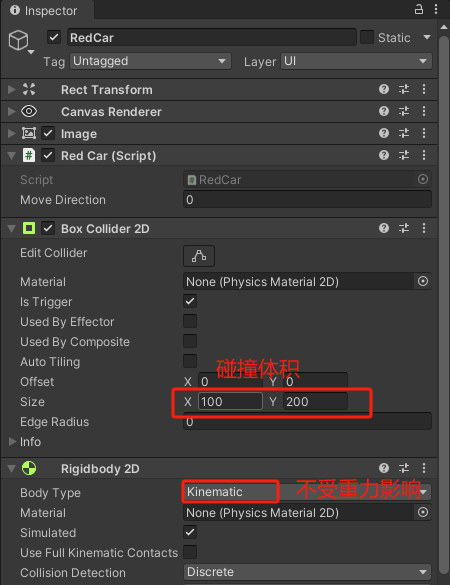
黄色小车挂载组件 Box Collider 2D
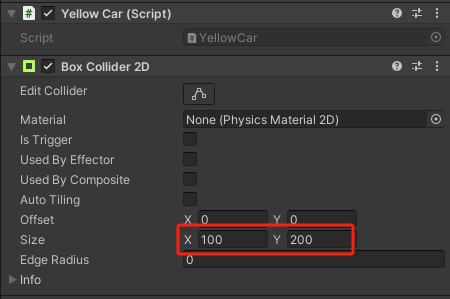
结束界面挂载脚本 OverPanel.cs
using System.Collections;
using System.Collections.Generic;
using UnityEngine;
using UnityEngine.SceneManagement;
using UnityEngine.UI;public class OverPanel : MonoBehaviour
{/// <summary>/// 分数文本/// </summary>public Text scoreText;// Start is called before the first frame updatevoid Start(){}// Update is called once per framevoid Update(){}/// <summary>/// 显示面板/// </summary>public void ShowPanel(){Time.timeScale = 0f;//游戏暂停gameObject.SetActive(true);}/// <summary>/// 点击按钮重新开始游戏/// </summary>public void OnRestartClick(){Time.timeScale = 1f;//游戏恢复gameObject.SetActive(false);SceneManager.LoadScene(0);}
}
GameManager.cs 新增结束界面变量
public class GameManager : MonoBehaviour
{/// <summary>/// 游戏管理器实例/// </summary>public static GameManager insta;/// <summary>/// 主界面/// </summary>public MainPanel mainPanel;/// <summary>/// 结束界面/// </summary>public OverPanel overPanel;...
2.6 更新界面分数
主界面
...public class MainPanel : MonoBehaviour
{/// <summary>/// 红色小车物体/// </summary>public RedCar redCar;/// <summary>/// 分数文本/// </summary>public Text scoreText;/// <summary>/// 分数数值/// </summary>public int score;/// <summary>/// 开始时间/// </summary>private float startTime;// Start is called before the first frame updatevoid Start(){startTime = Time.time;}// Update is called once per framevoid Update(){//更新分数score = (int)(Time.time - startTime);scoreText.text = "分数:" + score;}...
结束界面
...public class OverPanel : MonoBehaviour
{/// <summary>/// 分数文本/// </summary>public Text scoreText;// Start is called before the first frame updatevoid Start(){}// Update is called once per framevoid Update(){scoreText.text = "分数:" + GameManager.insta.mainPanel.score;}...
2.7 通过预设随机生成黄色小车
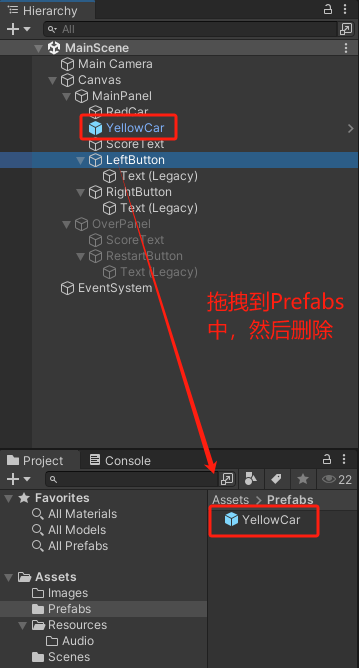
创建黄色小车根目录
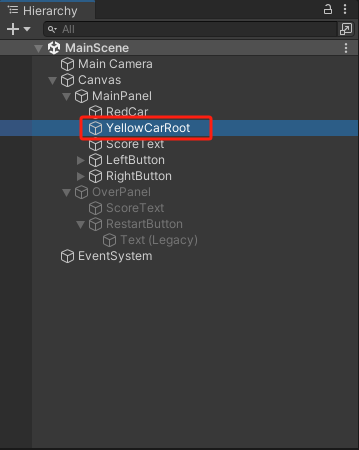
.../// <summary>/// 创建黄色小车上一次时间/// </summary>private float lastTime;/// <summary>/// 黄色小车物体预设/// </summary>public GameObject preYellowCarGo;/// <summary>/// 黄色小车根目录/// </summary>public GameObject yellowCarRootGo;// Start is called before the first frame updatevoid Start(){startTime = Time.time;lastTime = Time.time;}// Update is called once per framevoid Update(){//更新分数score = (int)(Time.time - startTime);scoreText.text = "分数:" + score;//每过3秒生成一辆黄色小车if(Time.time - lastTime >= 3f){CreateYellowCar();lastTime = Time.time;}}/// <summary>/// 点击按钮向左移动/// </summary>public void OnLeftMoveClick(){redCar.moveDirection = -1;}/// <summary>/// 点击按钮向右移动/// </summary>public void OnRightMoveClick(){redCar.moveDirection = 1;}/// <summary>/// 创建黄色小车/// </summary>private void CreateYellowCar(){//在x坐标为-490到490之间随机生成黄色小车GameObject yellowCarGo = Instantiate(preYellowCarGo, yellowCarRootGo.transform);int randomInt = Random.Range(-490, 490);yellowCarGo.transform.localPosition = new Vector3(randomInt, 1060, 0);}
}
2.8 添加音频
创建游戏中音频物体
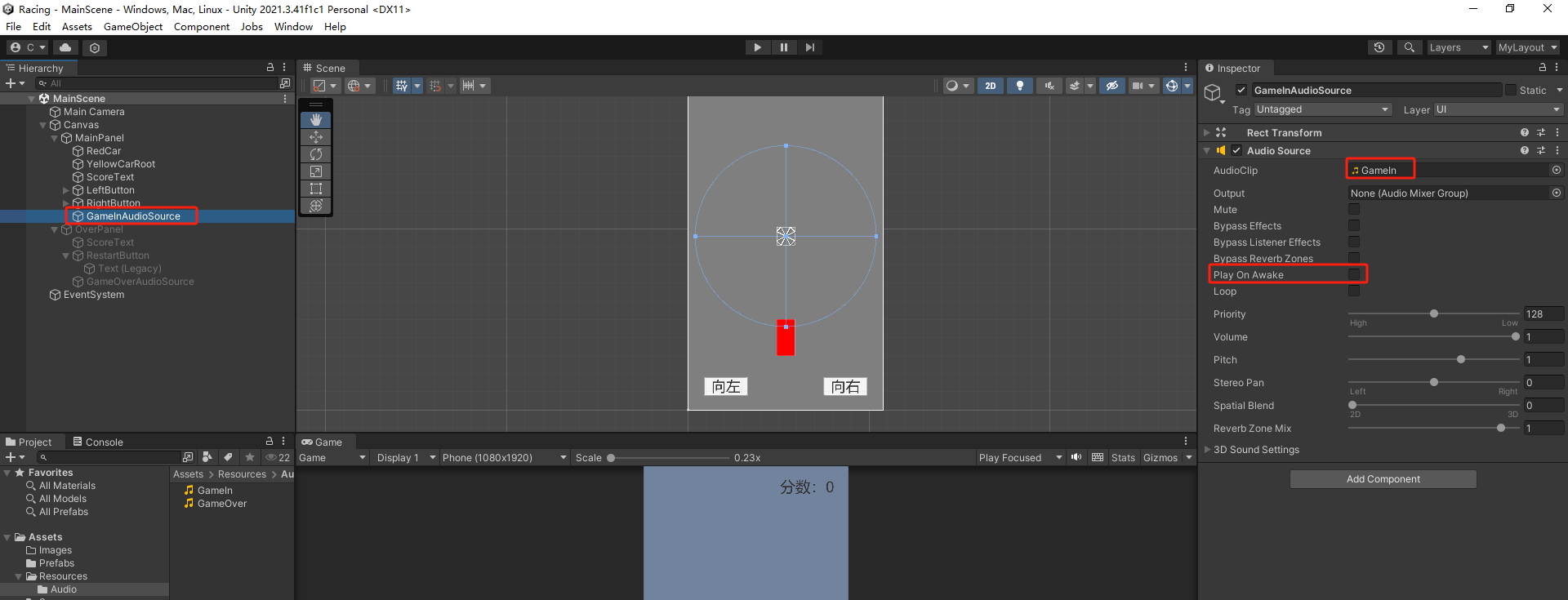
.../// <summary>/// 黄色小车根目录/// </summary>public GameObject yellowCarRootGo;/// <summary>/// 游戏进行中音频/// </summary>public AudioSource gameInAudioSource;// Start is called before the first frame updatevoid Start(){startTime = Time.time;// 开始时间赋值lastTime = Time.time;// 创建黄色小车上一次时间赋值gameInAudioSource.Play();//播放游戏进行音乐}...
创建游戏结束音频物体
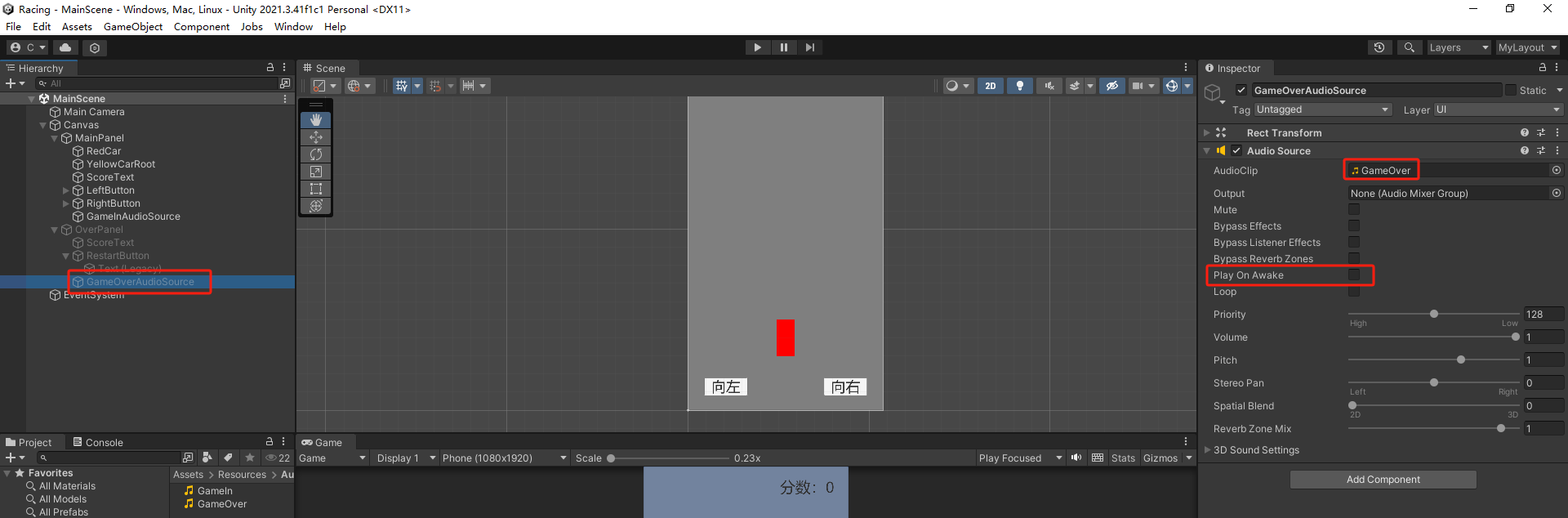
.../// <summary>/// 游戏技术音频/// </summary>public AudioSource gameOverAudioSource;.../// <summary>/// 显示面板/// </summary>public void ShowPanel(){Time.timeScale = 0f;//游戏暂停gameObject.SetActive(true);//停止游戏进行音频,播放游戏结束音频if (GameManager.insta.mainPanel.gameInAudioSource.isPlaying){GameManager.insta.mainPanel.gameInAudioSource.Stop();}gameOverAudioSource.Play();}...
2.9 物体换皮
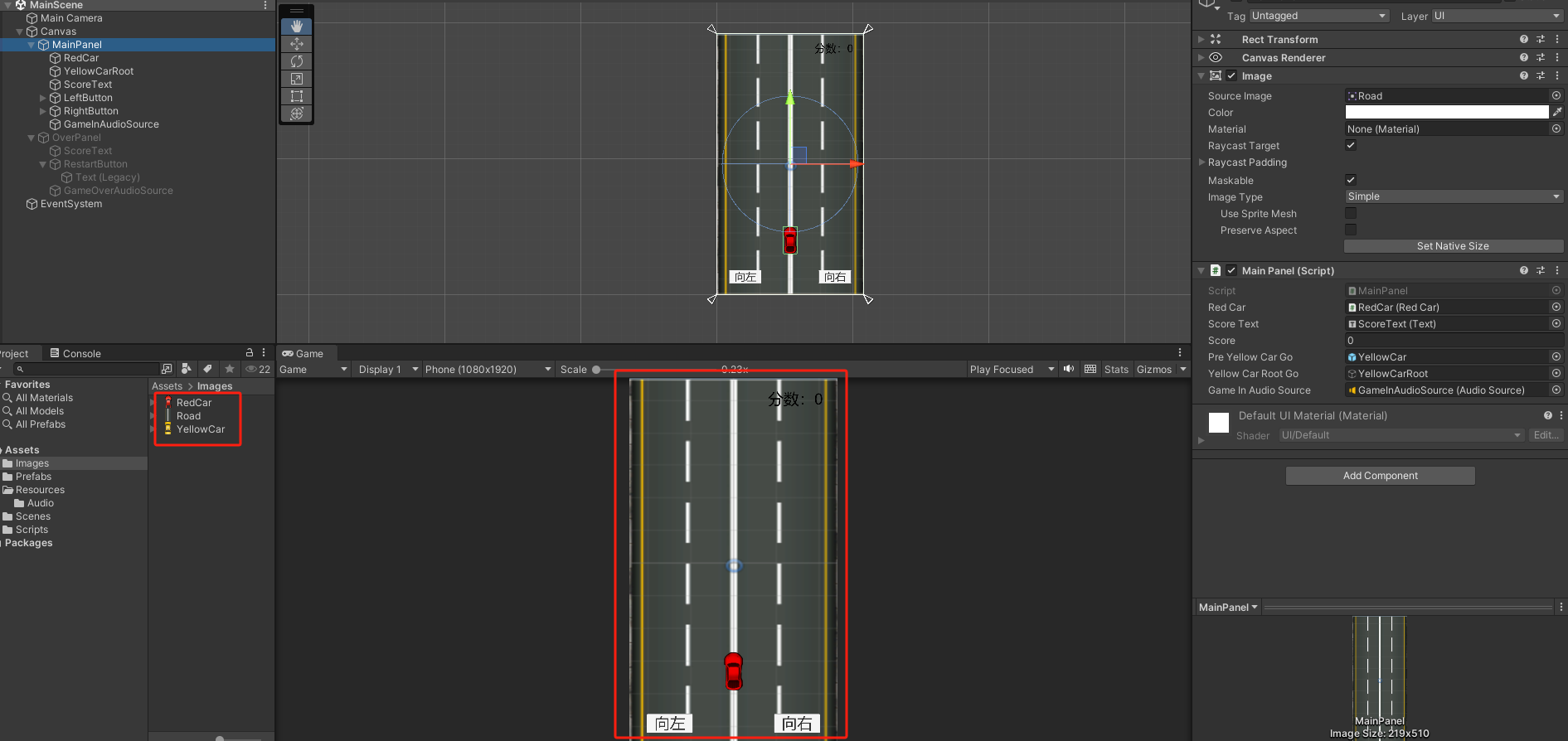
3.完整代码
GameManager
using System.Collections;
using System.Collections.Generic;
using UnityEngine;public class GameManager : MonoBehaviour
{/// <summary>/// 游戏管理器实例/// </summary>public static GameManager insta;/// <summary>/// 主界面/// </summary>public MainPanel mainPanel;/// <summary>/// 结束界面/// </summary>public OverPanel overPanel;private void Awake(){insta = this;}// Start is called before the first frame updatevoid Start(){}// Update is called once per framevoid Update(){}
}
MainPanel
using System.Collections;
using System.Collections.Generic;
using UnityEngine;
using UnityEngine.UI;public class MainPanel : MonoBehaviour
{/// <summary>/// 红色小车物体/// </summary>public RedCar redCar;/// <summary>/// 分数文本/// </summary>public Text scoreText;/// <summary>/// 分数数值/// </summary>public int score;/// <summary>/// 开始时间/// </summary>private float startTime;/// <summary>/// 创建黄色小车上一次时间/// </summary>private float lastTime;/// <summary>/// 黄色小车物体预设/// </summary>public GameObject preYellowCarGo;/// <summary>/// 黄色小车根目录/// </summary>public GameObject yellowCarRootGo;/// <summary>/// 游戏进行中音频/// </summary>public AudioSource gameInAudioSource;// Start is called before the first frame updatevoid Start(){startTime = Time.time;// 开始时间赋值lastTime = Time.time;// 创建黄色小车上一次时间赋值gameInAudioSource.Play();//播放游戏进行音乐}// Update is called once per framevoid Update(){//更新分数score = (int)(Time.time - startTime);scoreText.text = "分数:" + score;//每过3秒生成一辆黄色小车if(Time.time - lastTime >= 3f){CreateYellowCar();lastTime = Time.time;}}/// <summary>/// 点击按钮向左移动/// </summary>public void OnLeftMoveClick(){redCar.moveDirection = -1;}/// <summary>/// 点击按钮向右移动/// </summary>public void OnRightMoveClick(){redCar.moveDirection = 1;}/// <summary>/// 创建黄色小车/// </summary>private void CreateYellowCar(){//在x坐标为-490到490之间随机生成黄色小车GameObject yellowCarGo = Instantiate(preYellowCarGo, yellowCarRootGo.transform);int randomInt = Random.Range(-490, 490);yellowCarGo.transform.localPosition = new Vector3(randomInt, 1060, 0);}
}
OverPanel
using System.Collections;
using System.Collections.Generic;
using UnityEngine;
using UnityEngine.SceneManagement;
using UnityEngine.UI;public class OverPanel : MonoBehaviour
{/// <summary>/// 分数文本/// </summary>public Text scoreText;/// <summary>/// 游戏技术音频/// </summary>public AudioSource gameOverAudioSource;// Start is called before the first frame updatevoid Start(){}// Update is called once per framevoid Update(){scoreText.text = "分数:" + GameManager.insta.mainPanel.score;}/// <summary>/// 显示面板/// </summary>public void ShowPanel(){Time.timeScale = 0f;//游戏暂停gameObject.SetActive(true);//停止游戏进行音频,播放游戏结束音频if (GameManager.insta.mainPanel.gameInAudioSource.isPlaying){GameManager.insta.mainPanel.gameInAudioSource.Stop();}gameOverAudioSource.Play();}/// <summary>/// 点击按钮重新开始游戏/// </summary>public void OnRestartClick(){Time.timeScale = 1f;//游戏恢复gameObject.SetActive(false);SceneManager.LoadScene(0);}
}
RedCar
using System.Collections;
using System.Collections.Generic;
using UnityEngine;public class RedCar : MonoBehaviour
{/// <summary>/// 移动速度/// </summary>private int moveSpeed = 100;/// <summary>/// 移动方向/// </summary>public int moveDirection = 0;// Start is called before the first frame updatevoid Start(){}// Update is called once per framevoid Update(){//屏幕范围内左右移动if (moveDirection == -1 && transform.localPosition.x <= -490) return;if (moveDirection == 1 && transform.localPosition.x >= 490) return;transform.localPosition += new Vector3(moveDirection * moveSpeed * Time.deltaTime, 0, 0);}/// <summary>/// 碰撞显示结束界面/// </summary>/// <param name="collision"></param>private void OnTriggerEnter2D(Collider2D collision){GameManager.insta.overPanel.ShowPanel();}
}
YellowCar
using System.Collections;
using System.Collections.Generic;
using UnityEngine;public class YellowCar : MonoBehaviour
{/// <summary>/// 移动速度/// </summary>private int moveSpeed = 100;// Start is called before the first frame updatevoid Start(){}// Update is called once per framevoid Update(){transform.localPosition -= new Vector3(0, moveSpeed * Time.deltaTime, 0);//向下移动if(transform.localPosition.y <= -1060) Destroy(gameObject);//如果移动到屏幕最底端则自动销毁}
}