当前位置: 首页 > news >正文

android binder(二)应用层编程实例 - 指南

android binder(二)应用层编程实例 - 指南

2025-10-07 18:38  tlnshuju  阅读(0)  评论(0)    收藏  举报

一、binder驱动浅析

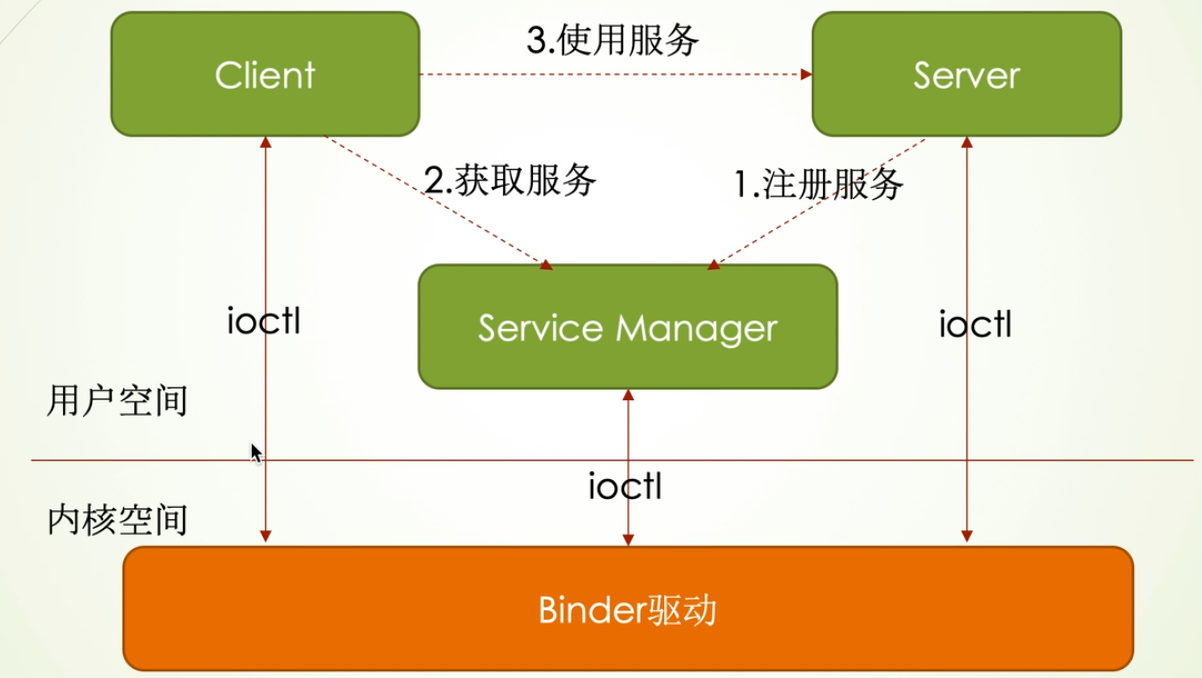
从上图看出,binder的通讯主要涉及三个步骤。

  • 在 Binder Server 端定义好服务,然后向 ServiceManager 注册服务
  • 在 Binder Client 中向 ServiceManager 获取到服务
  • 发起远程调用,调用 Binder Server 中定义好的服务

整个流程都是建立在 Binder 驱动提供的跨进程调用能力之上,bingde驱动的实现比较复杂,现阶段我们先以黑盒的方式去了解它:

Binder 是一个 Linux 字符驱动,对外提供了以下函数供应用程序使用:

ioctl(文件描述符,ioctl命令,数据)

文件描述符是在调用 open 时的返回值,ioctl 命令和第三个参数"数据"的类型是相关联的,具体如下:

ioctl命令数据类型函数动作
BINDER_WRITE_READstruct binder_write_read应用层向内核层收发数据
BINDER_SET_MAX_THREADSsize_t设置最大线程数
BINDER_SET_CONTEXT_MGRint or flat_binder_object设置当前进程为ServiceManager
BINDER_THREAD_EXITint删除 binder 线程
BINDER_VERSIONstruct binder_version获取 binder 协议版本

二、安卓提供的封装 

servicemanager - OpenGrok cross reference for /frameworks/native/cmds/servicemanager/
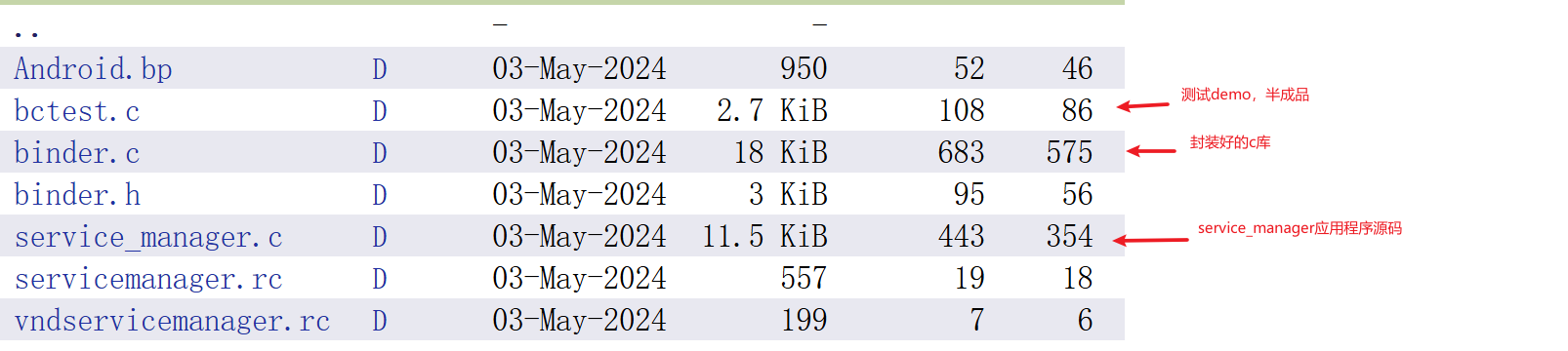
frameworks/native/cmds/servicemanager 目录下的 binder.cbctest.c 针对应用编写的需求,对open mmap ioctl 等基本操作做了封装,提供了以下几个函数:

三、 ServiceManager 源码分析

  • 打开 Binder 驱动
  • 告知驱动自身为 service manager
  • 循环处理
    • 从驱动读取数据
    • 解析数据并调用
      • 处理service端的注册服务请求:其实就是在一个链表记录服务名
      • 处理client获取服务请求:
        • 在链表查询服务
        • 返回 server 进程的 handle
service_manager.c
binder_open //打开 Binder 驱动
binder_become_context_manager //告知驱动自身为 service manager
binder_loop
binder_parse //从驱动读取数据并解析
svcmgr_handler//根据不同的命令,进入不同的处理流程
do_add_service //添加服务
do_find_service//获取服务

四、编写自定义service代码

参考代码:bctest.c - OpenGrok cross reference for /frameworks/native/cmds/servicemanager/bctest.c

1、主流程:

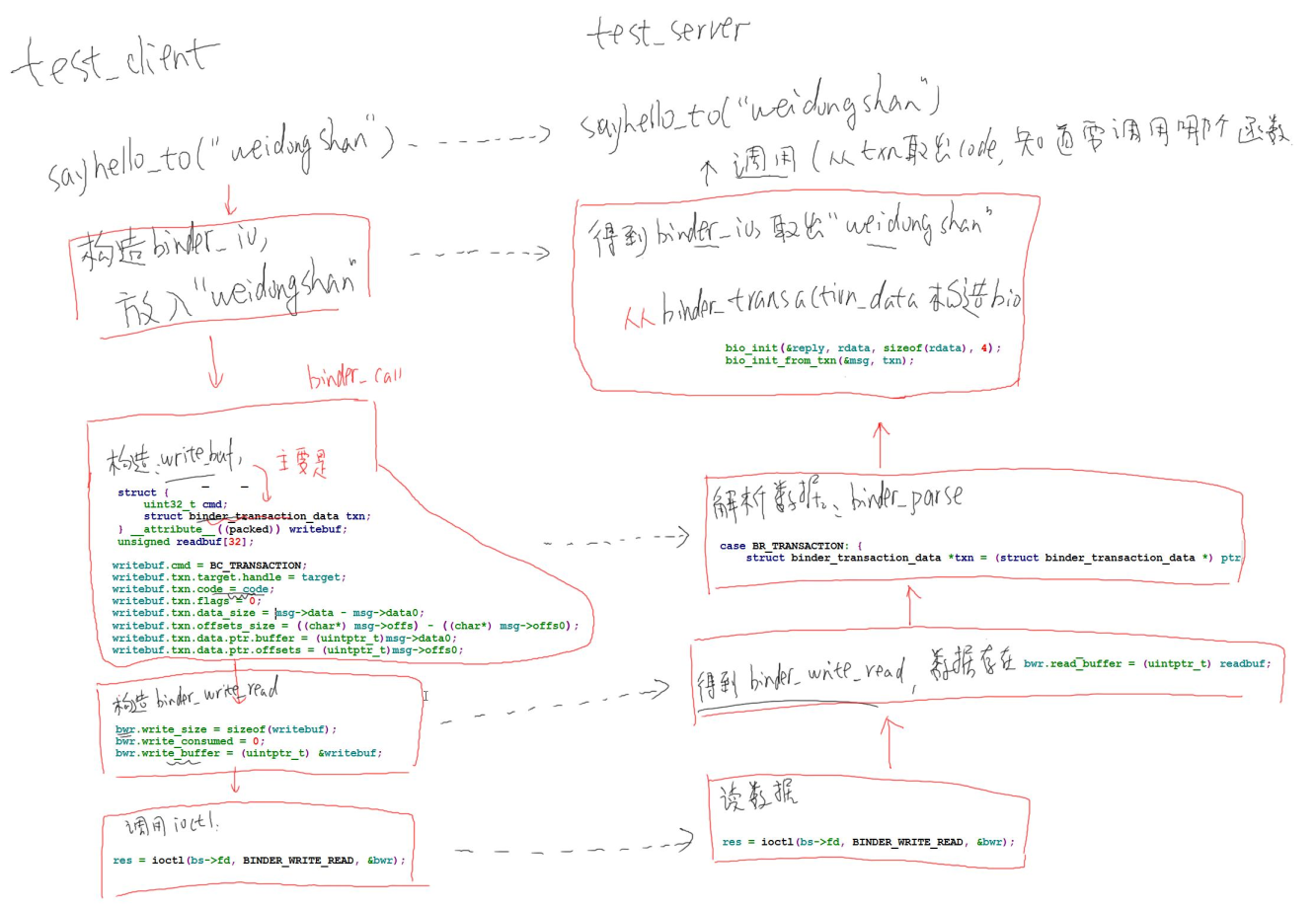
2、消息处理流程

当 client 发起远程调用时,server 端会收到数据,并将这些数据传递给服务回调函数,这个回调函数需要我们自己来定义:也就是binder_loop(bs, test_server_handler)传入的test_server_handler函数。

3、服务处理流程:hello_service_handler

我们在注册服务的时候,传入了一个func handle, hello_service_handler。当收到client请求服务的时候,会进入这个函数进行处理。

#include 
#include 
#include 
#include 
#include
#include #include "binder.h"#define LOG_TAG "BinderServer"
#include #define HELLO_SVR_CMD_SAYHELLO 1
#define HELLO_SVR_CMD_SAYHELLO_TO 2void sayhello(void)
{
static int cnt = 0;
//fprintf(stderr, "say hello : %d\n", ++cnt);
ALOGW("say hello : %d\n", ++cnt);
}int sayhello_to(char *name)
{
static int cnt = 0;
//fprintf(stderr, "say hello to %s : %d\n", name, ++cnt);
ALOGW("say hello to %s : %d\n", name, ++cnt);
return cnt;
}int hello_service_handler(struct binder_state *bs,
struct binder_transaction_data_secctx *txn_secctx,
struct binder_io *msg,
struct binder_io *reply)
{
struct binder_transaction_data *txn = &txn_secctx->transaction_data;/* 根据txn->code知道要调用哪一个函数
 * 如果需要参数, 可以从msg取出
 * 如果要返回结果, 可以把结果放入reply
 *//* sayhello
 * sayhello_to
 */uint16_t *s;
char name[512];
size_t len;
//uint32_t handle;
uint32_t strict_policy;
int i;// Equivalent to Parcel::enforceInterface(), reading the RPC
// header with the strict mode policy mask and the interface name.
// Note that we ignore the strict_policy and don't propagate it
// further (since we do no outbound RPCs anyway).
strict_policy = bio_get_uint32(msg);switch(txn->code) {
case HELLO_SVR_CMD_SAYHELLO:
sayhello();
bio_put_uint32(reply, 0); /* no exception */
return 0;case HELLO_SVR_CMD_SAYHELLO_TO:
/* 从msg里取出字符串 */
s = bio_get_string16(msg, &len); //"IHelloService"
s = bio_get_string16(msg, &len); // name
if (s == NULL) {
return -1;
}
for (i = 0; i < len; i++)
name[i] = s[i];
name[i] = '\0';/* 处理 */
i = sayhello_to(name);/* 把结果放入reply */
bio_put_uint32(reply, 0); /* no exception */
bio_put_uint32(reply, i);break;default:
fprintf(stderr, "unknown code %d\n", txn->code);
return -1;
}return 0;
}int test_server_handler(struct binder_state *bs,
struct binder_transaction_data_secctx *txn_secctx,
struct binder_io *msg,
struct binder_io *reply)
{
struct binder_transaction_data *txn = &txn_secctx->transaction_data;int (*handler)(struct binder_state *bs,
struct binder_transaction_data *txn,
struct binder_io *msg,
struct binder_io *reply);handler = (int (*)(struct binder_state *bs,
struct binder_transaction_data *txn,
struct binder_io *msg,
struct binder_io *reply))txn->target.ptr;return handler(bs, txn, msg, reply);
}int main(int argc, char **argv)
{
struct binder_state *bs;
uint32_t svcmgr = BINDER_SERVICE_MANAGER;
uint32_t handle;
int ret;//打开驱动
bs = binder_open("/dev/binder",128*1024);
if (!bs) {
fprintf(stderr, "failed to open binder driver\n");
return -1;
}//添加服务
ret = svcmgr_publish(bs, svcmgr, "hello", hello_service_handler);
if (ret) {
fprintf(stderr, "failed to publish hello service\n");
return -1;
}binder_loop(bs, test_server_handler);return 0;
}

五、编写自定义client 代码

编写 Client 程序的主要流程如下:

  • open  binder 驱动
  • 向service manager查询服务,获取到服务的句柄 handle
  • 通过 handle 调用远程调用函数
#include 
#include 
#include 
#include 
#include 
#include 
#include "binder.h"#define HELLO_SVR_CMD_SAYHELLO 1
#define HELLO_SVR_CMD_SAYHELLO_TO 2int g_handle = 0;
struct binder_state *g_bs;void sayhello(void)
{
unsigned iodata[512/4];
struct binder_io msg, reply;/* 构造binder_io */
bio_init(&msg, iodata, sizeof(iodata), 4);/* 放入参数 */
bio_put_uint32(&msg, 0); // strict mode header
bio_put_string16_x(&msg, "IHelloService");/* 调用binder_call */
if (binder_call(g_bs, &msg, &reply, g_handle, HELLO_SVR_CMD_SAYHELLO))
return ;/* 从reply中解析出返回值 */
binder_done(g_bs, &msg, &reply);}int main(int argc, char **argv)
{
int fd;
struct binder_state *bs;
uint32_t svcmgr = BINDER_SERVICE_MANAGER;
int ret;bs = binder_open("/dev/binder",128*1024);
if (!bs) {
fprintf(stderr, "failed to open binder driver\n");
return -1;
}g_bs = bs;/* get service */
g_handle = svcmgr_lookup(bs, svcmgr, "hello");
if (!g_handle) {
return -1;
}//调用服务
sayhello();}

六、梳理(待整理)

ref:

https://juejin.cn/post/7214342319347712057

Android系统--Binder系统具体框架分析(一) - lkq1220 - 博客园

https://juejin.cn/post/7210245482861264955

第5课第1节_Binder系统_C程序示例_框架分析_哔哩哔哩_bilibili

XRefAndroid - Support AOSP 15.0 AndroidXRef & OpenHarmony 5.0

【Android ServiceManager】从源码入手,剖析ServiceManager是如何处理客户端的请求的?_bnservicemanager 源码实现-CSDN博客

https://cs.android.com/android/platform/superproject/main