
看VLA相关内容,总是在用流匹配啊扩散模型啊生成这个策略那个策略,一会又是向量场一会又是高维空间的,这下是不学不行了,那就来好好看一看这个在AI时代被广泛应用的神仙方法吧。
与强化学习学习路径一样,先直观理解一下原理,然后找一个简单的demo跑起来,对着AI一点一点看代码。通过这几步,大概就能把这个方法看个七七八八了。至于再具体到创新与应用,还有具体的原理啥的,那就是现在不急了。
(碎碎念一下,在大模型出现之后,学习这种东西真的越来越容易了,看不懂的地方问ai,让ai一点一点纠正我的认知,让ai训练我了属于是。)
先贴代码,感谢https://www.youtube.com/watch?v=7cMzfkWFWhI这位博主提供的简单demo,帮助非常大。代码仓库见视频简介。


  1 #!/usr/bin/env python
  2 # coding: utf-8
  3
  4 # # Flow Matching (GPU版本)
  5
  6 # ## Data
  7
  8 # In[ ]:
  9
 10
 11 import tqdm
 12 import math
 13 import torch
 14 import numpy as np
 15 from torch import nn
 16 import matplotlib.pyplot as plt
 17 from matplotlib.colors import ListedColormap
 18
 19
 20 train = False
 21
 22 # 检查GPU是否可用
 23 device = torch.device("cuda" if torch.cuda.is_available() else "cpu")
 24 print(f"使用设备: {device}")
 25 if torch.cuda.is_available():
 26     print(f"GPU名称: {torch.cuda.get_device_name(0)}")
 27
 28 # Parameters
 29 N = 1000  # Number of points to sample
 30 x_min, x_max = -4, 4
 31 y_min, y_max = -4, 4
 32 resolution = 100  # Resolution of the grid
 33
 34 # Create the grid
 35 x = np.linspace(x_min, x_max, resolution)
 36 y = np.linspace(y_min, y_max, resolution)
 37 X, Y = np.meshgrid(x, y)
 38
 39 # Checkerboard pattern
 40 length = 4
 41 checkerboard = np.indices((length, length)).sum(axis=0) % 2
 42
 43 # Sample points in regions where checkerboard pattern is 1
 44 sampled_points = []  # 目标点,从棋盘中随机采样
 45 while len(sampled_points) < N:
 46     # Randomly sample a point within the x and y range
 47     x_sample = np.random.uniform(x_min, x_max)
 48     y_sample = np.random.uniform(y_min, y_max)
 49
 50     # Determine the closest grid index
 51     i = int((x_sample - x_min) / (x_max - x_min) * length)
 52     j = int((y_sample - y_min) / (y_max - y_min) * length)
 53
 54     # Check if the sampled point is in a region where checkerboard == 1
 55     if checkerboard[j, i] == 1:
 56         sampled_points.append((x_sample, y_sample))
 57
 58 # Convert to NumPy array for easier plotting
 59 sampled_points = np.array(sampled_points)
 60
 61 # Plot the checkerboard pattern
 62 plt.figure(figsize=(6, 6))
 63 plt.imshow(checkerboard, extent=(x_min, x_max, y_min, y_max),
 64            origin="lower", cmap=ListedColormap(["purple", "yellow"]))
 65
 66 # Plot sampled points
 67 plt.scatter(sampled_points[:, 0],
 68             sampled_points[:, 1], color="red", marker="o")
 69 plt.xlabel("X-axis")
 70 plt.ylabel("Y-axis")
 71 # plt.show()
 72
 73
 74 # In[2]:
 75
 76
 77 t = 0.5
 78 noise = np.random.randn(N, 2)  # 噪声采样
 79 plt.figure(figsize=(6, 6))
 80 plt.scatter(sampled_points[:, 0],
 81             sampled_points[:, 1], color="red", marker="o")
 82 plt.scatter(noise[:, 0], noise[:, 1], color="blue", marker="o")
 83 plt.scatter((1 - t) * noise[:, 0] + t * sampled_points[:, 0], (1 - t)
 84             * noise[:, 1] + t * sampled_points[:, 1], color="green", marker="o")
 85 # plt.show()
 86
 87
 88 # ## Model
 89
 90 # In[3]:
 91
 92
 93 class Block(nn.Module):
 94     def __init__(self, channels=512):
 95         super().__init__()
 96         self.ff = nn.Linear(channels, channels)
 97         self.act = nn.ReLU()
 98
 99     def forward(self, x):
100         return self.act(self.ff(x))
101
102
103 class MLP(nn.Module):
104     def __init__(self, channels_data=2, layers=5, channels=512, channels_t=512, device=device):
105         super().__init__()
106         self.channels_t = channels_t
107         self.device = device
108
109         # 网络层定义
110         self.in_projection = nn.Linear(channels_data, channels)
111         self.t_projection = nn.Linear(channels_t, channels)
112         self.blocks = nn.Sequential(*[
113             Block(channels) for _ in range(layers)
114         ])
115         self.out_projection = nn.Linear(channels, channels_data)
116
117         # 将模型移动到指定设备
118         self.to(device)
119
120     def gen_t_embedding(self, t, max_positions=10000):  # 编码器,将时间t转换成向量
121         t = t * max_positions
122         half_dim = self.channels_t // 2
123         emb = math.log(max_positions) / (half_dim - 1)
124         emb = torch.arange(
125             half_dim, device=self.device).float().mul(-emb).exp()
126         emb = t[:, None] * emb[None, :]
127         emb = torch.cat([emb.sin(), emb.cos()], dim=1)
128         if self.channels_t % 2 == 1:  # zero pad
129             emb = nn.functional.pad(emb, (0, 1), mode='constant')
130         return emb
131
132     def forward(self, x, t):
133         # 确保输入在正确的设备上
134         if x.device != self.device:
135             x = x.to(self.device)
136         if t.device != self.device:
137             t = t.to(self.device)
138
139         x = self.in_projection(x)
140         t_emb = self.gen_t_embedding(t)
141         t_proj = self.t_projection(t_emb)
142         x = x + t_proj
143         x = self.blocks(x)
144         x = self.out_projection(x)
145         return x
146
147
148 # In[ ]:
149
150
151 model = MLP(layers=5, channels=512, device=device)
152 optim = torch.optim.AdamW(model.parameters(), lr=1e-4)
153
154 # 打印模型参数数量
155 total_params = sum(p.numel() for p in model.parameters())
156 trainable_params = sum(p.numel()
157                        for p in model.parameters() if p.requires_grad)
158 print(f"总参数数量: {total_params:,}")
159 print(f"可训练参数数量: {trainable_params:,}")
160
161
162 # ### Load Pretrained Model for 500k Steps
163
164 # In[ ]:
165
166
167 # If you don't want to train yourself, just load a pretrained model which trained for 500k steps.
168 try:
169     ckpt = torch.load("models/model_500k.pt", map_location=device)
170     model.load_state_dict(ckpt)
171     print("已加载预训练模型")
172 except FileNotFoundError:
173     print("未找到预训练模型,将从头开始训练")
174
175
176 # ## Training
177
178 # In[14]:
179
180
181 # 将数据移动到GPU
182 data = torch.Tensor(sampled_points).to(device)
183 training_steps = 100_000
184 batch_size = 2048
185 pbar = tqdm.tqdm(range(training_steps))  # 进度条
186 losses = []
187
188 # 训练前清空GPU缓存
189 if torch.cuda.is_available():
190     torch.cuda.empty_cache()
191
192 if train == True:
193     for i in pbar:
194         # 从数据中随机采样目标点
195         indices = torch.randint(data.size(0), (batch_size,), device=device)
196         x1 = data[indices]
197
198     # 生成噪声点
199         x0 = torch.randn_like(x1, device=device)
200
201     # 计算目标向量
202         target = x1 - x0
203
204     # 随机采样时间
205         t = torch.rand(batch_size, device=device)
206
207     # 线性插值
208         xt = (1 - t[:, None]) * x0 + t[:, None] * x1
209
210     # 前向传播
211         pred = model(xt, t)
212
213     # 计算损失
214         loss = ((target - pred) ** 2).mean()
215
216     # 反向传播
217         loss.backward()
218         optim.step()
219         optim.zero_grad()
220
221     # 更新进度条
222         pbar.set_postfix(loss=loss.item())
223         losses.append(loss.item())
224
225     # 定期显示GPU内存使用情况
226         if i % 1000 == 0 and torch.cuda.is_available():
227             allocated = torch.cuda.memory_allocated(0) / 1024**3
228             reserved = torch.cuda.memory_reserved(0) / 1024**3
229             pbar.set_postfix(loss=loss.item(),
230                              gpu_alloc=f"{allocated:.2f}GB",
231                              gpu_reserved=f"{reserved:.2f}GB")
232
233     # 训练完成后保存模型
234         torch.save(model, "models/model_trained_gpu.pt")
235         print("模型已保存为 models/model_trained_gpu.pt")
236
237     # In[15]:
238
239         plt.plot(losses)
240         plt.title("Training Loss")
241         plt.xlabel("Steps")
242         plt.ylabel("Loss")
243         plt.show()
244
245
246 # Sampling
247
248 # In[1]:
249
250
251 # 设置评估模式
252 model = torch.load('models/model_trained_gpu.pt')
253 model.eval()
254 torch.manual_seed(42)
255
256 # 生成初始噪声
257 xt = torch.randn(1000, 2, device=device)
258 steps = 1000
259 plot_every = 25
260
261
262 # 采样过程
263 with torch.no_grad():  # 禁用梯度计算以节省内存
264     for i, t in enumerate(torch.linspace(0, 1, steps, device=device), start=1):
265         t_tensor = t.expand(xt.size(0))
266         pred = model(xt, t_tensor)
267         xt = xt + (1 / steps) * pred
268
269         # 定期可视化
270         if i % plot_every == 0:
271             # 将数据移动到CPU进行可视化
272             xt_cpu = xt.cpu().numpy()
273             plt.figure(figsize=(6, 6))
274             plt.scatter(sampled_points[:, 0],
275                         sampled_points[:, 1], color="red", marker="o", alpha=0.5, label="Target")
276             plt.scatter(xt_cpu[:, 0], xt_cpu[:, 1], color="green",
277                         marker="o", alpha=0.5, label="Generated")
278             plt.title(f"Sampling Step {i}/{steps}")
279             plt.legend()
280             plt.savefig(f"sampling_step_{i}.png")
281             # plt.show()
282
283 # 恢复训练模式
284 model.train()
285 print("Done Sampling")
286
287 # 清理GPU内存
288 if torch.cuda.is_available():
289     torch.cuda.empty_cache()
290     print("GPU内存已清理")
291
292
293 # In[ ]:
0、demo介绍
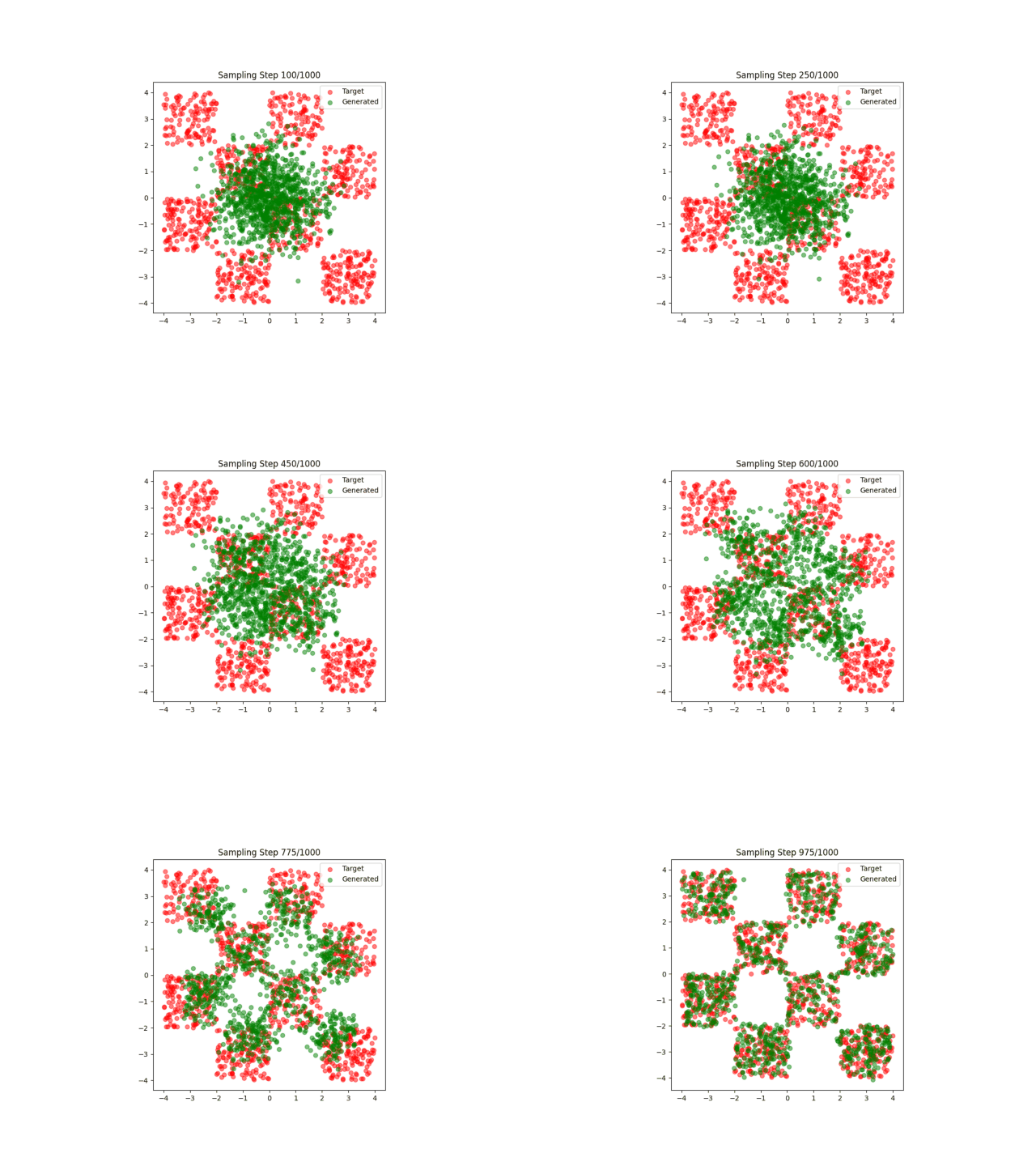
最简单的流匹配应用,匹配点阵。
1、什么是流匹配
简单来说,就是一个随时间变化的向量场,更简单来说就是这个场景中,每个点(注意,是点所在的位置)的速度变化。
当然,在更加复杂的场景中,向量场维度还会继续变化,这就不是入个门需要操心的事了。
在这个简单的demo中,作者使用了一个简单的MLP来拟合随时间分布的向量场。
2、Q&A
来说一下我在学习这个demo时的一些疑惑吧,再次感谢大模型
Q:流匹配拟合的是什么?结合这个demo讲一下
A:流匹配拟合的是一个(x,y,t)时刻的向量场,直观一点理解就是当时刻为t时,每个位置的点应该往哪里跑。这个速度分布是随时间变化的。之前在一些论文和项目里见到余弦时间戳之类的东西,现在明白了。时间戳这个东西在流匹配中是十分重要的,它直接告诉了模型当前时间应该调用哪个向量场。
还有,流匹配是按照(x,y,t)进行分批,即对t进行离散,每个时刻训练一整个二维的向量场,而不是对每个数据点训练不同的向量场,这也是比较容易混淆的点。据说是因为这样更加符合整个系统的物理变化,毕竟流匹配的本质是一个物理过程。
Q: